How to Learn AI in 2026: Where to Start, What to Understand, and How to Make Money With It

You are likely here because the noise is loud. Everyone is talking about artificial intelligence, but few people explain what it actually means for your career or your daily work. If you are a beginner, a career switcher, or a freelancer looking to add AI to your toolkit, you need a clear map, not another hype cycle. The question of how to learn AI is no longer about memorizing buzzwords. It is about understanding which of the three distinct paths fits your goals.
First, there is the path of using AI. This is for marketers, writers, project managers, and operations staff who want to integrate tools like chatbots and automation into their existing jobs. Second, there is the path of building with AI. This involves becoming an AI engineer who connects models to data using APIs, builds retrieval-augmented generation systems, and creates agents. Third, there is the path of machine learning and research. This is for those who want to understand the math, train models, and work as data scientists or research scientists.
This guide cuts through the marketing language. We will look at what you actually need to know, a step-by-step learning plan using free resources, and how to prove your skills with a portfolio. We will also examine the real data on jobs, salaries, and how to make money with AI without falling for scams. The goal is to give you a practical, sourced roadmap for 2026.
Decide which kind of “learning AI” you mean
Before you spend hours on a course, you must define what “learning AI” means to you. The skills required for a product manager who uses AI daily are vastly different from those needed for an engineer who builds the AI itself. Confusing these paths is the most common mistake beginners make.
Path 1 focuses on application. You are not building the model; you are using it to solve business problems. This path requires strong prompt engineering skills, an understanding of when AI makes mistakes, and the ability to integrate AI tools into workflows. You might use AI to summarize documents, generate code snippets, or automate email sequences. The technical barrier is low, but the strategic barrier is high. You need to know how to get reliable results from unpredictable tools.
Path 2 is for builders. These are developers who learn how to connect large language models to external data sources. You will learn about APIs, vector databases, and retrieval-augmented generation (RAG). You are creating applications that use AI as a core feature. This requires solid programming skills, typically in Python, and a good grasp of how data flows through an application. You are not training the model from scratch; you are orchestrating it.
Path 3 is for researchers and data scientists. This is the deepest technical track. You will work with the models themselves, tuning hyperparameters, managing training runs, and optimizing for performance. This path requires a strong foundation in mathematics, specifically linear algebra, calculus, and probability. You will likely need to know frameworks like PyTorch or TensorFlow inside and out.
To help you decide, here is a breakdown of what each path entails.
| Path | What you learn | Typical roles |
|---|---|---|
| 1: Using AI | Prompt engineering, workflow automation, tool evaluation, ethical use | Marketing Manager, Project Manager, Operations Specialist, Writer |
| 2: Building with AI | APIs, RAG, agents, Python, SQL, system architecture | AI Engineer, Software Developer, Full-Stack Developer with AI focus |
| 3: Machine Learning & Research | Linear algebra, calculus, probability, model training, optimization | Data Scientist, ML Engineer, Research Scientist, AI Researcher |
If you are already a developer, Path 2 or 3 is likely your natural home. If you are a non-technical professional, start with Path 1. Do not jump into deep learning math if your goal is simply to improve your daily productivity.
What you actually need to understand
To learn AI effectively, you need a mental model of how these systems work. You do not need to derive the backpropagation algorithm by hand, but you must understand the mechanics. This prevents you from treating AI like magic and helps you troubleshoot when it fails.
First, distinguish between the types of AI. Machine learning is the broader field where computers learn patterns from data. Deep learning is a subset of machine learning that uses neural networks with many layers. Generative AI is a type of deep learning that creates new content, such as text, images, or code. Understanding this hierarchy helps you choose the right tool for the job.
Next, understand how large language models (LLMs) work. They are essentially advanced autocomplete systems. They predict the next token in a sequence based on the patterns they learned during training. A token is a small unit of text, which can be a word, part of a word, or punctuation. The context window is the limit on how much text the model can take into account in one request, counting both your input and its answer. If a conversation or document is too long, the API rejects it or the application has to drop or summarize older parts. This is a fundamental limit that affects how you design applications.
You must also understand the limitations. Hallucinations occur when the model generates plausible-sounding but incorrect information. This happens because the model is optimizing for likelihood, not truth. Bias is inherent in the training data, which reflects historical patterns, both good and bad. Data privacy is another critical concern; when you feed proprietary data into a public model, you may lose control over how that data is used. Our glossary entries on tokens, the context window and hallucinations explain these limits in more detail, and LLM Hallucinations covers how to reduce them.
The math requirements depend entirely on your chosen path. For Path 1, you need almost no math. You just need to understand that the model is probabilistic. For Path 2, you need to understand basic algebra and logic, enough to debug your code. For Path 3, you need a strong grasp of linear algebra, calculus, and probability and statistics. You need to understand how gradients work and how error is calculated.
Programming is the universal language of AI. Python is the default because of its vast ecosystem. You should start with Python, then learn SQL for database interactions and Git for version control. Knowing how to read code is often more important than writing it from scratch, especially for beginners.
A step-by-step learning plan
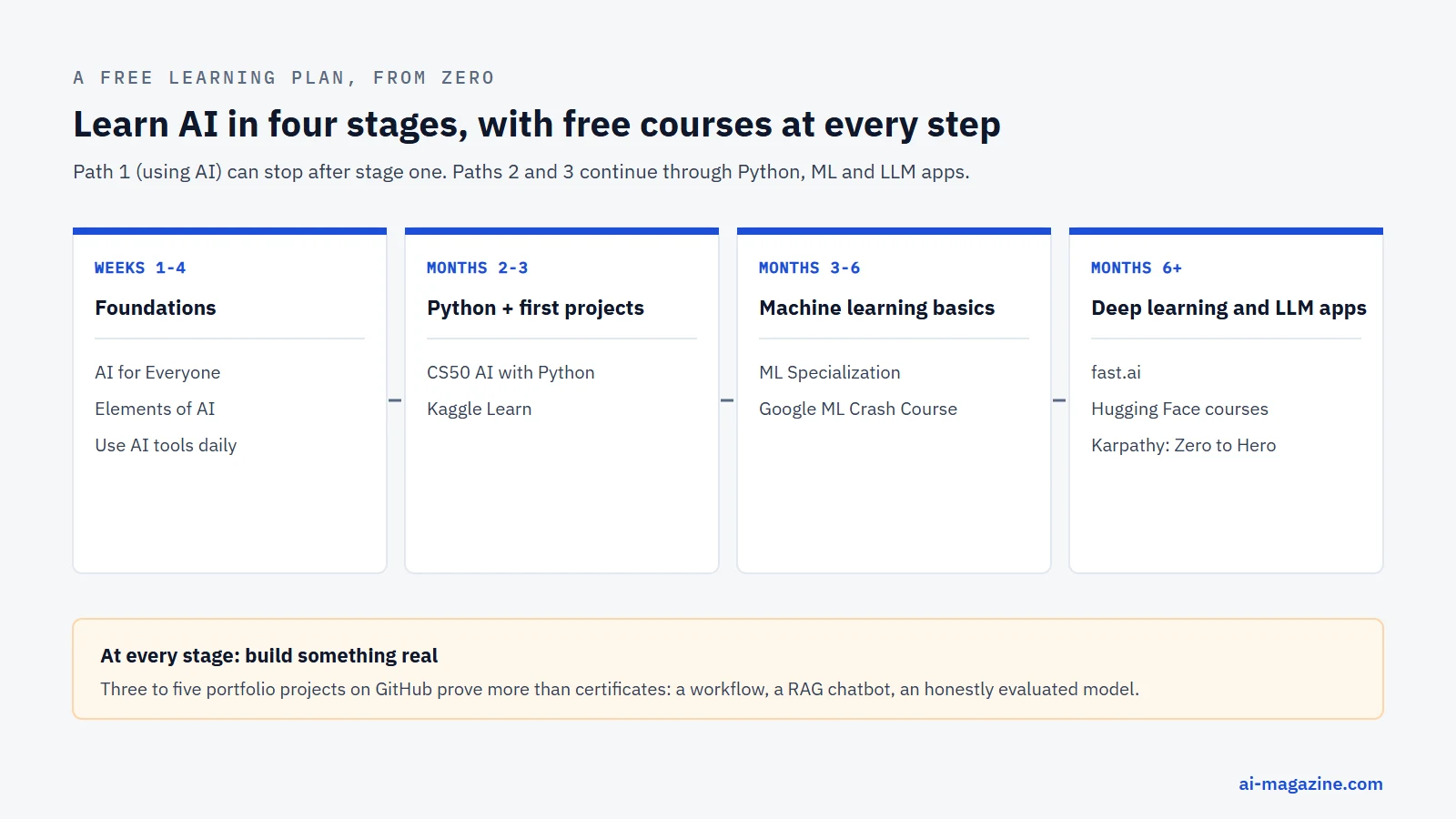
Learning is most effective when structured. The following plan assumes you are starting from zero and moving toward practical application. You can adjust the timeline based on your availability, but the sequence of concepts matters.
Weeks 1–4: Foundations and Daily Use
Start with AI for Everyone by Andrew Ng on Coursera. It is a non-technical course that takes about seven hours. It explains what AI can and cannot do, helping you set realistic expectations. Follow this with Elements of AI from the University of Helsinki and MinnaLearn. This free course has been taken by over two million students and requires no complicated math or programming. It provides a solid conceptual foundation.
During this phase, start using AI tools in your daily life. Use a chatbot to summarize articles, draft emails, or brainstorm ideas. Pay attention to what works and what fails. This hands-on experience will make the theoretical concepts stick.
Months 2–3: Python and First Projects
If you want to move beyond using tools to building with them, learn Python. Start with CS50’s Introduction to AI with Python from Harvard. This free course takes seven weeks and assumes basic Python knowledge. It covers classic AI algorithms like search and optimization, which are foundational for understanding modern systems.
Simultaneously, use Kaggle Learn for short, practical courses. Kaggle offers free certificates for topics like Intro to Machine Learning. These courses are project-based, meaning you write code immediately. This is crucial for building muscle memory.
Months 3–6: Machine Learning Basics
Now you are ready for formal machine learning. Take the Machine Learning Specialization by Stanford Online and DeepLearning.AI. It consists of three courses and takes about two months if you study ten hours a week. It is beginner-level and uses Python. You can audit it for free, or pay $49 a month for the certificate. Financial aid is available.
Supplement this with the Google Machine Learning Crash Course. It is free and takes about fifteen hours. It was relaunched in November 2024 with a specific module on large language models, which is highly relevant for 2026.
Months 6 and Beyond: Deep Learning and LLM Applications
For advanced learning, choose based on your path. For deep learning, try fast.ai Practical Deep Learning for Coders. It is free and consists of nine lessons. It is rigorous and assumes you have about a year of coding experience. For a deep dive into how transformers work, watch Andrej Karpathy’s Neural Networks: Zero to Hero on YouTube. It takes about twelve hours and builds a GPT model from scratch.
For LLM applications, take the Hugging Face LLM Course and the Hugging Face Agents Course. Both are free, and the Agents Course includes free certificates. Hugging Face hosts a large share of the open-weight models used in industry, so this knowledge transfers directly to real projects. Finally, use Microsoft Generative AI for Beginners on GitHub. It has twenty-one lessons and covers both Python and TypeScript, giving you a broad view of the ecosystem.
| Resource | Provider | Cost | What you get |
|---|---|---|---|
| AI for Everyone | DeepLearning.AI (Andrew Ng) | Paid certificate, financial aid available | About 7 hours, non-technical overview |
| Elements of AI | University of Helsinki / MinnaLearn | Free | Over 2M students, no math/programming required |
| CS50’s AI with Python | Harvard University | Free (paid cert on edX) | 7 weeks, assumes basic Python |
| Kaggle Learn | Free | Short courses, certificates, hands-on coding | |
| Machine Learning Specialization | Stanford Online / DeepLearning.AI | Free to audit, $49/mo cert | 3 courses, ~2 months, Python focus |
| Google Machine Learning Crash Course | Free | ~15 hours, includes LLM module | |
| fast.ai Practical Deep Learning | fast.ai | Free | 9 lessons, ~1 year coding exp needed |
| Hugging Face LLM Course | Hugging Face | Free | 12 chapters on working with language models |
| Hugging Face Agents Course | Hugging Face | Free | Agent creation, free certificates |
| Neural Networks: Zero to Hero | Andrej Karpathy | Free | ~12 hours, builds GPT from scratch |
| Generative AI for Beginners | Microsoft | Free | 21 lessons, Python and TypeScript |
Build a portfolio that proves your skills
Certificates are nice, but employers want to see what you can do. A portfolio proves you can apply knowledge to real problems. Aim for three to five projects. Host your code on GitHub and write short write-ups explaining what you built, what tools you used, and what failed.
For Path 1 (Using AI), build an automated workflow. For example, create a system that monitors a news site, summarizes the top three stories, and drafts a newsletter. Document the prompts you used and how you handled errors. This shows you understand workflow integration.
For Path 2 (Building with AI), create a chatbot over your own documents. Use retrieval-augmented generation (RAG) to connect a language model to a vector database. This is a highly sought-after skill. Build a small agent that can perform a multi-step task, like searching for data and updating a spreadsheet. Show your code for handling the API calls and error states.
For Path 3 (Machine Learning), train a model on a public dataset. Use a dataset from Kaggle or a government repository. Train a classifier or regressor. Crucially, include an honest evaluation. Do not just show the accuracy score. Show the confusion matrix, discuss bias in the data, and explain where the model fails. This demonstrates technical maturity.
Our guide on how to build an AI agent is a useful reference for agent design, and What Is RAG explains the retrieval pattern. If you are working with models directly, our overviews of PyTorch, TensorFlow and scikit-learn help you choose a framework. To experiment without API costs, you can also run an LLM locally with Ollama.
AI careers and salaries
The job market for AI is growing, but it is not uniform. Titles matter. “AI Engineer” and “Data Scientist” are distinct roles with different day-to-day responsibilities.
According to the US Bureau of Labor Statistics (Occupational Outlook Handbook, current edition), data scientists had a median pay of $120,230 in May 2025. Employment for data scientists is projected to grow 35% from 2025 to 2035, which is “much faster than the average,” with about 24,800 openings a year. Computer and information research scientists had a median pay of $140,300 in May 2025, with projected growth of 22% from 2025 to 2035. Software developers had a median pay of $135,980 in May 2025, with projected growth of 10% from 2025 to 2035. The BLS notes that demand is strong partly due to “software development for artificial intelligence (AI).” In July 2026, the BLS stated that the adoption of AI technologies “is expected to fuel strong job growth among computer and mathematical occupations.”
Demand for AI skills is surging. The PwC 2026 Global AI Jobs Barometer (June 2026), which analyzed more than 1 billion job ads in 27 countries and territories, found that the average wage premium for AI skills is 62%, up from 57% a year earlier. Jobs requiring specific AI skills grew 69% versus 9% for all jobs. Skills required for AI-exposed jobs are changing more than twice as fast as for less exposed roles.
Data from the Stanford AI Index 2026 (labour data from Lightcast) shows that 2.5% of all US job postings mention AI skills, up 55% from 2024. LinkedIn Jobs on the Rise 2026 (US, January 2026) lists AI Engineer as the #1 fastest-growing job, with AI Consultant/Strategist at #2, Data Annotator at #4, and AI/ML Researcher at #5. The top skills of AI engineers include LangChain, RAG, and PyTorch. LinkedIn Skills on the Rise 2026 also notes that prompt engineering and large language models are among the fastest-growing skills.
A Microsoft Work Trend Index 2025 survey of 31,000 workers across 31 markets found that 78% of leaders are considering hiring for AI-specific roles. AI trainer and AI data specialist are the top roles considered (32% each). Another Microsoft index from 2024 found that two-thirds of leaders said they would not hire someone without AI skills, yet only 39% of AI users had received AI training from their company.
Roles to consider include AI engineer, machine learning engineer, data scientist, research scientist, AI consultant, and data annotator. Prompt engineering is a skill everyone needs, but it is rarely a standalone job title. It is a component of many roles.
How to make money with AI
There are four main ways to make money with AI in 2026.
First, earn more in your current job. The PwC data shows a 62% wage premium for AI skills. If you can automate tasks in your current role, you increase your value. You are not just doing your job; you are doing it faster and better. This is the lowest-risk way to start.
Second, freelancing. Clients are buying specific outcomes. They want automation, AI integration, chatbots, AI video, and data annotation. According to the Upwork Future Workforce Index 2026 (July 2026), freelancers doing AI work earn 34% more per hour. Generative AI and creative production contracts are up 90% year on year, though earnings per contract are down 13%, indicating increased competition for simple tasks. However, earnings for complex AI work are up 45%.
Upwork In-Demand Skills 2026 (February 2026, based on 2025 data) shows AI-related skills demand is up 109% year on year. AI video is up 329%, AI integration up 178%, data annotation and labeling up 154%, and AI chatbot development up 71%. Fiverr Business Trends Index 2026 (June 2026, measuring search demand, not earnings) shows Claude Code specialists up 938%, n8n AI automation up 125%, and AI voice agents up 49%.
Third, AI training and data annotation jobs. This is entry-level work that involves labeling data to train models. LinkedIn defines a data annotator as someone who “Label and review data using detailed guidelines and quality checks to ensure accurate datasets for training AI and machine learning models — often on a per-project basis.”
Platforms pay different rates. DataAnnotation.tech states on its own site that generalist workers earn $25–$50 an hour, coding workers earn $40–$150+, language workers earn $25–$40, and STEM, finance, legal, and medical workers earn $40–$125+. These are the platform’s own figures. It describes the role as a “flexible, task-based contractor role.” Outlier, operated by Scale AI, states “$500M+ paid to experts” and pays weekly, but it does not publish hourly rates.
However, this work is unstable. Independent reporting shows significant volatility. In March 2024, Scale AI’s Remotasks platform cut off workers in Kenya, Nigeria, and Pakistan (Rest of World). In July 2025, Scale AI laid off 14% of staff and cut 500 contractors, largely in data labeling (TechCrunch). In September 2025, xAI laid off about 500 generalist data annotators while saying it would grow “specialist AI tutors” (TechCrunch, citing Business Insider). In August 2025, more than 200 Google AI rating contractors employed through GlobalLogic were laid off. The takeaway is clear: generalist annotation work is unstable and low-paid. Specialist work (coding, STEM, languages, law, medicine) pays more, and some companies say they are expanding it.
Fourth, building products and services. You can create small tools, automation services, or consulting offerings. This requires more upfront effort but offers higher upside. You are building assets that can scale.
Be aware of red flags. “Passive income with AI” schemes are common. The FTC has taken action against several. In Operation AI Comply (September 2024), five cases included Ascend Ecom (“AI-powered” online stores, at least $25 million in consumer losses), Ecommerce Empire Builders (packages up to $35,000), and FBA Machine (over $15.9 million). FTC Chair Lina Khan said, “Using AI tools to trick, mislead, or defraud people is illegal.” In March 2025, Click Profit promised passive income from “a proprietary system powered by artificial intelligence” and cost consumers at least $14 million. In March 2026, Air AI and its owners agreed to be banned from marketing business opportunities to settle FTC charges.
Common mistakes to avoid
Do not collect certificates without building projects. A certificate proves you watched videos; a project proves you can solve problems. Employers care about the latter.
Do not skip fundamentals. Jumping straight into LLMs without understanding basic programming or data structures will leave gaps in your knowledge. You will not know why your model fails.
Do not trust AI output without checking. Always verify facts, especially in high-stakes contexts. AI is probabilistic, not deterministic.
Do not pay for expensive “get rich with AI” courses. Most of the knowledge is available for free or low cost, as listed in the learning plan.
Do not learn only tools that change monthly. Tools like specific chat interfaces come and go. Skills like Python, SQL, and the concepts of RAG and agents last longer.
Frequently asked questions
Can I learn AI for free?
Yes. High-quality resources are available at no cost. Elements of AI, Kaggle Learn, Google’s Machine Learning Crash Course, fast.ai, Harvard’s CS50 AI course and the Hugging Face courses are all free. You can audit the Machine Learning Specialization for free, though its certificate costs money.
How long does it take to learn AI?
It depends on your depth and the hours you put in; these are rough guides, not guarantees. For Path 1 (using AI), you can become proficient in 4–6 weeks. For Path 2 (building with AI), expect 3–6 months of consistent study. For Path 3 (machine learning research), it often takes 6–12 months to build a strong foundation, plus ongoing learning for specialization.
Do I need math to learn AI?
Only if you want to be a data scientist or researcher. For Path 1, no math is needed. For Path 2, basic algebra is sufficient. For Path 3, you need linear algebra, calculus, and probability and statistics. You do not need to derive formulas by hand, but you must understand what they represent.
Can I learn AI without coding?
Yes, for Path 1. You can use no-code or low-code automation tools, such as n8n, to integrate AI into workflows. However, learning basic Python opens up many more opportunities, even for non-developers. It allows you to customize tools and understand their limits better.
Are AI training jobs legit?
Yes, they are legitimate work, but they are often unstable. Platforms like DataAnnotation.tech and Outlier hire contractors. Pay varies by specialization. Generalist work is lower-paid and prone to sudden layoffs, as seen with Scale AI and xAI. Specialist roles (coding, STEM, languages, law, medicine) are better paid, according to the platforms themselves.