Claude Code Tutorial: From First Session to Subagents and Hooks
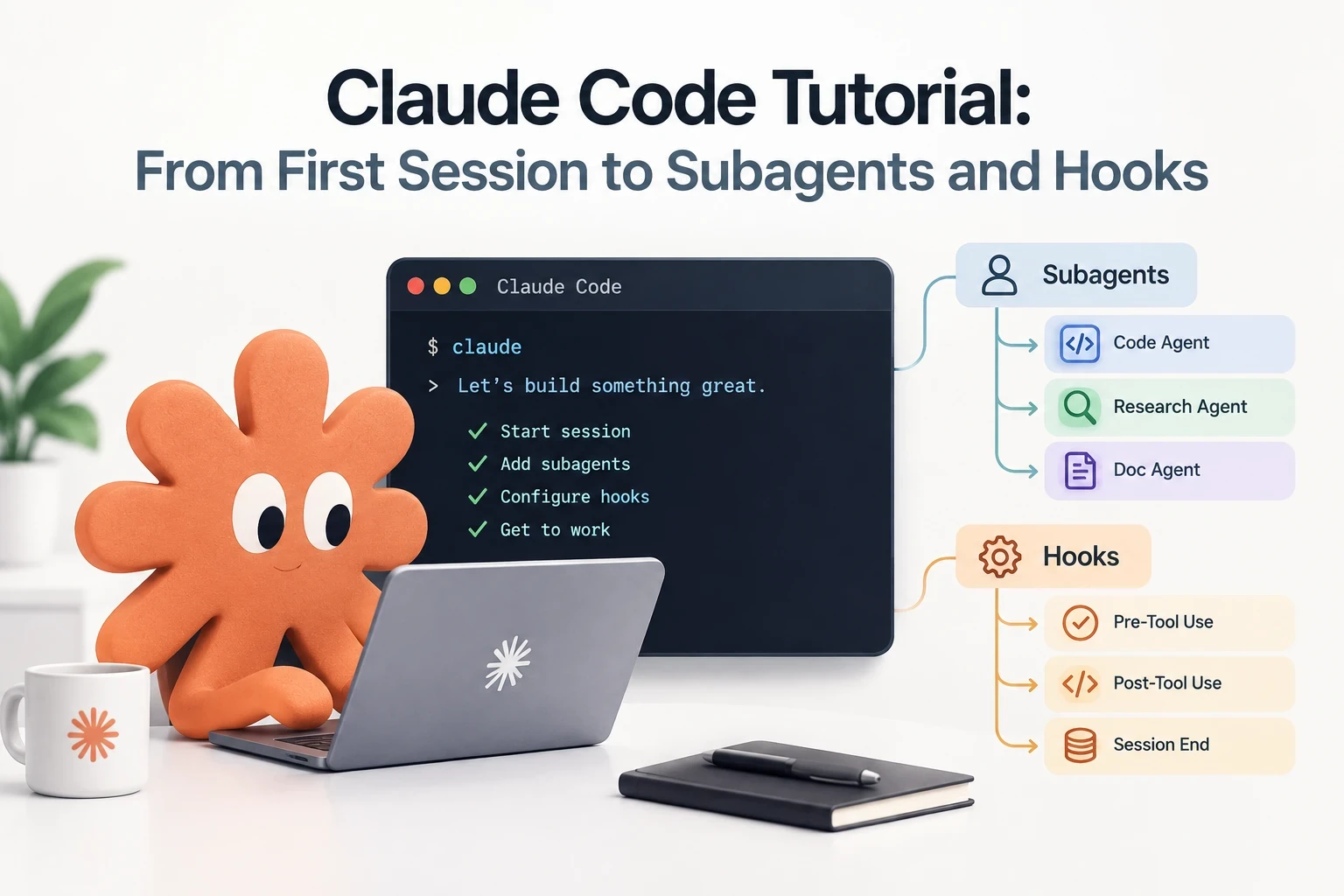
Claude Code is Anthropic’s agentic coding tool: a terminal program, IDE extension, desktop app, and web client that reads your codebase, edits files, runs commands, and calls other tools to get a task done. This guide is written the honest way to write one — using the tool to write about itself. Every mechanism described below (permission modes, memory files, subagents) is one this article’s own session has running right now, and the numbers are read from this exact project’s own files, not from a demo repo built for the occasion.
Install it
Three commands cover almost everyone:
# macOS, Linux, WSL
curl -fsSL https://claude.ai/install.sh | bash
# Windows PowerShell
irm https://claude.ai/install.ps1 | iex# Homebrew
brew install --cask claude-codeNative installs update themselves in the background; a Homebrew install needs brew upgrade claude-code by hand. Confirm it worked:
claude --versionYou need a Claude subscription (Pro, Max, Team, or Enterprise) or an Anthropic Console account with API credits. Claude Code isn’t included on the free plan. Beyond the terminal, the same tool runs as a VS Code extension, a JetBrains plugin, a standalone desktop app, and in the browser at claude.ai/code — the last one needs no local install at all.
Your first session
cd /path/to/your/project
claude
You’ll be prompted to log in the first time. After that, you’re dropped into an interactive prompt showing the version, current model, and working directory. From here, three things are worth trying immediately:
what does this project do?Claude Code reads your files as needed — you never manually add context. Ask it to explain the folder structure, find the entry point, or list the technologies in use, and it goes and looks.
Then make an actual change:
add a hello world function to the main fileClaude Code locates the right file and shows you a diff. Whether it asks first or just does it depends entirely on one setting: the permission mode.
Permission modes: the setting that changes everything else
This is the concept most tutorials skip, and it’s the one that decides how the tool feels to use. A permission mode sets which actions Claude Code can take without stopping to ask you.
| Mode | What runs without asking | Best for |
|---|---|---|
default (labeled Manual) |
Reads only | Reviewing every action yourself, sensitive work |
acceptEdits |
Reads, file edits, common filesystem commands (mkdir, mv, cp) |
Iterating on code you’re watching |
plan |
Reads, plus classifier-approved commands once you approve a plan | Exploring before you commit to changes |
auto |
Everything, with a second model reviewing actions in the background | Long tasks, fewer interruptions |
dontAsk |
Reads and a pre-approved allowlist; anything else is denied outright | Locked-down CI and scripts |
bypassPermissions |
Everything, no review | Isolated containers only |
Press Shift+Tab at any time to cycle modes mid-session.
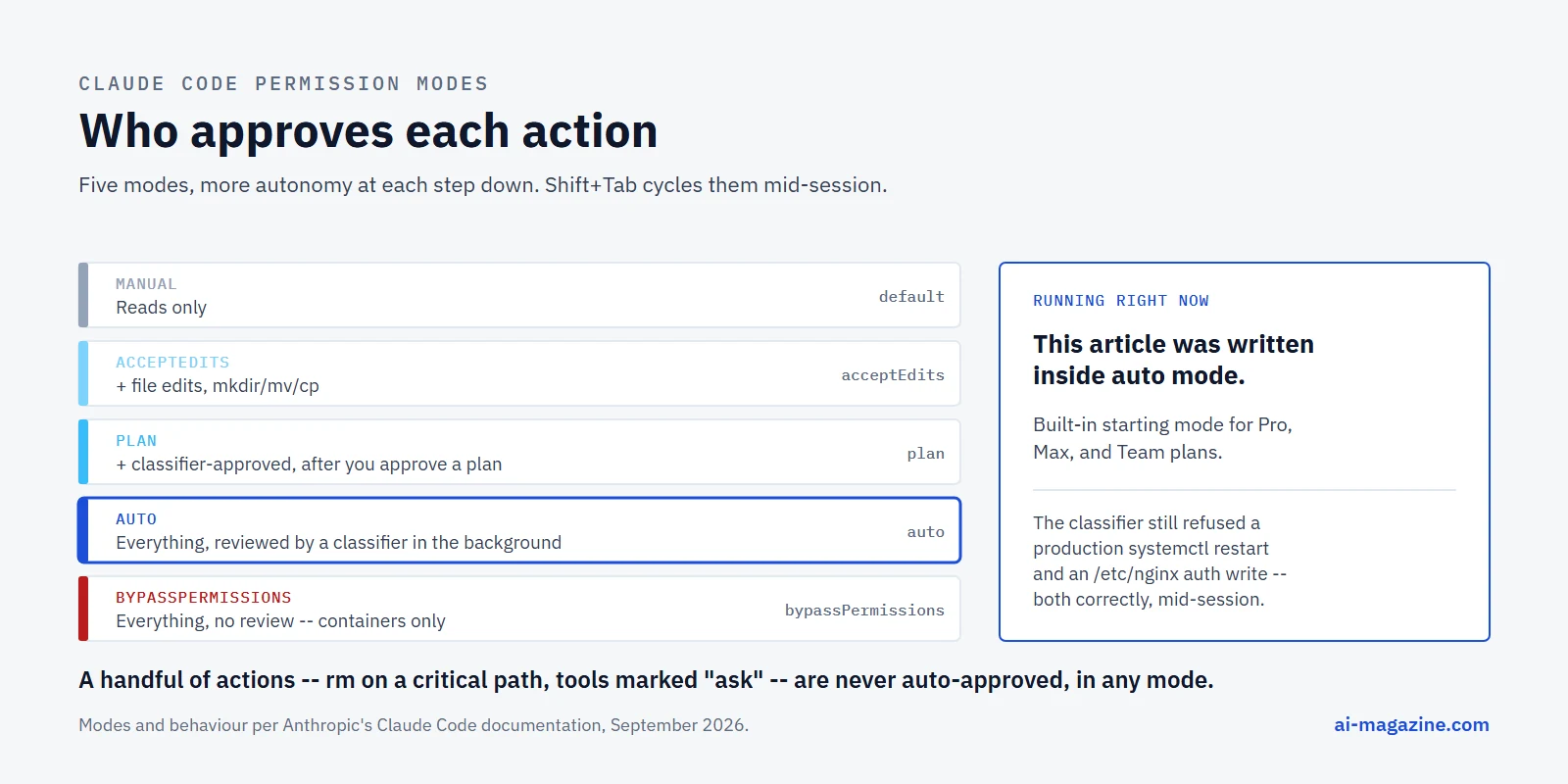
auto is the one worth understanding, because it’s the built-in starting mode for Pro, Max, and Team plans as of Claude Code 2.1.228 (2.1.233 on native Windows) — you may already be in it without choosing to be. Instead of Claude Code asking you before every file edit or shell command, a separate classifier model reviews each action and approves the routine ones itself. This is not a hypothetical: this article was written inside a session running in exactly this mode. When the classifier declines to approve something — a step it judges destructive, irreversible, or outside its rules — it still stops and asks. That happened several times while writing an earlier article in this same series, when the classifier refused a sudo systemctl restart on a production server and a write to an /etc/nginx/.htpasswd file, both correctly, and both requiring a human to actually run the command.
A few actions are never auto-approved in any mode, including bypassPermissions: tools an explicit rule marks “ask”, anything needing direct user interaction, and rm/rmdir against a small list of critical paths. No allow rule overrides that last one.
plan mode is the other one worth using deliberately: Claude Code researches your codebase with a read-only subagent, presents a plan, and won’t touch a file until you approve it. Good default for a codebase you don’t know yet.
CLAUDE.md: instructions that persist across sessions
Every session starts with an empty context window — Claude Code has no memory of yesterday unless something loads it back in. Two files do that:
- CLAUDE.md, which you write.
- Auto memory, which Claude writes itself.
CLAUDE.md files stack by scope, loaded broadest to most specific:
| Scope | Location | Shared with |
|---|---|---|
| Managed policy | /etc/claude-code/CLAUDE.md (Linux), C:\Program Files\ClaudeCode\CLAUDE.md (Windows) |
Everyone in the org |
| User | ~/.claude/CLAUDE.md |
Just you, every project |
| Project | ./CLAUDE.md or ./.claude/CLAUDE.md |
The team, via git |
| Local | ./CLAUDE.local.md |
Just you, this project |
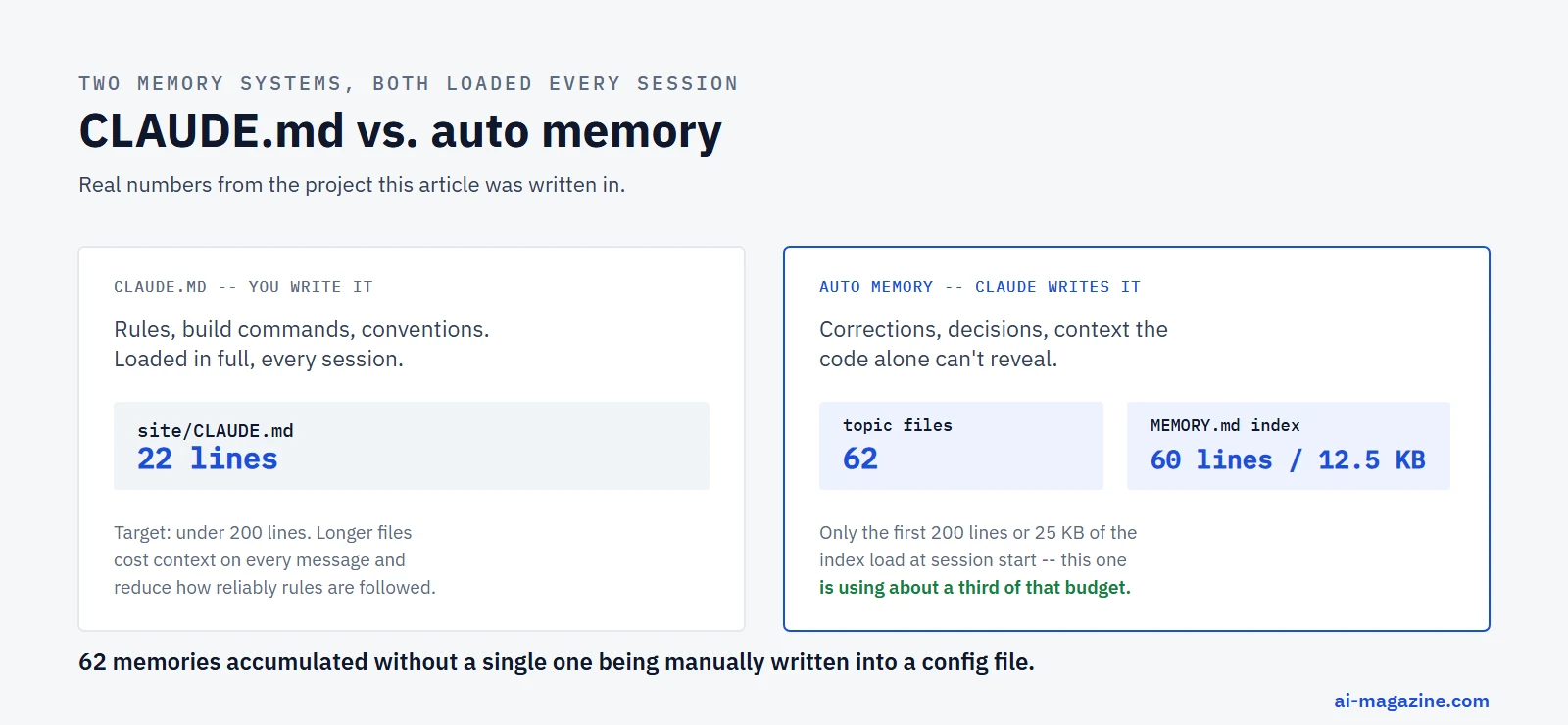
Run /init in a session and Claude analyzes the codebase and writes a starting CLAUDE.md for you — build commands, test instructions, conventions it can infer. From there, add only what Claude can’t derive from the code itself: this project’s own CLAUDE.md is 22 lines and says, among other things, to start the dev server in background mode and to consult specific Astro documentation pages before touching routing or content collections. The rule of thumb from Anthropic’s own docs: target under 200 lines, because a longer file consumes more context on every single message and adherence drops. If a rule only matters for one part of the codebase, a path-scoped rule in .claude/rules/ loads it only when relevant instead of on every turn.
Auto memory: the part that writes itself
Auto memory is the newer half of the system, and it’s the one actually running behind the scenes of every long project. Claude records four kinds of note, tagged by type in each file’s frontmatter:
user— your role and working preferencesfeedback— corrections you’ve given, approaches you’ve confirmedproject— ongoing decisions the code itself won’t revealreference— where to find something outside the repo
It skips anything derivable from the codebase and anything your CLAUDE.md already covers. This is not a small, theoretical feature: the project behind this article has 62 separate memory files — one fact each, on everything from a server’s SSH quirks to a naming convention for a specific client’s automated messages — indexed by a MEMORY.md file currently sitting at 60 lines and 12.5 KB. That’s about a third of its budget: only the first 200 lines or 25 KB of MEMORY.md load at session start, and Claude Code warns itself to trim the index once it gets close, moving detail into the topic files rather than the index. The topic files themselves aren’t loaded automatically; Claude reads one only when it’s relevant, the same way it reads any other file.
Run /memory to browse what’s been saved, edit any file directly (they’re plain markdown), or toggle auto memory off entirely.
Give it a specialist: custom subagents
A subagent is a separate Claude Code instance with its own context window, its own restricted tool set, and often its own model — invoked by the main conversation to do one job and report back, so the exploration or grunt work doesn’t fill up your main context.
Claude Code ships with a few built in. Two of them, Explore and general-purpose, are the ones you’ll see fire automatically and often: Explore is read-only and used for fast codebase search, general-purpose gets every tool and handles multi-step work that needs both research and changes. A third, claude-code-guide, exists specifically to answer questions about Claude Code itself — a small piece of self-reference worth noting.
Making your own is a conversation, not a form:
Create a personal code-improver subagent in ~/.claude/agents/ that scans
files and suggests improvements for readability, performance, and best
practices. It should explain each issue, show the current code, and
provide an improved version. Make it read-only and have it use Sonnet.
Claude writes the file itself:
---
name: code-improver
description: Scans files and suggests improvements for readability, performance, and best practices. Use after writing or modifying code.
tools: Read, Grep, Glob
model: sonnet
---

You are a code improvement specialist. For each issue you find, explain
the problem, show the current code, and provide an improved version.
Save it under ~/.claude/agents/ and it’s available in every project on your machine; save it in .claude/agents/ inside a repo and it ships with that project for the whole team. Invoke it by name — “use the code-improver agent on this file” — or let Claude delegate to it automatically when the description matches what you asked for.
Hooks: code that runs on Claude’s own actions
A hook is a shell command, HTTP call, or another subagent that Claude Code fires automatically at a specific point in its own lifecycle — before a tool runs, after one finishes, when a session starts, and over a dozen other events. Hooks are configuration, not something Claude decides to skip; a PreToolUse hook that returns “deny” blocks the action regardless of what any CLAUDE.md file says.
Here’s a real one from Anthropic’s own reference docs: block any rm -rf, even one the model would otherwise be allowed to run.
{
  "hooks": {
    "PreToolUse": [
      {
        "matcher": "Bash",
        "hooks": [
          {
            "type": "command",
            "if": "Bash(rm *)",
            "command": "${CLAUDE_PROJECT_DIR}/.claude/hooks/block-rm.sh"
          }
        ]
      }
    ]
  }
}
#!/bin/bash
# .claude/hooks/block-rm.sh
COMMAND=$(jq -r '.tool_input.command')
if echo "$COMMAND" | grep -q 'rm -rf'; then
jq -n '{
hookSpecificOutput: {
hookEventName: "PreToolUse",
permissionDecision: "deny",
permissionDecisionReason: "Destructive command blocked by hook"
}
}'
else
exit 0
fiThe matcher narrows to Bash calls, the if condition narrows further to commands matching rm *, and only then does the script run — so it costs nothing on the other 99% of tool calls that aren’t rm. Beyond blocking, the same mechanism preprocesses data before Claude ever sees it: a hook can grep a 10,000-line log for ERROR and hand back a dozen matching lines instead of making Claude read the whole thing, which is a real, measured way to cut token spend, not a theoretical one.
Where you save the hook decides its reach: ~/.claude/settings.json for every project on your machine, .claude/settings.json for one project shared with the team via git, .claude/settings.local.json for one project, just you, never committed.
MCP servers: connecting Claude to your actual tools
An MCP server gives Claude Code access to something outside your filesystem — a database, an internal API, a SaaS product. Add a remote one in a single command:
claude mcp add --transport http notion https://mcp.notion.com/mcpOr a local one that runs as its own process:
claude mcp add --transport stdio airtable -- npx -y airtable-mcp-serverEverything after the -- is passed straight to the server; everything before it is Claude Code’s own flags. Run /mcp inside a session to see what’s connected, disable a server you’re not using, or re-authenticate one that needs OAuth.
MCP tool definitions are deferred by default — only names and short descriptions enter context until Claude actually calls a tool — but a session with many servers connected still adds up. If a tool has a plain CLI (gh, aws, gcloud), Anthropic’s own guidance is that the CLI is usually more context-efficient than the equivalent MCP server, because the CLI adds no per-tool listing at all.
Run it headless, in scripts and CI
-p (or --print) runs one query, prints the answer, and exits — no interactive session, no follow-up. This is the form that makes Claude Code scriptable rather than just chatty:
claude -p "explain what changed in the last commit"# structured output for a script to parse
claude -p "list the exported functions in src/api.ts" --output-format json# pipe content in
cat error.log | claude -p "what's the root cause of this crash?"Two flags matter specifically for CI: --permission-mode dontAsk --allowedTools "Bash(npm test)" "Read" runs against an exact allowlist and denies anything outside it rather than hanging on a prompt nobody’s there to answer, and --max-turns caps how many agentic turns a single headless run gets before it exits with an error — useful the first time you wire this into a pipeline and want a hard ceiling on runaway cost.
For work you want to keep running while you do something else, --bg starts a background session and returns your terminal immediately; claude agents lists what’s running, claude attach <id> reconnects to watch it.
Common mistakes in the first week
Treating CLAUDE.md as a dumping ground. Every line loads into every session, on every message, whether it’s relevant to the current task or not. A 600-line CLAUDE.md written in one enthusiastic afternoon measurably hurts adherence, per Anthropic’s own guidance — the model has to hold more instructions in mind, and specific rules get lost in general ones. Split anything that only matters for part of the codebase into a .claude/rules/ file scoped to those paths instead.
Never checking /context. Context fills up with tool output, file contents, and MCP tool listings whether you’re watching or not. Runs slow to a crawl or noticeably worse answers midway through a long session, usually mean context is full of stale material /clear or /compact would have cleared. Check before assuming the model got worse.
Assuming auto mode means unattended. It means a classifier reviews routine actions instead of you — it still stops for anything it judges risky. Treating every unprompted pause as a bug rather than the safety mechanism working leads to reflexively re-running the same blocked command through a different tool, which is exactly the pattern the classifier exists to catch.
Writing a subagent prompt instead of asking for one. The quickstart example above is a full sentence of plain English, not YAML. Claude writes the frontmatter and system prompt; describing the tool restrictions and model in the request is enough.
The slash commands worth knowing on day one
Type / to see everything available in your session; these are the ones that matter early.
| Command | Does |
|---|---|
/init |
Generates a starting CLAUDE.md from your codebase |
/clear |
Starts a new conversation with empty context |
/compact [instructions] |
Summarizes the conversation so far to free up context |
/context |
Visualizes what’s using your context window right now |
/usage |
Session cost, plan usage, and (on paid plans) a breakdown by skill/subagent/MCP server |
/model |
Switch models mid-session |
/permissions |
View and edit allow/ask/deny rules |
/agents |
Reminder to ask Claude to create a subagent, or edit .claude/agents/ directly |
/hooks |
View configured hooks |
/mcp |
Manage MCP server connections |
/memory |
Browse and edit CLAUDE.md and auto memory |
/resume |
Reopen a previous conversation by name or picker |
/diff |
Review everything changed in the working tree so far |
/rewind |
Roll the conversation and/or code back to an earlier point |
/doctor |
Diagnose installation and settings problems |
What it actually costs
Claude Code bills by API token consumption unless you’re on a subscription plan, where usage is included. Anthropic’s own published figure, across enterprise deployments: an average of about $13 per developer per active day, $150–250 per month, with 90% of users staying under $30 on any given day. That’s a wide range because it depends entirely on model choice, codebase size, and how much you run in parallel.
Subscription pricing, for scale: Pro starts at $17/month (annual) or $20/month (monthly) and includes Claude Code with standard usage limits; Max starts at $100/month for 5× or 20× the usage. Anyone running Claude Code daily on non-trivial codebases will cross the API-equivalent of a Pro plan within a handful of active days — the subscription math favors regular use over metered API access for most individuals.
Three levers actually move the number, in order of how much they matter:
- Model choice. Sonnet handles most coding work and costs a fraction of Opus. Reserve Opus for genuinely hard architectural reasoning, and set cheap subagents (
model: haiku) for simple, well-scoped delegated tasks. - Context hygiene.
/clearbetween unrelated tasks — stale context is re-billed on every message that follows it, not just the one that created it./compactwith focus instructions when a long session needs to keep going. - MCP server count. Every connected server, even idle, adds its name and description to context.
/mcpto see what’s connected, and turn off what you’re not using this session.
Prompt caching handles a lot of this automatically underneath — Anthropic’s own docs report sessions running at 90%+ of input tokens served from cache once a session has been running a while, which is the main reason a long working session doesn’t cost what the raw token count would suggest. Prompt caching covers the same mechanism from the API side, with per-vendor prices.
Claude Code vs. Cursor and other AI IDEs
The honest comparison is about surface, not raw capability. Cursor is an IDE fork with AI built into the editing experience; Claude Code is a CLI-first agent that also has IDE extensions, so it works the same way in a terminal, in VS Code, in JetBrains, in a standalone desktop app, or in a browser with no local install. If your workflow already lives in the terminal — scripts, CI, remote servers over SSH — Claude Code meets it there directly, including running fully headless with -p for one-off queries in a pipeline. If you want AI woven into a specific editor’s own UI with inline diffs as the primary interface, an IDE-first tool matches that better. Plenty of people run both.
Frequently asked questions
Is Claude Code free?
No. It requires a Claude Pro, Max, Team, or Enterprise subscription, or an Anthropic Console account billed by API usage. There’s no tier of Claude Code on the free consumer plan.
What’s the difference between CLAUDE.md and auto memory?
You write CLAUDE.md; Claude writes auto memory. CLAUDE.md holds rules and standards you want followed every session — build commands, conventions. Auto memory holds things Claude noticed and decided were worth keeping across sessions on its own — your corrections, project context the code doesn’t reveal. Both load at the start of every conversation.
What is auto mode, and is it safe?
Auto mode replaces “Claude asks before every action” with “a second model reviews each action and approves the routine ones,” stopping only for things it judges risky, irreversible, or outside its own rules. It’s the built-in starting mode for Pro, Max, and Team plans. It is not the same as bypassPermissions, which skips review entirely and is meant for isolated containers, not daily use.
Can Claude Code work without an internet connection or MCP servers?
Yes, for the built-in tools — reading, writing, editing files, running shell commands. MCP servers extend it to external systems, but nothing about the core agent loop requires one.
How do I stop Claude Code from re-reading the same context every session?
That’s what CLAUDE.md and auto memory are for. Anything Claude has to be told twice is a candidate for one or the other — a rule you’d write yourself goes in CLAUDE.md, a pattern Claude noticed on its own becomes an auto memory entry.
Related
- How to build an AI agent, for the model-plus-tools-plus-loop mechanics Claude Code is itself built on
- How to connect an MCP server and Claude Skills, the two main ways to extend it
- Prompt caching, the mechanism behind Claude Code’s own low per-message cost in long sessions
- LLM API pricing for the raw token rates behind the subscription math above