Claude Skills: What They Are and How to Write Your First Skill
A skill is a folder with a SKILL.md file in it. Inside are instructions that teach Claude how to do a particular job the way you want it done, plus any scripts, templates or reference files that job needs. Claude reads the folder only when a request matches what the skill is for, so a shelf full of skills costs almost nothing until one is used.
Anthropic calls the format Agent Skills and the feature Skills; “Claude Skills” is what everyone types into a search box. It was announced on October 16, 2025 and published as an open standard in December 2025, and it is now supported by dozens of other agent products, including tools from OpenAI, Google, Microsoft and Cursor.
This guide covers what a skill is made of, how Claude decides to use one, how to write and test your first skill, where skills work today, and what to check before you install someone else’s.
What a skill actually is
Anthropic’s documentation defines Agent Skills as “modular capabilities that extend Claude’s functionality”, each one packaging “instructions, metadata, and optional resources (scripts, templates)”. The engineering team’s own comparison is more memorable: building a skill “is like putting together an onboarding guide for a new hire”.
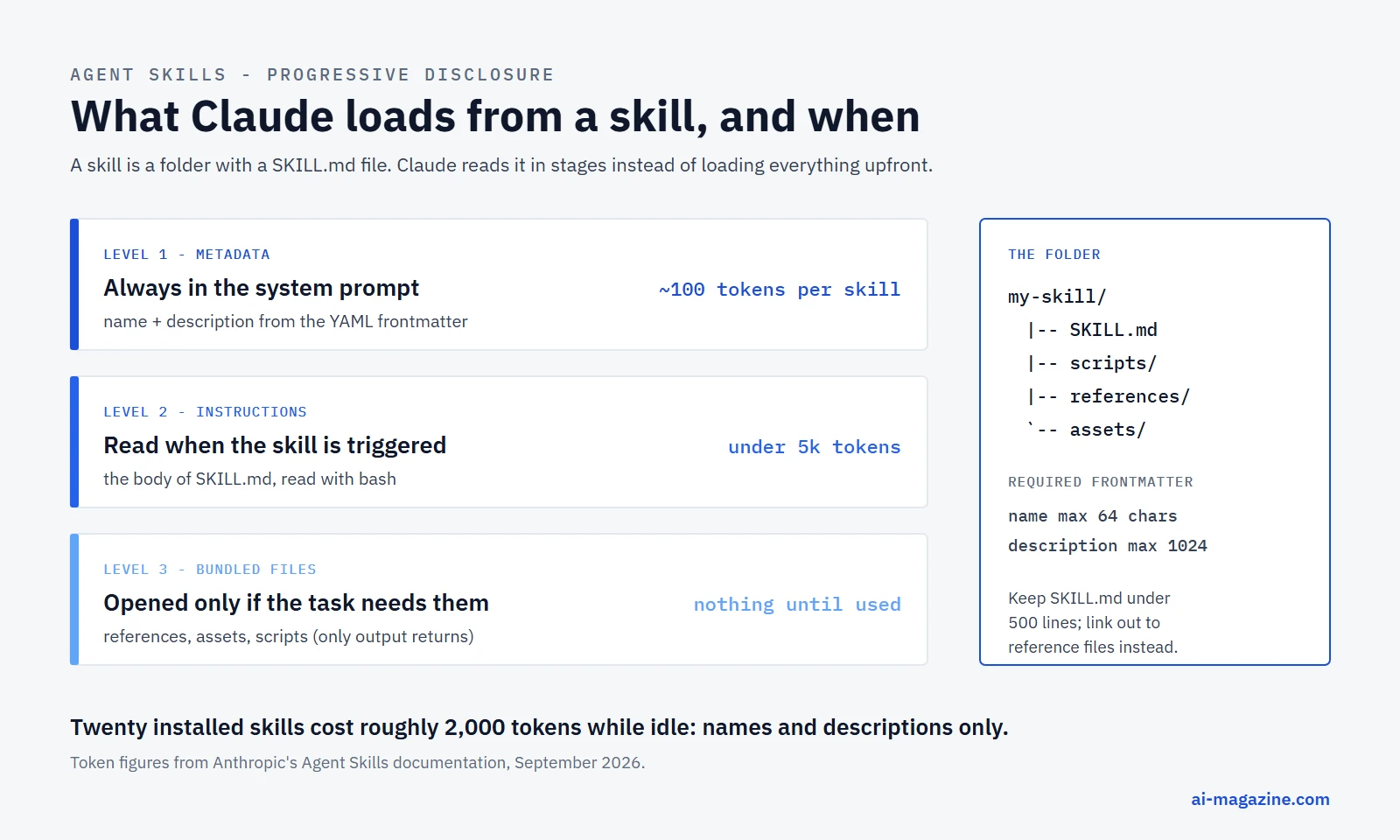
The mechanism that makes this practical is progressive disclosure. Instead of loading everything upfront, Claude reads a skill in stages.
| Level | When it loads | Token cost | What it contains |
|---|---|---|---|
| 1. Metadata | Always, at startup | About 100 tokens per skill | name and description from the YAML frontmatter |
| 2. Instructions | When the skill is triggered | Under 5,000 tokens | The body of SKILL.md |
| 3. Resources | Only if the task needs them | Nothing until opened | Reference files, templates, scripts |
Source: Anthropic’s Agent Skills overview.
Scripts are the interesting case. A bundled script is executed rather than read: Claude runs it through bash and only its output enters the conversation. A 400-line Python file can cost a handful of tokens of context.
That budget discipline is the point. Anthropic’s best-practices guide puts it in one line: “The context window is a public good.” Twenty installed skills sit in the system prompt for roughly 2,000 tokens in total, and the rest of each skill stays on disk until it is needed.
Skill, MCP server or project instructions?
These three get confused constantly, and Anthropic’s support documentation draws the line clearly.
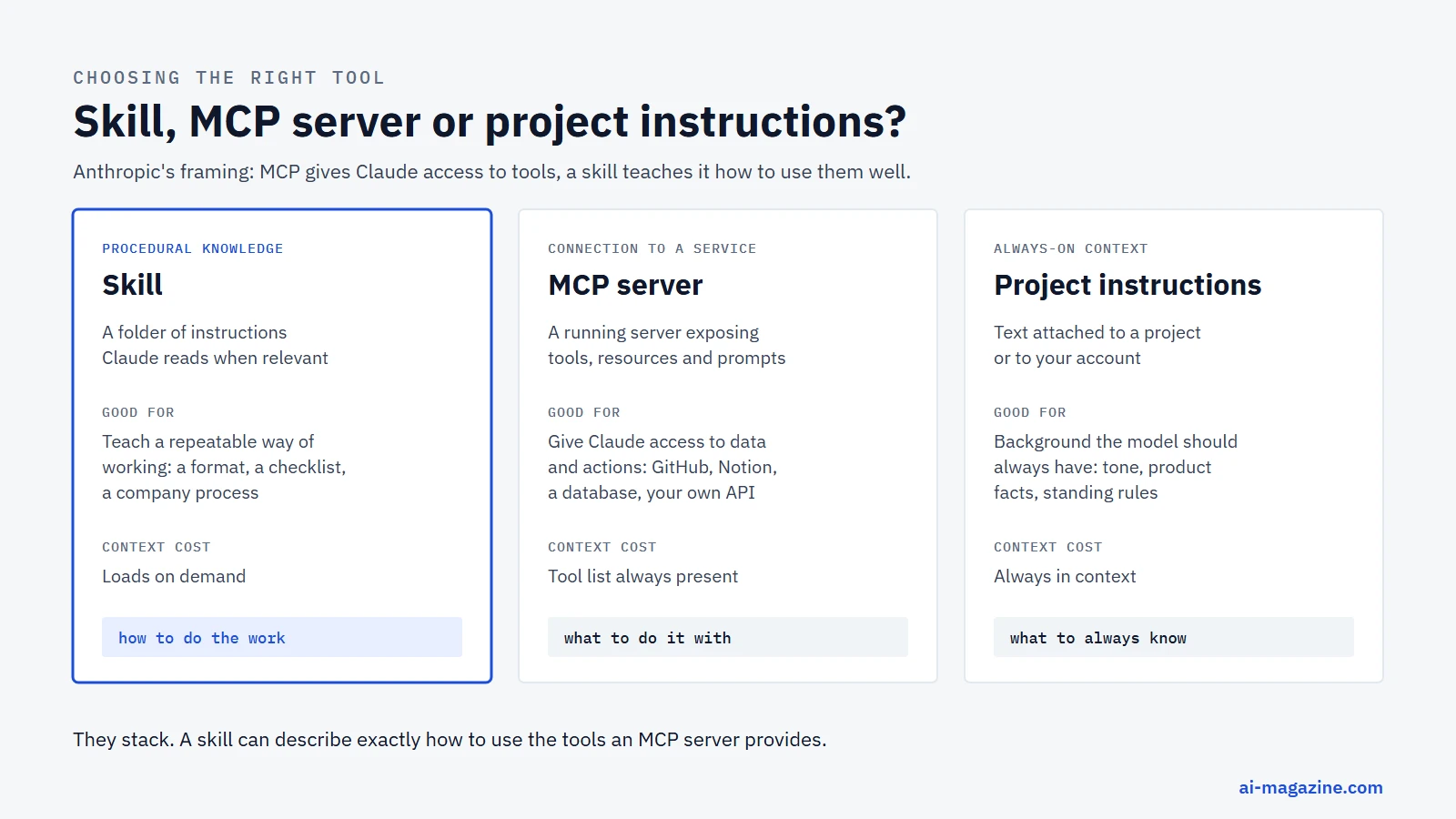
- Skills are procedural knowledge: how to do something. They “activate dynamically when needed and work everywhere across Claude”.
- MCP servers are connections: “MCP connects Claude to external services and data sources. Skills provide procedural knowledge.” The two are complementary, in Anthropic’s words: “MCP connections give Claude access to tools, while skills teach Claude how to use those tools effectively.”
- Projects and custom instructions are always-on context: “Projects provide static background knowledge that’s always loaded”, while custom instructions “apply broadly to all your conversations”.
A useful test: if you are describing what Claude may touch, you want an MCP server. If you are describing how the work should be done, you want a skill. If it must be true in every single conversation, it belongs in project or custom instructions.
Anatomy of a skill
The open specification defines the layout:
skill-name/
├── SKILL.md          # Required: metadata + instructions
├── scripts/          # Optional: executable code
├── references/       # Optional: documentation
├── assets/           # Optional: templates, resources
└── ...               # Any additional files or directories
The file name is SKILL.md in capitals; on a case-sensitive filesystem skill.md will not be found.
The frontmatter
Only two fields are required by the standard:
| Field | Required | Rules |
|---|---|---|
name |
Yes | Max 64 characters, lowercase letters, numbers and hyphens; must match the folder name; cannot contain the words “claude” or “anthropic” |
description |
Yes | Max 1,024 characters; says what the skill does and when to use it |
license |
No | License name or a bundled license file |
compatibility |
No | Max 500 characters; environment requirements |
metadata |
No | Free-form string keys and values, often used for author and version |
allowed-tools |
No | Space-separated list of pre-approved tools; marked experimental in the spec |
The reserved-word rule is real, not theoretical: a skill in Anthropic’s own repository was renamed from claude-academy-guide to academy-guide because “skill names cannot contain the reserved words ‘claude’ or ‘anthropic’”, and its description was trimmed from 1,176 to 992 characters to fit the 1,024-character limit.
The smallest valid skill, straight from the spec:
---
name: skill-name
description: A description of what this skill does and when to use it.
---
Everything below the frontmatter is ordinary Markdown, and the spec sets no format rules for it. Two pieces of guidance matter: keep SKILL.md under 500 lines, and keep file references one level deep rather than building chains of documents that point at each other.
Writing your first skill
Here is a complete, working skill. It teaches Claude to summarize a CSV file the same way every time, and it ships a script so the analysis itself costs no context.
The folder:
csv-summary/
├── SKILL.md
└── scripts/
└── summarize.pySKILL.md:
---
name: csv-summary
description: Summarises a CSV file: row and column counts, fill rate, unique values, numeric ranges and the most common values per column. Use when the user shares a CSV or asks what is inside a data file, before any analysis or cleaning.
license: MIT
metadata:
  author: ai-magazine
  version: "1.0"
---

# CSV summary

## Instructions

1. Run the bundled script on the file the user named:

   ```bash
   python scripts/summarize.py <path-to-csv> --max-cols 20
   ```

2. Read the output, then report in this order:
   - the shape of the file: rows and columns;
   - any column with a fill rate below 90%, named explicitly;
   - any column whose values look like an identifier (unique count equals row count);
   - numeric ranges that look implausible, such as negative prices or dates in the future.

3. Do not load the whole file into the conversation. If the user wants specific rows,
   filter them with a follow-up command instead of pasting the file.

4. End with one question that the data could answer and one problem that would block it.

## Notes

- The script treats a column as numeric when at least 80% of its filled values parse as numbers,
  so columns like "$1,200" are still summarised as numbers.
- For files above about 200 MB, tell the user it will be slow and suggest sampling first.
The script, scripts/summarize.py, is a plain Python file with no dependencies beyond the standard library:
"""Summarise a CSV file: shape, column types, missing values and top values."""
import argparse, csv, statistics
from collections import Counter


def parse_number(value):
    try:
        return float(value.replace(",", "").replace("$", "").strip())
    except (ValueError, AttributeError):
        return None


def main():
    parser = argparse.ArgumentParser()
    parser.add_argument("path")
    parser.add_argument("--max-cols", type=int, default=20)
    args = parser.parse_args()

    with open(args.path, encoding="utf-8-sig", newline="") as f:
        rows = list(csv.DictReader(f))
    if not rows:
        print("The file has no data rows.")
        return

    columns = list(rows[0].keys())
    print(f"{len(rows):,} rows x {len(columns)} columns\n")
    print(f"{'column':28} {'filled':>8} {'unique':>8}  summary")

    for column in columns[: args.max_cols]:
        values = [(r.get(column) or "").strip() for r in rows]
        filled = [v for v in values if v]
        numbers = [n for n in (parse_number(v) for v in filled) if n is not None]
        if numbers and len(numbers) >= 0.8 * len(filled):
            summary = f"min {min(numbers):g}, median {statistics.median(numbers):g}, max {max(numbers):g}"
        else:
            common = Counter(filled).most_common(3)
            summary = ", ".join(f"{v[:24]} ({c})" for v, c in common) or "-"
        print(f"{column[:28]:28} {len(filled) / len(values):7.0%} {len(set(filled)):8,}  {summary}")


if __name__ == "__main__":
    main()
Run it once yourself before handing it to Claude. On our own URL map, it prints:
639 rows x 17 columns

column                         filled   unique  summary
path                            100%      639  / (1), /10-ai-courses-for-aspir (1), /10-groundbreaking-ai-pr (1)
action                          100%        6  keep (426), 410 (98), new (57)
target                           83%      483  /news/ (28), /feed/ (7), /glossary/knowledge-grap (3)
template                         79%       25  glossary-term (266), article (168), category-page (18)
kind                             96%       27  glossary (266), post (167), legacy-410 (49)
status_now                       90%        5  min 200, median 200, max 410
That output is what reaches the conversation. The script itself never does.
Installing it
In Claude Code, a skill is just a folder in the right place:
| Location | Path | Scope |
|---|---|---|
| Personal | ~/.claude/skills/csv-summary/SKILL.md |
Every project on your machine |
| Project | .claude/skills/csv-summary/SKILL.md |
Everyone who checks out the repository |
| Plugin | <plugin>/skills/csv-summary/SKILL.md |
Invoked as /plugin-name:csv-summary |
No restart is needed: edits to SKILL.md apply during a session. Run /skills to see what is loaded, and /csv-summary to invoke it directly. When the same name exists in more than one place, enterprise settings win, then personal, then project.
On claude.ai, the same folder becomes a zip file, uploaded under Customize → Skills with code execution enabled. Through the API, it is uploaded once and then referenced by ID, as shown below.
What Claude Code does with a long skill shelf
Claude Code puts a budget on the skill listing itself: it scales to about 1% of the model’s context window, and when the listing overflows, descriptions are dropped starting with the skills you invoke least. Each entry is truncated at 1,536 characters, so a novel-length description is wasted effort. /doctor estimates what the listing costs, /context shows its size after budgeting, and /skill-doctor reports skills nobody uses.
Two behaviours are worth knowing when a session runs long. Once a skill is invoked, its content stays in the conversation rather than being re-read each turn. After automatic compaction, Claude Code re-attaches the most recent invocation of each skill, keeping the first 5,000 tokens of each within a combined 25,000-token budget.
Where skills work
| Surface | How skills get there | Notes |
|---|---|---|
| claude.ai and the desktop app | Upload a zip under Customize → Skills | Documentation lists Pro, Max, Team and Enterprise with code execution enabled; the Help Center now also lists Free |
| Claude Code | Folders in ~/.claude/skills/ or .claude/skills/ |
No upload, no API; personal, project, plugin and enterprise locations |
| Claude Developer Platform (API) | Upload via the Skills API, then reference by skill_id |
Requires the code execution tool |
| Claude Agent SDK | Loaded from the filesystem through settingSources |
No programmatic registration; a skills option picks which load |
| Claude on AWS | Same as the API, custom skills uploaded via the Skills API | “Inherit the same Skills behavior as the Claude API” |
| Microsoft Foundry | Supported only on a “Hosted on Anthropic” deployment | Not when hosted on Azure |
One limitation catches people out, and it is stated plainly in the docs: custom skills do not sync across surfaces. A skill uploaded to claude.ai is not available through the API, and a skill in Claude Code is separate from both. Keep the folder in Git and treat each surface as a deployment target. Claude Code can pull down skills from a connected claude.ai account into ~/.claude/skills/synced/, which is the one bridge that exists.
Using a skill through the API
Skills run inside the code execution tool’s container. Anthropic ships four document skills, pptx, xlsx, docx and pdf, that need no upload:
curl https://api.anthropic.com/v1/messages \
  -H "x-api-key: $ANTHROPIC_API_KEY" \
  -H "anthropic-version: 2023-06-01" \
  -H "content-type: application/json" \
  -d '{
    "model": "claude-opus-5",
    "max_tokens": 4096,
    "container": {
      "skills": [
        { "type": "anthropic", "skill_id": "pptx", "version": "latest" }
      ]
    },
    "messages": [{"role": "user", "content": "Create a presentation about renewable energy"}],
    "tools": [{ "type": "code_execution_20250825", "name": "code_execution" }]
  }'
Your own skill is uploaded first, then referenced with "type": "custom" and its skill_id:
curl -X POST "https://api.anthropic.com/v1/skills" \
  -H "x-api-key: $ANTHROPIC_API_KEY" \
  -H "anthropic-version: 2023-06-01" \
  -F "files[]=@csv-summary/SKILL.md;filename=csv-summary/SKILL.md" \
  -F "files[]=@csv-summary/scripts/summarize.py;filename=csv-summary/scripts/summarize.py"
The limits to design around, from the Skills API guide:
- 20 skills per request, 30 MB per skill uncompressed.
- The container has no network access and cannot install packages at runtime, so bundle what you need and stick to the standard library where you can.
- A new version is a full snapshot, not a delta. Files you leave out of an upload are gone in that version.
- Custom skills are workspace-wide. Any API key with access to the workspace can read, invoke and delete them; Anthropic’s suggested pattern for multi-tenant products is one workspace per tenant.
- In production, pin a version rather than using
latest, or a colleague’s upload changes what your agents run.
The Skills API left beta in September 2026, so the anthropic-beta: skills-2025-10-02 header is no longer needed, though old requests that still send it keep the beta response shapes.
Making a skill trigger reliably
A skill that never activates is a file nobody reads. The description is the only thing Claude sees when deciding, so it does all the work.
Anthropic’s best-practices guide gives one hard rule: write descriptions in the third person. The text goes into the system prompt, and mixing points of view causes discovery problems.
- Good:
Processes Excel files and generates reports - Avoid:
I can help you process Excel files,You can use this to process Excel files
The standard’s own guidance adds the second half: say when to use it, in plain terms, and “err on the side of being pushy” about listing the situations. Anthropic’s canonical example does both in one string:
description: Extract text and tables from PDF files, fill forms, merge documents. Use when working with PDF files or when the user mentions PDFs, forms, or document extraction.Documented anti-examples are just as instructive: Helps with documents, Processes data, Does stuff with files. Names matter too. Anthropic suggests gerunds such as processing-pdfs or analyzing-spreadsheets, and warns against helper, utils and tools.
One honest caveat from the same page: “agents typically only consult skills for tasks that require knowledge or capabilities beyond what they can handle alone”. A one-line request the model can already do may not trigger your skill no matter how good the description is.
What to build first
The skills that pay off have a shape in common: a task you do repeatedly, where the model’s default answer is close but not quite how your team does it.
- A house style for a recurring document. Release notes, incident reports, commit messages, client updates. The skill carries the structure, the tone rules and one good example, so you stop pasting the same instructions.
- A checklist you keep forgetting. Pre-deploy checks, accessibility review, a security pass over a pull request. Skills are good at turning “we always mean to do this” into something that actually happens.
- A wrapper around a fiddly tool. If getting a useful answer out of an internal CLI takes five flags in the right order, bundle a script and describe when to run it.
- A data format only your company uses. Explain the columns, the gotchas and the validation rules once.
- A workflow that combines tools. With an MCP server connected, a skill can say which tool to call first, what to check in between, and when to stop and ask.
What not to build: a skill that restates general knowledge. Anthropic’s guidance is to assume “Claude is already very smart” and to ask of every paragraph whether it justifies its token cost.
Testing your skill
Anthropic’s documentation is unusually direct about the difference between a skill firing and a skill working: “Seeing a skill trigger tells you Claude found it, not that it did what you intended.”
Three levels of testing, in increasing rigor:
- Baseline comparison. Run the same prompts in a fresh session with and without the skill. The fresh session matters, because leftover context from writing the skill masks gaps in the instructions.
- Trigger evaluation. The standard’s recommended design: about 20 queries, split between ones that should trigger the skill and near-misses that should not, each run three times, with a trigger rate above 0.5 as the bar.
- Automated evaluation. The
skill-creatorplugin runs test cases in isolated subagents, records tokens and duration, grades results, and can compare two versions of a skill blind. For skills shipped in a plugin,claude plugin evalruns an eval suite and exits non-zero below a threshold, which makes it usable in CI.
There is also a validator for the format itself: skills-ref validate ./my-skill, published by Anthropic on PyPI, and claude plugin validate .claude/skills inside Claude Code for catching frontmatter that fails to parse.
Test with more than one model. The guidance names all three tiers: does the skill give Haiku enough to work with, is it clear and efficient for Sonnet, and does it avoid over-explaining to Opus.
Security: a skill is code you are installing
The overview page leads its security section with a single sentence: “Use Skills only from trusted sources.” The reasoning follows immediately: “a malicious Skill can direct Claude to invoke tools or execute code in ways that don’t match the Skill’s stated purpose.”
Three specific things are worth knowing before you install a skill from a repository.
Sandboxing differs by surface. Through the API, skills run in a container with no network access and no runtime package installation. In Claude Code, the docs are blunt: “Skills have the same network access as any other program on the user’s computer.”
In Claude Code, allowed-tools is not gated by workspace trust. A skill checked into a repository can grant itself tool permissions, including in a non-interactive run in a folder you never trusted. Anthropic’s own advice is to review the allowed-tools of any skill in a repository before running Claude Code there.
Skill scanning has gaps. Enterprise organizations can enable scanning that blocks skills containing hidden code execution or data exfiltration, but it covers skills uploaded or edited in claude.ai and Cowork only. It does not cover the Skills API or the Console, does not apply retroactively to skills that were already there, and does not apply to organizations with customer-managed keys, zero data retention or HIPAA readiness.
For teams, Anthropic publishes a review checklist with risk tiers. It treats code execution, instruction manipulation, MCP server references, network calls and hardcoded credentials as high-risk indicators, and adds a process rule worth adopting: “Skill authors should not be their own reviewers.”
The official examples, and the license trap
Anthropic’s skills repository is the reference library: 19 skills plus a template, 177,000 stars as of September 19, 2026. They install as Claude Code plugins:
/plugin marketplace add anthropics/skills
/plugin install document-skills@anthropic-agent-skills
/plugin install example-skills@anthropic-agent-skills
Categories worth browsing: document skills (docx, pdf, pptx, xlsx), creative ones (algorithmic-art, canvas-design, brand-guidelines), development ones (claude-api, mcp-builder, skill-creator, webapp-testing) and enterprise ones (internal-comms, doc-coauthoring).
The licensing is where write-ups get it wrong. The repository has no repository-level license file. Each skill folder carries its own: most are Apache 2.0, but the four document skills are source-available under Anthropic’s terms, not open source. The README also states that the skills are “provided for demonstration and educational purposes only”. Check the LICENSE.txt in the folder you are copying from.
An open standard, not a Claude feature
Since December 2025 the format has been published as an open standard at agentskills.io, and the client showcase there lists 46 agent products that read the same folder format, including OpenAI’s Codex, Google’s Gemini CLI, VS Code, GitHub Copilot, Cursor, JetBrains Junie, AWS Kiro and Block’s Goose. The spec repository is Apache 2.0.
The Model Context Protocol has also absorbed skills: SEP-2640, the Skills extension, reached Final status and was merged on September 13, 2026. It lets an MCP server publish skills through skills/list and skills/get, with an explicit safety rule that reading a SKILL.md through the protocol “does not itself activate a skill” — the host still applies its own approval path. The documentation notes that SDK and host support is still being implemented.
The practical consequence for authors: write to the six fields in the open spec and your skill is portable. Claude Code supports a much larger superset, with fields such as when_to_use, argument-hint, disable-model-invocation, context: fork and paths, and those extras are a hard error elsewhere, not a silent ignore. The error message you will see when packaging is specific:
Unexpected key(s) in SKILL.md frontmatter: argument-hint.
Allowed properties are: allowed-tools, compatibility, description, license, metadata, name
Common mistakes
| Mistake | What happens | Fix |
|---|---|---|
| Vague description | The skill never triggers | Say what it does and when to use it, in third person, with concrete nouns |
name missing or not matching the folder |
Fine in Claude Code, rejected on upload | Always write name, and match the folder exactly |
| Using “claude” or “anthropic” in the name | Upload validation fails | Rename, as Anthropic did with academy-guide |
| A 2,000-line SKILL.md | Burns context every time the skill triggers | Keep it under 500 lines; move detail into references/ |
| Explaining what the model already knows | Wasted tokens, weaker instructions | Ask whether each paragraph justifies its cost |
| Time-sensitive wording, such as “the new API” | Ages badly and confuses the model later | Describe the method, not the calendar |
| Claude Code-only frontmatter in a shared skill | Hard error on other clients | Keep the six spec fields for anything you publish |
| Installing skills from anywhere | Code execution with your permissions | Read SKILL.md, the scripts and allowed-tools first |
Frequently asked questions
What is a Claude skill?
A folder containing a SKILL.md file with instructions for a specific job, plus optional scripts and reference files. Claude loads the name and description always, and the rest only when a request matches.
Do skills cost tokens when I am not using them?
Very little. Each installed skill contributes about 100 tokens of metadata to the system prompt; the instructions and bundled files load only when the skill is triggered.
Are skills the same as MCP servers?
No. MCP connects Claude to external tools and data; a skill teaches Claude how to do something. They work well together: a skill can describe exactly how to use the tools an MCP server exposes.
Do I need to be a developer to write one?
No. The minimum skill is a folder with a Markdown file containing two lines of frontmatter and some instructions. Scripts are optional, and useful mainly for deterministic steps you do not want the model improvising.
Where do I put a skill in Claude Code?
~/.claude/skills/<name>/SKILL.md for yourself, or .claude/skills/<name>/SKILL.md in a repository to share it with the team. Both load without a restart; /skills lists what is active.
Can other AI tools use the same skill?
Yes, if you stick to the open specification’s six frontmatter fields. The format is published as an open standard and read by dozens of agent products, from OpenAI’s Codex to Gemini CLI, VS Code and Cursor.
Related
- How to connect an MCP server, the other half of extending an AI app
- What is RAG? for knowledge that lives in documents rather than instructions
- How to build an AI agent, a working example with the mistake left in
- How to run an LLM locally with Ollama, if you would rather the model ran on your own hardware
- Token counter to measure what a skill costs, and LLM API pricing for what those tokens are worth