How to Build an AI Agent: A Working Example in 100 Lines

An AI agent is a language model that can call your code, look at what came back, and decide what to do next. That is the whole idea. Anthropic puts it plainly in Building Effective Agents: agents “are typically just LLMs using tools based on environmental feedback in a loop.”
The loop is short enough to write out in full:
1. Send the task and the list of tools to the model
2. If the model asks for a tool, run it and send back the result
3. Repeat
4. Stop when the model answers, or when you hit your own limit
Everything else — frameworks, orchestration, multi-agent systems — is built on those four lines. This guide builds a working agent from scratch against a local model, with no API key and no framework, watches it succeed at the mechanics and fail at the reasoning, and then fixes it using the rule the vendor documentation actually recommends.
Agent or workflow?
Before building one, it is worth knowing whether you need one. Anthropic draws a distinction that most write-ups skip:
Workflows are systems where LLMs and tools are orchestrated through predefined code paths. Agents, on the other hand, are systems where LLMs dynamically direct their own processes and tool usage, maintaining control over how they accomplish tasks.
Both are “agentic systems”. The difference is who decides the order of operations: your code, or the model.
That matters because agents cost more and fail in more ways. Anthropic’s recommendation is blunt — find “the simplest solution possible, and only increasing complexity when needed. This might mean not building agentic systems at all.” For many applications, “optimizing single LLM calls with retrieval and in-context examples is usually enough.”
The five workflow patterns they document, in rough order of complexity:
| Pattern | What it does | Good for |
|---|---|---|
| Prompt chaining | Each call processes the previous call’s output, with optional checks between steps | Tasks that decompose into fixed subtasks; trades latency for accuracy |
| Routing | Classify the input, send it to a specialised prompt or model | Distinct categories handled better separately; cheap model for easy cases |
| Parallelization | Split into independent subtasks, or run the same task several times and vote | Speed, or higher confidence through multiple attempts |
| Orchestrator-workers | A central model splits the task, delegates, then synthesises | Complex tasks where you cannot predict the subtasks |
| Evaluator-optimizer | One call generates, another critiques, loop | Clear evaluation criteria and value in iteration |
Use an actual agent, in Anthropic’s framing, “for open-ended problems where it’s difficult or impossible to predict the required number of steps, and where you can’t hardcode a fixed path.”
The loop in detail
OpenAI’s function calling guide describes the same mechanic as five steps:
- Make a request to the model with tools it could call
- Receive a tool call from the model
- Execute code on the application side with input from the tool call
- Make a second request to the model with the tool output
- Receive a final response from the model (or more tool calls)
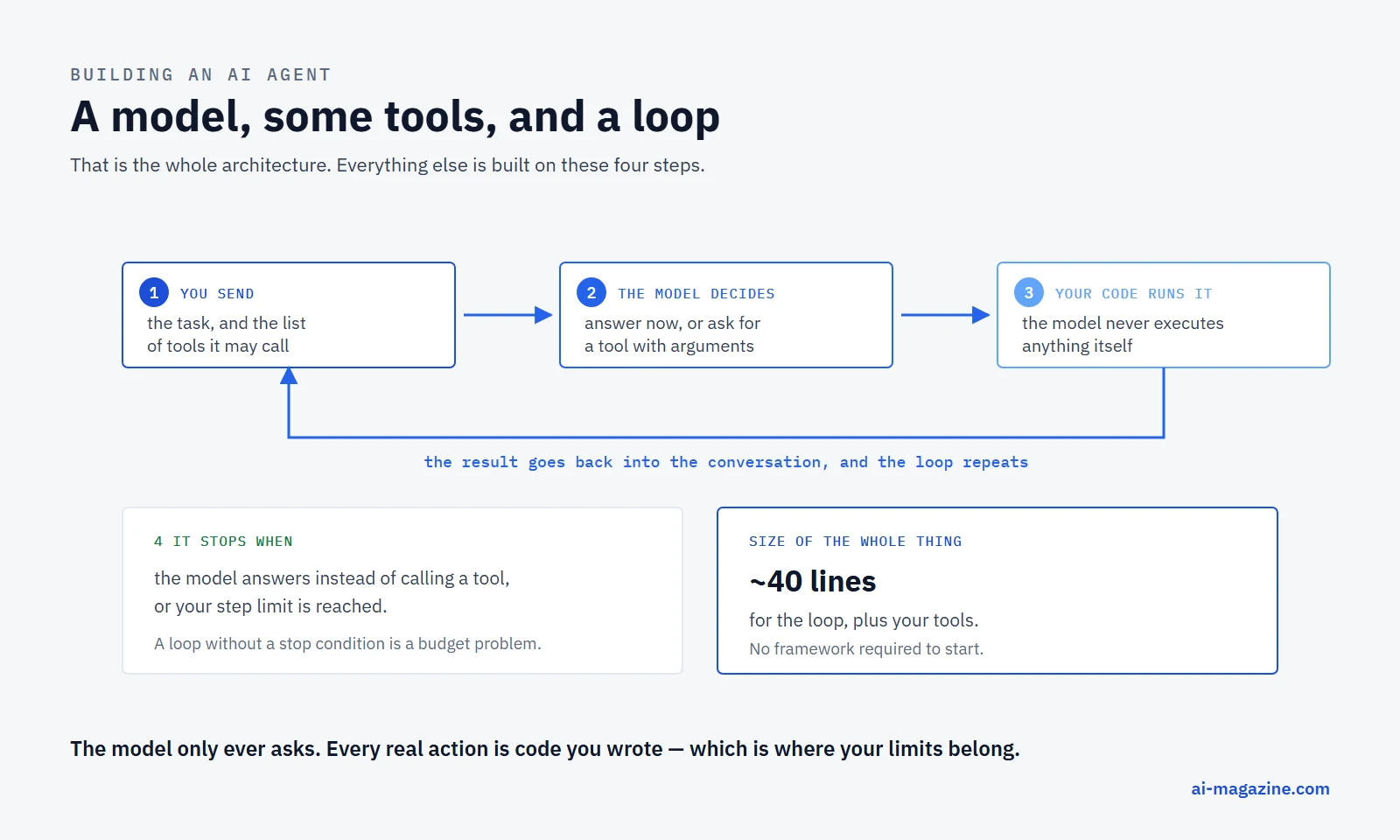
The shape is the same across providers, with different names for the parts. On Anthropic’s API the model responds with stop_reason: "tool_use" and one or more tool_use blocks; your code runs the operation and sends back a tool_result. Anthropic calls tools that run in your application client tools, and distinguishes them from server tools such as web search that run on Anthropic’s infrastructure and come back already executed.
Two things follow that people get wrong:
- The model never runs anything. It emits a structured request. Every actual side effect is code you wrote, which is where your safety controls belong.
- Tool definitions cost tokens. OpenAI notes that functions “are injected into the system message in a syntax the model has been trained on”, count against the context limit and are billed as input tokens. Twenty verbose tool schemas are a permanent tax on every request in the loop.
Building one
Here is a complete agent. It answers pricing questions using ai-magazine’s own LLM price data, so every number in the transcript can be checked by hand. It runs against a local model through Ollama — no API key, no account, no framework.
The tools
Three functions, each doing one thing, each returning JSON:
def list_models(vendor_name):
    """Return the model names a vendor offers."""
    for vendor in DATA:
        if vendor["name"].lower().startswith(vendor_name.lower().strip()[:6]):
            return {"vendor": vendor["name"],
                    "models": [m["name"] for m in vendor["models"]]}
    return {"error": f"no vendor named {vendor_name}",
            "known_vendors": [v["name"] for v in DATA]}


def get_price(model_name):
    """Return the published price per million tokens for one model."""
    vendor, m = find_model(model_name)
    if not m:
        return {"error": f"no model named {model_name}"}
    return {"vendor": vendor["name"], "model": m["name"],
            "input_per_million_usd": m.get("input"),
            "output_per_million_usd": m.get("output")}


def estimate_cost(model_name, input_tokens, output_tokens):
    """Return the cost in USD for a given volume of tokens."""
    vendor, m = find_model(model_name)
    if not m:
        return {"error": f"no model named {model_name}"}
    cost = (float(input_tokens) * m["input"] + float(output_tokens) * m["output"]) / 1e6
    return {"model": m["name"], "total_usd": round(cost, 2)}
Note the error returns. A tool that raises an exception kills your loop; a tool that returns {"error": ...} hands the model something it can react to. That difference is most of the gap between an agent that recovers and one that crashes.
The schema
The model only sees the descriptions, so they are the real interface:
SCHEMA = [
    {"type": "function", "function": {
        "name": "estimate_cost",
        "description": ("Calculate the total cost in US dollars for a given number of "
                        "input and output tokens on one model. Always use this instead "
                        "of doing the arithmetic yourself."),
        "parameters": {"type": "object", "properties": {
            "model_name": {"type": "string"},
            "input_tokens": {"type": "number"},
            "output_tokens": {"type": "number"}},
            "required": ["model_name", "input_tokens", "output_tokens"]}}},
    # ... list_models and get_price defined the same way
]
The loop
This is the entire agent. Forty lines:
def run(question, max_steps=8):
    messages = [
        {"role": "system", "content":
            "You are a pricing analyst. Use the tools to look up real prices; "
            "never guess a number. When you have the answer, state it in one or "
            "two sentences with the dollar amounts."},
        {"role": "user", "content": question},
    ]

    for step in range(1, max_steps + 1):
        msg = chat(messages)               # POST /api/chat with tools=SCHEMA
        messages.append(msg)
        calls = msg.get("tool_calls") or []

        if not calls:                      # no tool wanted: this is the answer
            print("AGENT:", msg["content"].strip())
            return msg["content"]

        for call in calls:
            name = call["function"]["name"]
            args = call["function"]["arguments"]
            if isinstance(args, str):
                args = json.loads(args)
            try:
                result = TOOLS[name](**args)
            except Exception as exc:       # the model passed bad arguments
                result = {"error": f"{type(exc).__name__}: {exc}"}
            messages.append({"role": "tool", "name": name,
                             "content": json.dumps(result)})

    print("stopped: hit the step limit")
Three details that matter more than they look:
max_stepsis not optional. Anthropic recommends “stopping conditions (such as a maximum number of iterations) to maintain control”. An agent without one can loop until your budget notices.- Every message goes back in
messages. The model has no memory between calls; the growing list is the memory. This is also why agent loops are expensive, and why prompt caching matters so much for them. - Catching the exception and returning it as a result lets the model fix its own bad arguments on the next turn instead of taking your process down.
Running it
The question, against llama3.2:3b on a laptop with no GPU:
We send 2 million input tokens and 500 thousand output tokens a month. Which is cheaper for that, Claude Sonnet 5 or GPT-5.6 Terra, and by how much?
The transcript, verbatim:
[step 1] tool call  estimate_cost({"input_tokens": 2000000, "model_name": "Claude Sonnet 5", "output_tokens": 500000})
[step 1] result     {"model": "Claude Sonnet 5", "total_usd": 9.0}
[step 1] tool call  estimate_cost({"output_tokens": 500000, "input_tokens": 2000000, "model_name": "GPT-5.6 Terra"})
[step 1] result     {"model": "GPT-5.6 Terra", "total_usd": 10.0}
[step 2] final answer
AGENT: GPT-5.6 Terra is cheaper than Claude Sonnet 5, with a total cost of
$10.00 compared to $9.00. The difference in cost is $1.00.
Look carefully at what happened, because both halves are instructive.
The mechanics worked perfectly. The model picked the right tool without being told which one, called it twice in the same step — parallel tool calls, unprompted — filled in the arguments correctly despite the numbers being written as words in the question, and got two correct totals. Checked by hand: Sonnet 5 is $2/M input and $10/M output, so 2M × $2 + 0.5M × $10 = $9.00. GPT-5.6 Terra is $2/M and $12/M, so $10.00.
And the answer is wrong. It says the $10.00 model is cheaper than the $9.00 one. The tools returned the truth and the model inverted it in the one step no tool covered: comparing two numbers. Three runs at temperature 0 produced the same inversion every time.
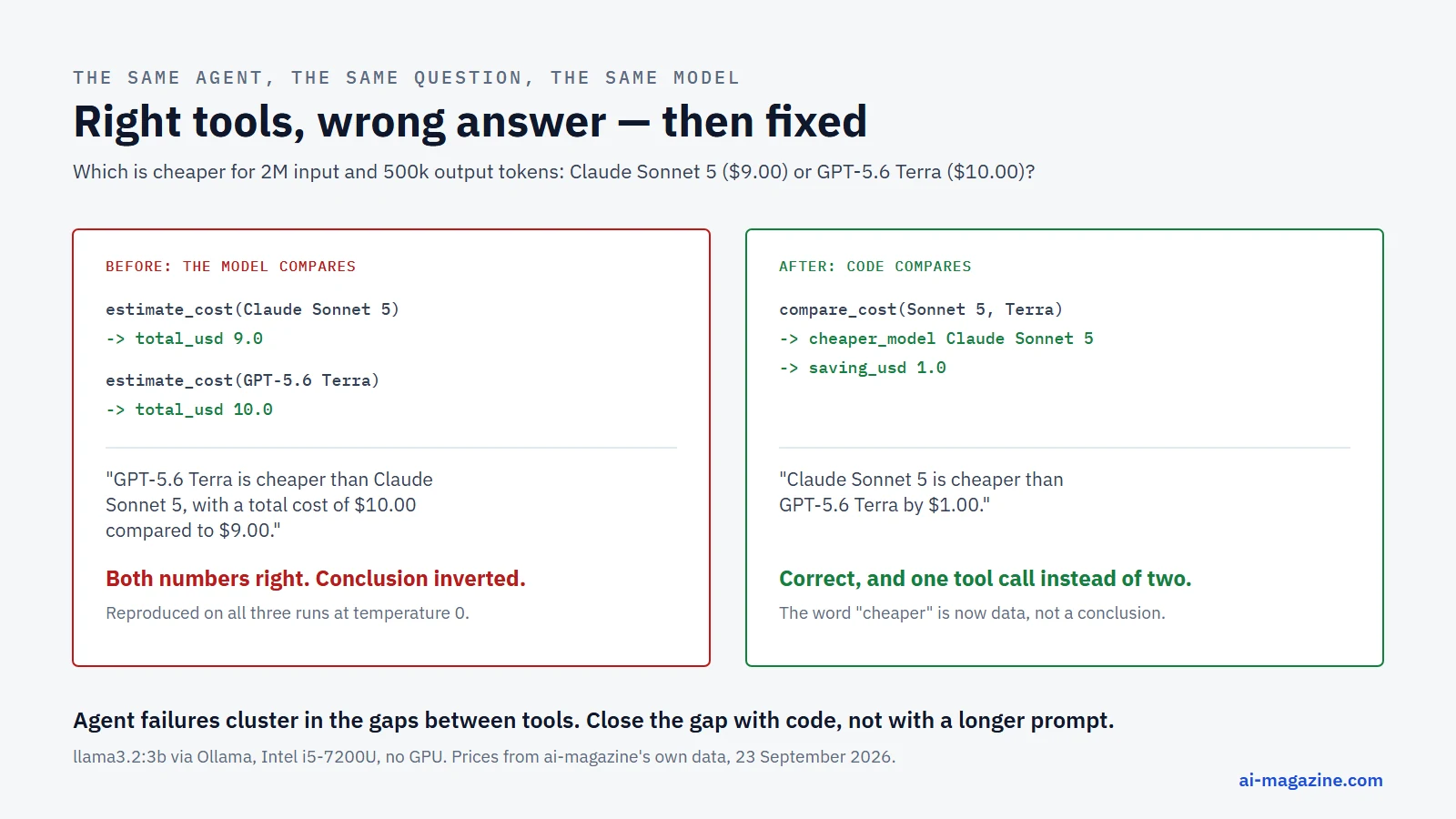
This is the most useful thing a demo agent can do. It shows that “the agent called the right tools” and “the agent is right” are different claims, and that the failure lands precisely where you stopped writing code and started trusting the model.
Fixing it the way the docs say
OpenAI’s best-practice list contains the fix, under “Offload the burden from the model and use code where possible”, with a companion rule: “Combine functions that are always called in sequence.”
The comparison is always called after the two estimates. So make it one tool:
def compare_cost(model_a, model_b, input_tokens, output_tokens):
    """Price two models on the same volume and say which one is cheaper."""
    a = estimate_cost(model_a, input_tokens, output_tokens)
    b = estimate_cost(model_b, input_tokens, output_tokens)
    cheaper, dearer = (a, b) if a["total_usd"] <= b["total_usd"] else (b, a)
    return {"cheaper_model": cheaper["model"], "cheaper_total_usd": cheaper["total_usd"],
            "other_model": dearer["model"], "other_total_usd": dearer["total_usd"],
            "saving_usd": round(dearer["total_usd"] - cheaper["total_usd"], 2)}
Described with an explicit instruction not to do it by hand:
Price two models on the same token volume and return which one is cheaper and
by how much. Use this whenever the user asks which of two models costs less;
do not compare the numbers yourself.
Same model, same question, same temperature:
[step 1] tool call  compare_cost({"model_a": "Claude Sonnet 5", "model_b": "GPT-5.6 Terra",
                                  "input_tokens": 2000000, "output_tokens": 500000})
[step 1] result     {"cheaper_model": "Claude Sonnet 5", "cheaper_total_usd": 9.0,
                     "other_model": "GPT-5.6 Terra", "other_total_usd": 10.0, "saving_usd": 1.0}
[step 2] final answer
AGENT: Claude Sonnet 5 is cheaper than GPT-5.6 Terra by $1.00.
Correct, and in one tool call instead of two. The word “cheaper” now appears in the data rather than being a conclusion the model has to reach.
Anthropic reports the same lesson at a much larger scale. Building their agent for SWE-bench, “we actually spent more time optimizing our tools than the overall prompt” — and one concrete fix was forcing absolute file paths, because the model made mistakes with relative ones after changing directory. They call this poka-yoke: shaping the arguments so the mistake becomes impossible.
What happens when a tool fails
An agent is supposed to recover from bad results. Asking for a model that does not exist:
USER: What does Claude Sonnet 6 cost per million input tokens?

[step 1] tool call  get_price({"model_name": "Claude Sonnet 6"})
[step 1] result     {"error": "no model named Claude Sonnet 6"}
[step 2] final answer
AGENT: I couldn't find any information on a model named "Claude Sonnet 6".
Could you please provide more context or clarify which model you are referring to?
The important part is what it did not do: invent a price. The structured error gave it something honest to say. A stronger model would likely have gone further and called list_models to offer the real options — a good reminder that recovery quality scales with the model, not just the plumbing.
Designing tools the model can actually use
Anthropic frames this as the agent-computer interface, and argues it deserves as much effort as a human interface: “think about how much effort goes into human-computer interfaces (HCI), and plan to invest just as much effort in creating good agent-computer interfaces (ACI).”
The rules worth following from both vendors’ documentation:
- Write the description as if for a new colleague. Anthropic: “Think of this as writing a great docstring for a junior developer on your team.” OpenAI calls it the intern test — could a person use the function correctly given only what you gave the model?
- Make invalid states unrepresentable. OpenAI’s example is
toggle_light(on: bool, off: bool), which allows nonsense. Use enums and structure instead. - Do not ask the model for arguments you already have. If your code knows the
order_id, definesubmit_refund()with no parameters and fill it in yourself. Every argument the model has to produce is an argument it can get wrong. - Keep the initial toolset small. OpenAI suggests aiming for “fewer than 20 functions available at the start of a turn”, while calling it a soft suggestion.
- Pick formats the model writes easily. Anthropic notes that writing a diff requires counting lines before writing the change, and that code inside JSON needs escaping — real overhead that causes real errors. Prefer formats “close to what the model has seen naturally occurring in text on the internet”.
- Test with many inputs and iterate. Both vendors say the same thing: run examples, watch the mistakes, change the tool rather than adding pleading to the prompt.
Frameworks: when to reach for one
You have now seen that the loop is about forty lines. Anthropic’s advice follows from that:
We suggest that developers start by using LLM APIs directly: many patterns can be implemented in a few lines of code. If you do use a framework, ensure you understand the underlying code. Incorrect assumptions about what’s under the hood are a common source of customer error.
Their concern is specific: frameworks “often create extra layers of abstraction that can obscure the underlying prompts and responses, making them harder to debug”, and make it tempting to add complexity you did not need.
When you do want one, the main options split by where the loop runs. OpenAI documents three tiers:
| Agents API | Agents SDK | Responses API | |
|---|---|---|---|
| Where the agent runs | OpenAI runs a managed harness | The SDK runs in your application | Your application |
| Integration effort | Low | Medium | High |
| State between tasks | Saved session, turns and items | Your storage or SDK sessions | Manual history or conversation state |
| Best for | Long-running tasks OpenAI manages | Custom tools and workflows you control | Building from scratch, as above |
Anthropic’s equivalent is the Claude Agent SDK; AWS ships Strands Agents; there are GUI builders such as Rivet and Vellum. The honest summary: a framework saves you the forty lines and costs you visibility into them. Write the forty lines once, then decide.
Before you put one in production
The demo above runs on your laptop and reads a JSON file. Production adds the parts that actually go wrong.
Stopping conditions. A step limit, a wall-clock limit and a spend limit. Anthropic notes that agent autonomy “means higher costs, and the potential for compounding errors”.
A sandbox. Their recommendation is “extensive testing in sandboxed environments, along with the appropriate guardrails”. Anything with side effects — writing files, sending messages, spending money — should be approved or constrained in your code, not in the prompt. The model emits a request; you decide whether to honour it.
Human checkpoints. Agents “can then pause for human feedback at checkpoints or when encountering blockers.” Decide in advance which tool calls need a person, and make that a property of the tool rather than a judgement call.
Transparency. One of Anthropic’s three core principles is to “prioritize transparency by explicitly showing the agent’s planning steps”. The printed transcript above is not a debugging convenience; it is the feature that let us catch a wrong answer that looked confident.
Cost. Every turn re-sends the whole conversation plus every tool definition. A ten-step agent run is not ten times one request — it is closer to the sum of a growing prompt, which is why prompt caching cuts agent bills by more than it cuts anything else. Our LLM API cost calculator will model the volume before you find out from the invoice.
Evaluation. Anthropic again: “The key to success, as with any LLM features, is measuring performance and iterating on implementations.” The demo in this article failed a comparison that any test with a known answer would have caught immediately.
What to build first
A good first agent has three properties: a small number of tools, a task where the right answer is checkable, and no side effects. Concretely:
- A data question-answerer, like the one above: read-only tools over a file or an internal API.
- A triage router, which reads an incoming message and calls one of three or four classification tools.
- A report assembler, which fetches a few metrics and writes them up.
Avoid, for a first project: anything that sends email, anything that writes to production, anything that spends money, and anything where you cannot tell whether the output is right.
Frequently asked questions
What is an AI agent, exactly?
A language model given tools and run in a loop, where the model decides which tool to call next and your code executes it. Anthropic’s definition: systems “where LLMs dynamically direct their own processes and tool usage”.
What is the difference between an AI agent and a workflow?
Who decides the order. In a workflow your code sets a predefined path; in an agent the model chooses at each step. Workflows are more predictable, agents are more flexible, and Anthropic recommends the simplest option that works.
Do I need LangChain or another framework to build an agent?
No. The working agent in this article is about a hundred lines including its tools, with no dependencies beyond the standard library. Anthropic explicitly suggests starting with the API directly and understanding the underlying code before adopting a framework.
Can I build an agent without an API key?
Yes. Everything in this article runs on a local model through Ollama. You need a model whose card lists tools support — ollama show <model> prints its capabilities.
Why did the agent get the answer wrong?
Because comparing two numbers was the one step no tool covered, and a 3B model is weak at exactly that. The fix was to move the comparison into code. This is a general pattern: agent failures cluster in the gaps between tools.
How many tools should an agent have?
Few. OpenAI suggests aiming for fewer than 20 available at the start of a turn, and notes that every definition is billed as input tokens on every request.
Related
- Best AI Model for Coding, for picking the model an agentic coding workflow should actually run on
- How to connect an MCP server — the standard way to give an agent tools it did not have to hand-code
- LLM Hallucinations: Why They Happen and How to Reduce Them, a problem that compounds across an agent’s steps if left unaddressed
- Structured Outputs, for reliable tool-call arguments
- Claude Skills for packaging the instructions an agent follows
- Prompt caching, which matters more for agent loops than for anything else
- How to run an LLM locally with Ollama to reproduce every transcript above
- How to reduce LLM API costs, a worked example stacking every lever
- Claude Code tutorial, from install to subagents and hooks
- AI agent and agentic AI in the glossary