How to Connect an MCP Server, and Why MCP Is Simpler Than Custom Integrations
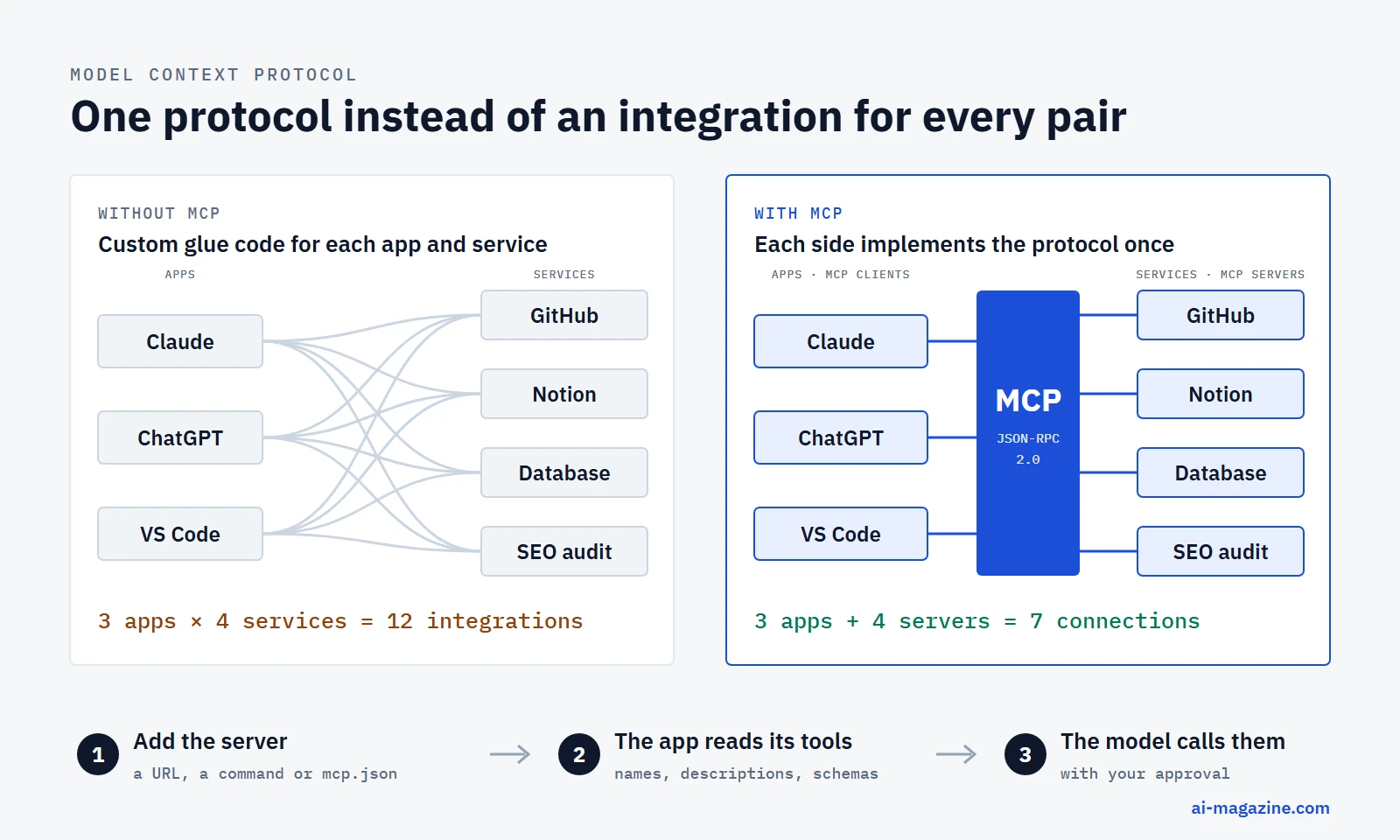
The Model Context Protocol (MCP) is an open standard for connecting AI applications to tools and data. Instead of writing a separate integration for every pair of AI app and service, a service publishes one MCP server, and any app that speaks MCP can use it. Connecting that server is usually one command, one config entry or one URL.
This guide explains what MCP is, why it is simpler than building integrations by hand, and how to connect a server in Claude Code, Claude Desktop, claude.ai, ChatGPT, VS Code, Cursor, Gemini CLI and the OpenAI and Claude APIs. Every command and config snippet below is taken from the vendor’s own documentation as of September 16, 2026, and the protocol details follow the current MCP specification, version 2026-07-28.
What MCP is
Anthropic announced and open-sourced MCP on November 25, 2024, describing it as a standard for connecting AI assistants “to the systems where data lives”. On December 9, 2025, Anthropic donated MCP to the Agentic AI Foundation, a fund under the Linux Foundation co-founded by Anthropic, Block and OpenAI. Google, Microsoft, AWS, Cloudflare and Bloomberg are among its platinum members. The project keeps control of its own technical direction, and the specification and code are licensed under Apache 2.0. According to the MCP blog, the most widely used official SDKs were approaching half a billion downloads a month by July 2026.
The official documentation compares MCP to “a USB-C port for AI applications”: one plug shape, many devices. The specification also says it takes inspiration from the Language Server Protocol, which let code editors support any programming language through one shared protocol.
The three roles
- Host: the AI application you use, such as Claude Desktop, ChatGPT, VS Code or Cursor.
- Client: a connector inside the host. The host creates one client for each server it connects to.
- Server: a program that exposes capabilities, such as a GitHub, Notion or database server.
Messages between client and server use JSON-RPC 2.0, a simple request-and-response format.
What a server can offer
| Feature | What it is | Who uses it |
|---|---|---|
| Tools | Functions the model can call, such as “create issue” or “query database” | The model decides when to call them |
| Resources | Data and context, such as files or records | The user or the model |
| Prompts | Reusable prompt templates and workflows | The user picks them |
Tools are what most people mean when they talk about MCP. Each tool comes with a name, a description and a JSON Schema for its inputs, so the model can read what the tool does and how to call it. Since the 2025-06-18 version a tool can also return structured output that matches a declared schema.
Why MCP is simpler than custom integrations
Before MCP, connecting an AI app to a service meant writing glue code: call the service’s API, describe each function in the app’s own function-calling format, handle authentication, and repeat all of it for the next app. Anthropic’s announcement put the problem plainly: every new data source “requires its own custom implementation”.
1. Build once, use in every client
A useful way to picture it: with five AI apps and ten services, point-to-point integrations need up to 5 × 10 = 50 pieces of glue code. With a shared protocol, each app implements MCP once and each service ships one server, so the work grows as 5 + 10 = 15. This is our illustration, not official wording, but it is the core of the argument.
The same MCP server works today in Claude (web, desktop and Claude Code), ChatGPT, VS Code with GitHub Copilot, Cursor, Gemini CLI, and through the OpenAI Responses API and the Claude API. A team that publishes an MCP server reaches all of them without writing a line of client-specific code.
2. The model discovers tools on its own
With a hand-built integration, you describe every function to the model yourself and update those descriptions whenever the API changes. An MCP server lists its tools, with descriptions and input schemas, and the client passes that list to the model. When the server adds or changes a tool, every connected app sees the new version the next time it asks for the list. Since the 2026-07-28 specification, the server returns that list in a deterministic order, so it stays stable from one request to the next.
3. Connecting is configuration, not code
For the person using the tool, connecting a server is a setting, not a software project:
- in Claude Code:
claude mcp add --transport http notion https://mcp.notion.com/mcp - in claude.ai: paste a server URL into “Add custom connector”
- in VS Code or Cursor: a few lines in
mcp.json
Nothing needs to be compiled, deployed or maintained on the user’s side.
4. Sign-in is standardized
Remote MCP servers use OAuth 2.1, the same kind of browser sign-in you already use for “Sign in with Google”. The client discovers where to log in from the server itself, opens the provider’s login page, and stores the token. Users do not have to create API keys and paste them into config files. The specification also forbids a server from forwarding the user’s token to other services, which closes a common security hole in home-made integrations.
5. The service vendor maintains the server
Many companies now host official MCP servers: the vendor docs use examples such as Notion (mcp.notion.com), GitHub (api.githubcopilot.com/mcp) and Stripe (mcp.stripe.com). When the service changes its API, the vendor updates its server, and every connected AI app keeps working. With a custom integration, that maintenance is yours.
6. No lock-in to one AI vendor
Because MCP is governed by a Linux Foundation fund rather than a single company, an integration built for Claude is not tied to Claude. The same server can be used from ChatGPT, Copilot or Gemini CLI tomorrow, and switching models does not mean rewriting tools.
7. The 2026 protocol is lighter
The current specification, released on July 28, 2026, removed a lot of machinery:
- No handshake and no protocol sessions. Earlier versions opened every connection with an
initializeexchange and tracked a session ID. Now each request carries its own protocol version and client capabilities, so the server no longer has to remember connection setup between requests. Servers that need state pass explicit handles as ordinary tool arguments. - Simpler server-to-client requests. When a server needs more input, such as a confirmation from the user, it returns an “input required” result and the client simply retries the call with the answer.
- Optional features moved to extensions. Long-running tasks, interactive UI (MCP Apps) and Skills over MCP are opt-in extensions, so a basic server stays small.
Because no request depends on an earlier handshake, a remote MCP server can be run and scaled much like any other web API.
MCP compared with a custom API integration
| Custom API integration | MCP server | |
|---|---|---|
| Works in | The one app you built it for | Any MCP-compatible app |
| Tool descriptions for the model | Written and updated by you, per app | Published once by the server |
| Setup for the user | Install or deploy your code | One command, config entry or URL |
| Authentication | Your own scheme, often pasted API keys | OAuth 2.1 flow defined by the spec |
| Maintenance when the service changes | Yours | The server’s maintainer |
| Governance | Your code | Open specification under the Linux Foundation |
When a custom integration still makes sense
MCP is not always the right tool:
- One app, one API, full control. If you are building a single application that calls one service, calling its API directly with your model’s function calling has fewer moving parts.
- Latency-sensitive paths. An MCP call adds a hop between the model host and the service.
- Security review. A server can read data and take actions. Every server you connect widens what the model can do, so each one needs the same scrutiny as any third-party code.
Local and remote servers
MCP defines two standard transports:
| Local server (stdio) | Remote server (Streamable HTTP) | |
|---|---|---|
| Where it runs | On your computer, started by the app | On the internet or your network |
| How it talks | Standard input and output | HTTP POST to one endpoint |
| Typical use | Files, local databases, developer tools | SaaS services such as Notion, GitHub, Stripe |
| Authentication | Credentials from environment variables | OAuth 2.1 |
| Main risk | Runs arbitrary code on your machine | Sends data to a third party |
The older HTTP+SSE transport is deprecated in the specification, although several clients still accept it for older servers.
How to connect an MCP server
Config formats differ between apps, which is the most common source of errors. The top-level key is mcpServers in Claude, Cursor, Gemini CLI and GitHub Copilot CLI, but servers in VS Code.
Claude Code
Add a remote server (the recommended option) from the terminal:
claude mcp add --transport http notion https://mcp.notion.com/mcpFor a server that needs a token, add a header: --header "Authorization: Bearer your-token". For a local server, put the launch command after --:
claude mcp add --env AIRTABLE_API_KEY=YOUR_KEY --transport stdio airtable -- npx -y airtable-mcp-serverServers are saved per project by default. Use --scope user to make one available in all projects, or --scope project to write it to a shared .mcp.json file in the repository:
{
  "mcpServers": {
    "shared-server": { "type": "http", "url": "https://example.com/mcp" }
  }
}
Check what is connected with claude mcp list, sign in to OAuth servers with /mcp inside a session, and import servers from Claude Desktop with claude mcp add-from-claude-desktop. Source: Claude Code MCP docs.
Claude Desktop
For local servers, open Settings → Developer → Edit Config. This opens claude_desktop_config.json, stored at ~/Library/Application Support/Claude/ on macOS and %APPDATA%\Claude\ on Windows:
{
  "mcpServers": {
    "filesystem": {
      "command": "npx",
      "args": ["-y", "@modelcontextprotocol/server-filesystem", "/Users/username/Desktop"]
    }
  }
}
Restart Claude Desktop after saving. Packaged servers can also be installed as desktop extensions from Settings → Extensions. Sources: MCP docs, Claude Help Center.
claude.ai (remote connectors)
Custom connectors are available on the Free, Pro, Max, Team and Enterprise plans; Free accounts can add one. On Pro and Max, go to Customize → Connectors, click “+”, choose “Add custom connector” and paste the server URL. On Team and Enterprise, an Owner adds the connector in Organization settings → Connectors, and members then click “Connect”. Because Anthropic’s cloud makes the connection, the server must be reachable from the public internet. Source: Claude Help Center.
ChatGPT
ChatGPT connects to remote MCP servers through developer mode. OpenAI’s developer documentation lists it for Pro, Plus, Business, Enterprise and Education accounts on the web: turn on Settings → Security and login → Developer mode, then create an app from the server URL. OpenAI’s help center describes full MCP support as rolling out in beta to Business, Enterprise and Edu, and uses different menu names (“Apps”), so check the current labels in your account. Write actions ask for confirmation by default.
VS Code with GitHub Copilot
Create .vscode/mcp.json in the workspace, or run “MCP: Open User Configuration” for all workspaces. Note the servers key:
{
  "servers": {
    "github": { "type": "http", "url": "https://api.githubcopilot.com/mcp" },
    "playwright": { "command": "npx", "args": ["-y", "@microsoft/mcp-server-playwright"] }
  }
}
You can also run “MCP: Add Server” from the command palette or browse servers with @mcp in the Extensions view. VS Code asks you to trust a server before it starts. Source: VS Code docs.
Cursor
Use .cursor/mcp.json in a project or ~/.cursor/mcp.json for all projects:
{
  "mcpServers": {
    "server-name": {
      "command": "npx",
      "args": ["-y", "mcp-server"],
      "env": { "API_KEY": "value" }
    }
  }
}
For a remote server, replace command and args with "url". Cursor supports stdio, SSE and Streamable HTTP, and can read secrets from environment variables with ${env:NAME}. Source: Cursor docs.
Gemini CLI
Run gemini mcp add --transport http <name> <url>, or edit mcpServers in ~/.gemini/settings.json (user) or .gemini/settings.json (project). Gemini CLI uses httpUrl for Streamable HTTP servers and url for older SSE servers:
{
  "mcpServers": {
    "httpServer": { "httpUrl": "http://localhost:3000/mcp", "timeout": 5000 }
  }
}
Avoid "trust": true unless you know the server well: it skips every confirmation. Source: Gemini CLI docs.
OpenAI Responses API
Add a remote server as a tool of type mcp:
{
  "type": "mcp",
  "server_label": "dmcp",
  "server_description": "A Dungeons and Dragons MCP server to assist with dice rolling.",
  "server_url": "https://dmcp-server.deno.dev/mcp",
  "require_approval": "never"
}
Approval is required by default; allowed_tools limits which tools the model may call, and authorization passes an OAuth token. Source: OpenAI docs.
Claude API
The Messages API connects to remote servers with the MCP connector, currently in beta (header anthropic-beta: mcp-client-2025-11-20). Add the server in mcp_servers with "type": "url", its url, a name and an optional authorization_token, then enable it with a tool of type mcp_toolset. It supports tools from remote servers only. Source: Claude API docs.
Example: connecting an SEO audit server to Claude
To show what this looks like in practice, here is a real remote server connected to Claude Desktop: ourseo.tools, an SEO audit service. Disclosure: ourseo.tools is developed by Semalt, where the author of this guide works.
The server lives at https://mcp.ourseo.tools/mcp. Access is tied to a personal token that is part of the connection URL, so the setup is the same as for any remote connector: open Settings → Connectors (under Customize), add a custom connector and paste the full URL. Because the token sits inside the URL, treat the whole URL like a password. Don’t paste it into shared documents or screenshots; in the screenshot below it is blurred.
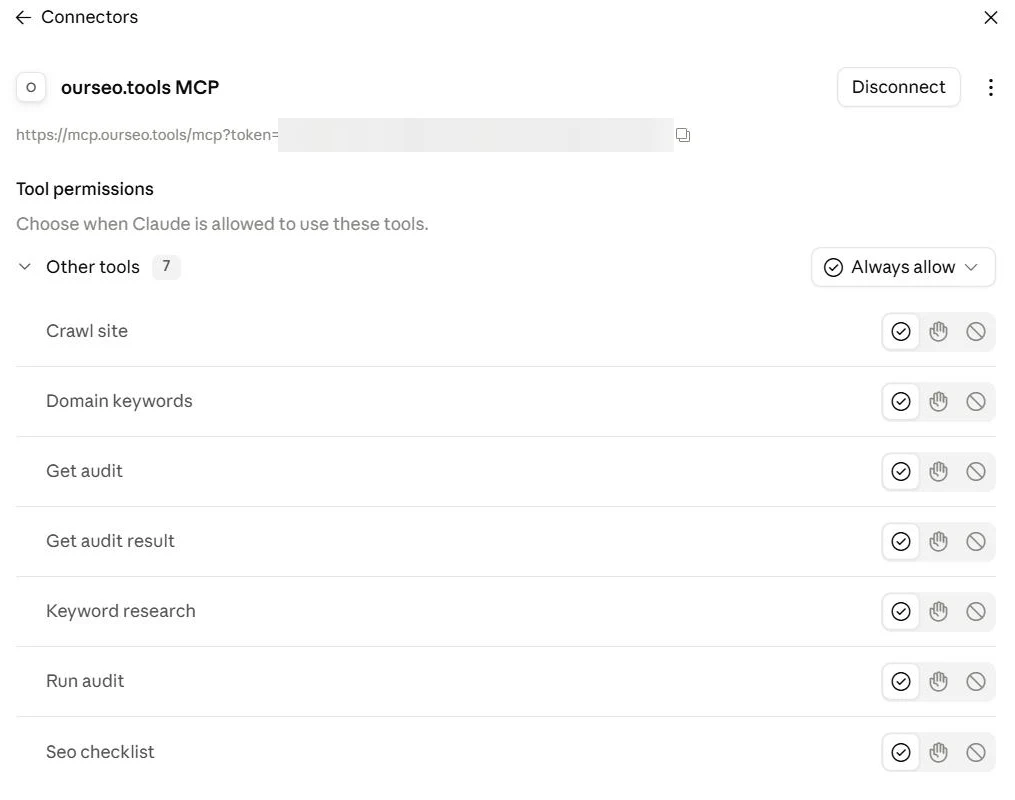
Once connected, Claude reads the server’s tool list and shows each tool with its own permission control: allow it, ask before each use, or block it. The seven tools and what their descriptions say they do:
| Tool | What it does |
|---|---|
| Crawl site | Crawls up to 1,000 pages and returns titles, meta descriptions, canonicals, indexability, structured data, headings, links, word count, page size and load time |
| Seo checklist | Runs a 49-point check of the homepage: redirects, compression, PageSpeed, AI crawler access in robots.txt, security headers, on-page tags and social signals |
| Run audit | Starts a full audit in the background: site crawl, a 69-point weighted checklist, a 40-point E-E-A-T review and per-page content scoring |
| Get audit | Reports the progress of a running audit |
| Get audit result | Returns the finished audit as one JSON object with scores and recommendations |
| Domain keywords | Lists the keywords a domain ranks for, from Google Search Console when it is connected for that domain |
| Keyword research | Expands a seed keyword with Google Autosuggest and question or comparison variations, each tagged by search intent |
Nothing about this required code. After pasting one URL, you can ask Claude something like “Run a full SEO audit of example.com and summarize the ten most important problems”. Claude picks the tools itself: it starts the audit with Run audit, checks progress with Get audit while the crawl runs, then reads the report with Get audit result and writes the summary. The server splits the work into three calls because a full site audit takes minutes, longer than a single tool call should wait.
The same URL works in any other client that accepts remote servers, such as Claude Code with claude mcp add --transport http, or VS Code and Cursor through their mcp.json files. That is the “build once, use everywhere” argument from the start of this guide, in one example.
Security checklist
The MCP specification states that tools “represent arbitrary code execution” and that the protocol itself cannot enforce safe use. Before connecting a server:
- Prefer official servers hosted by the service vendor. Anthropic and OpenAI both note that they do not verify third-party servers.
- Read the exact launch command of a local server before approving it. It runs with your user’s permissions.
- Keep approvals on for write actions. Tool labels such as “read-only” are hints from the server and must not be trusted unless you trust the server.
- Limit what the model can reach: use
allowed_toolsin the OpenAI API, and connect only the servers a task needs. - Watch for prompt injection. Text returned by a tool, such as an email or a web page, can contain instructions aimed at the model.
- Give servers narrow credentials: restricted API keys and the smallest OAuth scopes that work.
- Remove servers you no longer use, and re-check a server when its tools or behaviour change.
Where to find servers
The official MCP Registry launched in preview on September 8, 2025, and is still in preview. It stores metadata about public servers and verifies namespaces through GitHub or DNS; apps are expected to use downstream catalogs built on top of it. When we queried its public API on September 16, 2026, it listed 32,458 servers, counting the latest version of each, including any marked deprecated. Official SDKs for building your own server exist for TypeScript, Python, C#, Go, Rust, Java, Ruby, Swift, PHP and Kotlin.
Frequently asked questions
What is an MCP server?
A program that exposes tools, data or prompt templates to AI applications through the Model Context Protocol. It can run locally on your computer or remotely as a web service.
What is the difference between MCP and an API?
An API is how a program talks to one service. MCP is a standard layer on top: an MCP server usually wraps a service’s API and describes its functions in a format every MCP-compatible AI app understands, so the integration is written once instead of once per app.
Is MCP free and open source?
Yes. The specification and SDKs are open source under the Apache 2.0 license, and the protocol is governed within the Linux Foundation’s Agentic AI Foundation. Individual servers and the services behind them may have their own pricing.
Does ChatGPT support MCP?
Yes, through developer mode on the web for remote servers, and through the mcp tool in the OpenAI Responses API. Availability by plan differs between OpenAI’s developer docs and help center, so check your account settings.
Is the SSE transport still supported?
It is deprecated in the specification in favor of Streamable HTTP. Claude Code, Cursor, Gemini CLI, ChatGPT and the OpenAI API still document support for SSE servers, but new servers should use Streamable HTTP.
Related
- Claude Skills: what they are and how to write your first skill, the other way to extend an AI app
- How to build an AI agent, a working example with the mistake left in
- Model Context Protocol (MCP) in the glossary
- AI agent and agentic AI
- Token counter: tool descriptions from every connected server count toward your prompt
- Prompt caching: how it works and what it saves: tool definitions sit at the front of the prompt, which is exactly what caches well
- Claude Code tutorial, from install to subagents and hooks, including how to add an MCP server with
claude mcp add - LLM API pricing for the models behind MCP clients