How to Reduce LLM API Costs: A $295-to-$5.75 Worked Example
Every LLM API bill is the same equation: tokens × price per token. OpenAI’s own production guidance puts it in exactly those terms — cut the number of tokens, cut the price per token, or both. Nearly every cost-reduction technique that actually works is one of those two levers, and most articles on this topic list five or six of them without ever showing what they add up to.
This one does the arithmetic. Take one realistic workload, apply each lever on top of the last, and price every step with the real numbers on our own LLM API pricing page: $295 a month at the naive starting point, $5.75 once every lever is pulled — a 98% reduction, stacked step by step so you can see exactly which lever did how much.
The workload
10,000 requests a month, each with:
- A 2,000-token shared prefix — system prompt, few-shot examples, retrieved context that barely changes between calls
- A 200-token tail — the part that’s actually different each time, the user’s message
- A 150-token output
This is not a contrived shape. It’s the profile of a support bot, a classification pipeline, a document-processing job — anything where most of the prompt is boilerplate and a small slice is new.
Lever 1: the number of tokens doesn’t change, only who pays full price for them
The naive version sends the full 2,200-token prompt on every single request, at full price, on the most capable model available. That’s the $295 baseline below. Prompt caching doesn’t shrink the prompt — it changes what you pay for tokens you’ve already sent once. The first request writes the 2,000-token prefix to the cache at a small premium; the other 9,999 read it back at roughly a tenth of the input price. The 200-token tail, being different every time, is never eligible and always costs full price.
Lever 2: the price per token
This is model choice, and it’s the blunt instrument: a frontier model and its cheapest sibling from the same vendor can differ by 10× on input tokens and more on output. The trap is applying it uniformly. A support bot answering “what are your hours” doesn’t need the model you’d use for contract review. Route by task, not by habit.
Lever 3: get paid to wait
Both major labs offer a batch tier for work that doesn’t need an answer in the next second: OpenAI’s Batch API and Anthropic’s Message Batches API each cut the price 50% flat, in exchange for asynchronous processing — queue a file of requests, get results back within 24 hours (Anthropic: usually within one hour). Evaluations, content moderation, nightly report generation, and bulk classification are the textbook uses, and none of them care whether the answer arrives in 200 milliseconds or 20 minutes.
The detail worth knowing: the discounts stack. Anthropic’s own docs say it directly — “the pricing discounts from prompt caching and Message Batches can stack, providing even greater cost savings when both features are used together.” Cache hit rates inside a batch run lower than in a live session, typically 30-98% depending on traffic pattern, because requests process concurrently rather than in the tight sequence that keeps a cache warm. Anthropic’s mitigation is specific: use the 1-hour cache TTL instead of the default 5 minutes, since a batch can take up to an hour to clear.
What that actually costs, stacked
Same workload, same three levers, applied one at a time, priced against every tier of one vendor’s current lineup:
| Model | Sync, no caching | + Prompt caching | + Caching + Batch API | Total reduction |
|---|---|---|---|---|
| Claude Fable 5.1 (frontier) | $295.00 | $100.02 | $50.01 | 83% |
| Claude Opus 5 | $147.50 | $57.51 | $28.76 | 90% |
| Claude Sonnet 5 | $59.00 | $23.00 | $11.50 | 95% |
| Claude Haiku 4.5 | $29.50 | $11.50 | $5.75 | 98% |
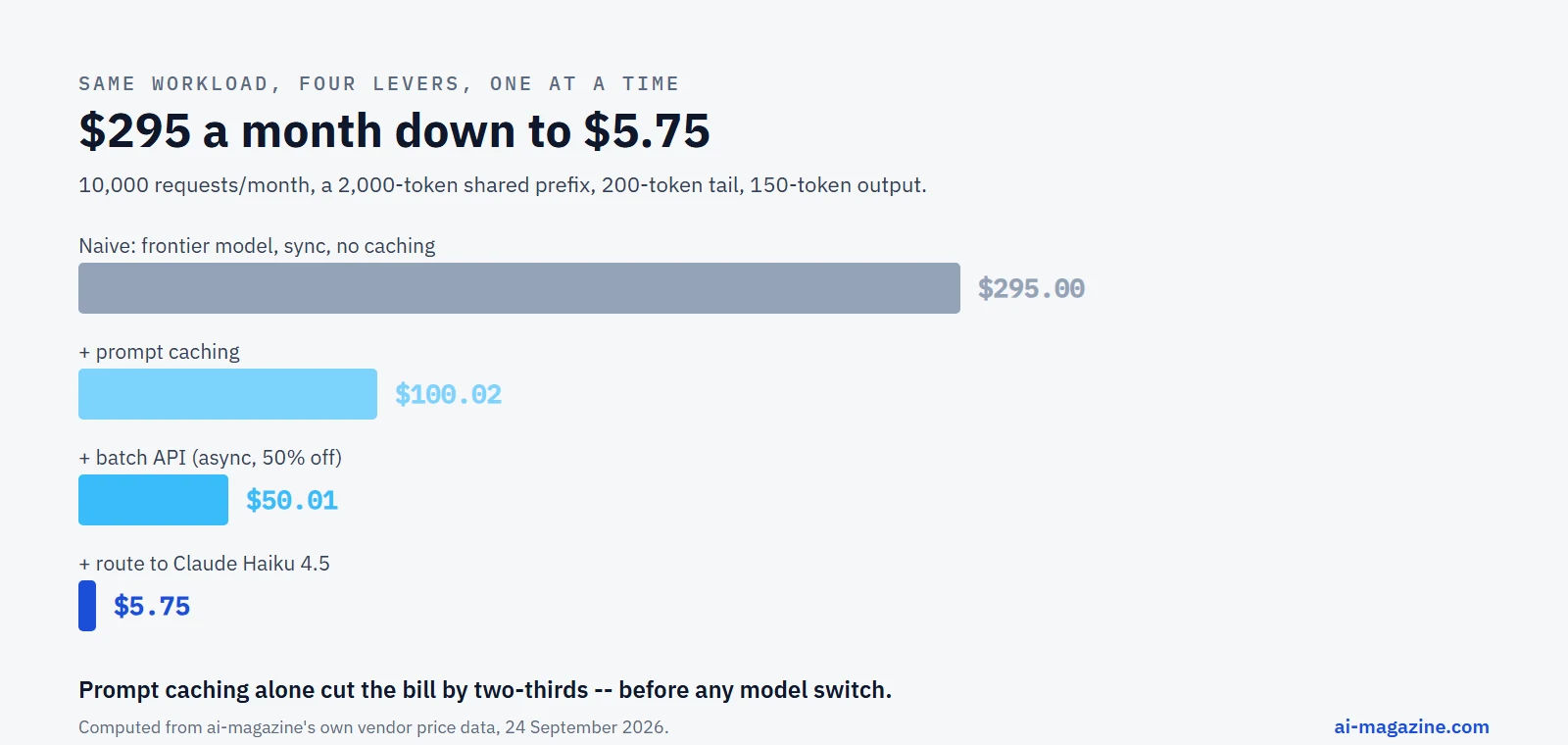
Read the table by column, not just by row. Moving down a column — same technique, cheaper model — is the multiplier everyone already knows about. Moving across a row — same model, add a lever — is the one most teams leave on the table: prompt caching alone cuts every single model’s bill by roughly two-thirds on this shape of workload, before a single line of routing logic is written. Add the batch API on top of that and the frontier model ends up cheaper than the cheap model was running naively.
None of this requires switching vendors. Run the same arithmetic against OpenAI’s lineup and the shape repeats, because the underlying mechanism is identical: a cached prefix reads back at roughly a tenth of its write price, and OpenAI’s Batch API takes the same flat 50% off everything, cache included.
| Model | Sync, no caching | + Prompt caching | + Caching + Batch API |
|---|---|---|---|
| GPT-6 Astra (frontier) | $295.00 | $115.02 | $57.52 |
| GPT-5.6 Sol | $118.00 | $46.01 | $23.01 |
| GPT-5 mini | $8.50 | $4.00 | $2.00 |
| GPT-5 nano | $1.70 | $0.80 | $0.40 |
Same shape, same order of operations, and the endpoints of the two tables tell the real story: the worst case on either vendor is the same $295, and the best case — cheapest model, fully cached, fully batched — lands at 40 cents. That’s not two different techniques; it’s the same two levers pulled on two different price lists.
The lever nobody mentions: time of day
DeepSeek prices two tiers explicitly by clock time rather than by an API flag. Its published “standard” rate is the off-peak price; a peak-hours surcharge doubles it — DeepSeek V4 Pro goes from $0.66 to $1.32 per million input tokens, V4.1 Flash from $0.15 to $0.30, output pricing doubles the same way. For a batch-shaped job that doesn’t care when it runs, scheduling it for the off-peak window is a 50% cut with no API to learn and no format to adopt — just a cron schedule.
Model routing, as a decision rather than a habit
“Use the cheap model where you can” is easy to say and easy to get wrong in one of two directions: sending everything to the flagship out of caution, or sending everything to the cheap tier and quietly eating a worse answer on the requests that needed better. A workable process, in order:
- Pull a sample of real production requests — not hand-picked examples, the actual traffic, at least a few hundred of them.
- Run the sample through the cheaper model and check the answers against whatever your quality bar already is: a human review, an eval, a simple exact-match check for structured tasks.
- Route by the property that predicts difficulty, not by guessing. A classification task with a fixed label set, a lookup against known data, or a short factual question are exactly the shapes a small model handles reliably. Open-ended reasoning, long multi-step instructions, and anything where a wrong answer is expensive to catch later belong on the model that costs more per token but wastes less of everything else when it’s right the first time.
- Re-check periodically. A router built against last quarter’s traffic mix silently degrades as the mix shifts — a new feature that generates a new kind of request doesn’t retroactively re-run your evaluation.
The cost of getting this wrong in the frugal direction is usually invisible in the token bill and visible everywhere else: more support tickets, more manual review, more “the bot got this wrong” reports. A model swap that saves $200 a month and creates $2,000 a month of cleanup isn’t a cost optimization.
Context that grows without you noticing
Every technique above assumes a prompt with a stable shape. A conversational agent doesn’t have one — each turn re-sends the entire history so far, so a ten-turn conversation isn’t ten independent requests, it’s something closer to the sum of every prefix length from turn one to turn ten. A system prompt and tool set of 10,000 tokens, growing by 1,500 tokens a turn, adds up to 182,500 cumulative input tokens by turn ten for a conversation that only ever held 25,000 tokens of actual content — the same conversation re-read from the beginning, in full, on every single turn.
This is exactly the shape prompt caching was built for, and exactly why an agent loop benefits from it more than a single-shot request ever will: cache the stable header once, let the growing history read back at the cache rate turn after turn, and the bill tracks the conversation’s actual size instead of its accumulated re-reads. It’s also why a tool definition that changes mid-conversation is expensive in a way it isn’t for a one-off call — changing the tool list invalidates the cache back to that point, and every turn since then gets re-billed at full price on the next request. Append-only tool updates, not edits, keep the cache — and the bill — intact.
Cut the tokens themselves
Everything above changes what you pay per token. The other half of the equation is sending fewer of them in the first place.
Trim the prefix, not just the tail. A 2,000-token system prompt someone wrote once in March and never revisited is 2,000 tokens on every single request, cached or not — caching makes it cheap, not free, and the write on request one and the tail on every request still cost full price. Read it back before assuming it’s still earning its length.
Cap output deliberately. max_tokens isn’t just a safety rail against runaway generation — it’s a price ceiling on the output half of every response. A classification task that returns one word doesn’t need the same cap as a summarization task, and a model with room to ramble will use it.
Structured outputs cost the schema, not just the answer. A JSON schema enforced on every response is tokens rendered into the prompt on OpenAI’s implementation specifically — real, billed tokens, on every single call, whether or not the schema itself ever changes. A large schema repeated across thousands of daily calls is exactly the kind of stable, repeated content prompt caching exists for.
Don’t fine-tune your way around a caching problem. OpenAI’s own framing splits the fix by which kind of gap you have: a model that doesn’t know something is an “in-context memory” problem, solved by retrieval or caching; a model that behaves inconsistently is a “learned memory” problem, and that’s what fine-tuning is actually for. Fine-tuning a model to skip explaining itself doesn’t fix a prompt that’s too long — it just makes the same mistake on a model you now also have to maintain.
A different kind of batching: pack the request, not the queue
The vendor Batch APIs above are async — send now, get results later. There’s a separate, simpler technique that has nothing to do with waiting: put more than one item in a single prompt instead of firing one request per item. If a classification prefix costs 2,000 tokens and each item to classify is 50 tokens, one item per call means paying the full 2,000-token prefix 10,000 times over. Fold 100 items into each call and the same prefix gets paid for 100 times, not 10,000.
| Items per call | Calls needed | Cost for 10,000 classifications |
|---|---|---|
| 1 | 10,000 | $41.50 |
| 10 | 1,000 | $5.50 |
| 50 | 200 | $2.30 |
| 100 | 100 | $1.90 |
Same model (Claude Sonnet 5), same 10,000 items, same instructions — packing 100 items into each call instead of one is a 95% reduction on its own, with no caching and no batch API involved. It combines with both: a prefix that’s read from cache costs less per call, and a batch of packed calls submitted through the async Batch API stacks that discount on top again. The limit is the output format — batching only works cleanly when you can parse N distinct answers back out of one response, which means structured output or a strict, consistent format matters more here than almost anywhere else in this list.
Watch it happen, not just estimate it
Every number above is a projection. The gap between a projection and a bill is where surprises live, and both major vendors ship the same first line of defense: a spend-notification threshold that emails you once usage crosses a number you set, and a usage dashboard that shows the current billing cycle broken down by model. Set the threshold before the workload ships, not after the first invoice — it’s a five-minute setting that turns “the bill was 4x what I expected” into “I got an email on day 12.”
Past that first alert, the diagnostic questions are always the same three:
- Is the prefix actually caching? A hit rate far below expectations almost always means something changes near the top of the prompt between requests — a timestamp, a session ID, a shuffled tool list. Prompt caching covers the usual suspects.
- Is the model doing work that doesn’t need it? If a cheaper model in the same family answers correctly on a sample of real traffic, the expensive model on that route is a cost with no corresponding benefit.
- Is any of this work actually synchronous? A nightly digest, a backlog of support tickets, a batch of product descriptions — anything generated for later reading is a batch-API candidate that’s currently paying the synchronous premium for no reason.
A checklist, in the order that pays off fastest
- Cap
max_tokenson every call. Takes minutes, costs nothing, and stops the worst-case output bill immediately. - Route by task. Send the easy 80% of requests to the cheapest model that still gets them right; keep the expensive model for the 20% that need it.
- Turn on prompt caching wherever a prefix repeats. On the shape above, this alone was the single biggest lever — bigger than switching from a frontier model to the cheapest tier in its own lineup.
- Pack multiple items into one call wherever the task is repeated many times with a shared prefix — classification, tagging, extraction. This is separate from the vendor batch APIs and stacks with them.
- Move anything non-realtime to the batch API. Evaluations, moderation, nightly jobs, bulk generation — none of it should be paying the synchronous rate.
- Set a spend alert before launch, not after the first surprising invoice.
What this doesn’t cover
Two techniques are deliberately out of scope here because they’re bigger changes than a pricing lever: fine-tuning a smaller model to match a larger one’s accuracy on a narrow task, and running a model yourself instead of paying per token at all. The second is real and often underrated for privacy-sensitive or offline work — see how to run an LLM locally with Ollama for what that actually costs in hardware and speed, measured, not estimated. For most teams paying a metered API bill today, the five items in the checklist above are the ones that pay off before the next invoice, not the one after that.
Frequently asked questions
What’s the single biggest lever for reducing LLM API costs?
On a workload with a repeated prefix — which describes most production LLM use — prompt caching. In the worked example above it cut every model’s bill by roughly two-thirds on its own, before any model switch or batching.
Does the batch API hurt quality?
No. Anthropic and OpenAI process batch requests through the same models as synchronous calls; the only difference is turnaround time (up to 24 hours instead of seconds) and eligibility (no streaming, no fast-mode latency tuning).
Can I combine prompt caching and the batch API?
Yes, and the discounts stack rather than compete — Anthropic states this explicitly. Cache hit rates run lower inside a batch than in a live session because requests process concurrently, so use the longer 1-hour cache TTL for batch workloads instead of the 5-minute default.
Is switching to a cheaper model always worth it?
Only if it still gets the task right. Test on a sample of real production traffic before routing, not on a handful of hand-picked examples — the failure mode that costs the most is a cheap model silently getting a meaningful fraction of requests wrong.
How do I know if my prompt caching is actually working?
Check the cache-related fields in the API response (cache_read_input_tokens and cache_creation_input_tokens on Anthropic, cached_tokens on OpenAI) rather than assuming. A hit rate far below expectations usually traces to something changing near the top of the prompt between calls.
Related
- Best AI Model for Coding, where price per request is as much a factor as the benchmark score
- Prompt caching: how the mechanism works, what each vendor charges, and how to structure a prompt so it actually caches
- LLM API pricing for the current per-model rates behind every number above, and the LLM API cost calculator to run your own workload’s shape
- How to run an LLM locally with Ollama, for when the right answer is skipping the per-token bill entirely
- How to build an AI agent, where a growing conversation history makes caching matter even more
- Claude Code tutorial, whose own cost-management guidance uses the same tokens-times-price framework