How to Run an LLM Locally With Ollama

Running a large language model on your own computer takes two commands. The first installs Ollama, the second downloads a model and starts a chat:
ollama run gemma3:270mNothing leaves the machine. There is no API key, no per-token bill and no rate limit. The catch is everything else: the model has to fit in your memory, it runs at the speed of your hardware, and a model small enough for a laptop is markedly worse than the one behind a chat app.
This guide covers the install, what actually fits in a given amount of RAM, how to pick and size a model, the two settings that trip up almost everyone, and how to wire a local model into code and editors. The numbers in the benchmark section were measured on a 2017 ultrabook with no usable GPU — the worst realistic case, and the one most people are actually asking about.
What “locally” means here
Ollama is a program that downloads model weights, loads them into memory and serves them over a local HTTP API on port 11434. It bundles the inference engine, a model registry and a command line in one install, and it is MIT-licensed.
Three things follow from that design:
- Your prompts stay on the machine. Ollama’s FAQ is explicit: “Ollama runs locally. We don’t see your prompts or data when you run locally.” The company also sells hosted models, which do leave your machine; that distinction gets its own section below.
- It behaves like a server, not an app. Anything that can send an HTTP request can use it, and it speaks the OpenAI and Anthropic request formats as well as its own.
- The model is a file. It sits in a folder on disk, it works offline, and it does not change under you until you pull a new version.
Will it fit? The part that decides everything
A model’s download size is the first number to look at, because a model that does not fit in memory either runs at disk speed or does not run at all. These are real sizes from Ollama’s library, read on September 21, 2026:
| Model | Tag | Download | Notes |
|---|---|---|---|
| Gemma 3 | gemma3:270m |
292 MB | Tiny; useful for formatting and extraction |
| Qwen 3 | qwen3:0.6b |
523 MB | Smallest usable chat model |
| Gemma 3 | gemma3:1b |
815 MB | |
| Qwen 3.5 | qwen3.5:0.8b |
1.0 GB | |
| Llama 3.2 | llama3.2:1b |
1.3 GB | Supports tool calling |
| Llama 3.2 | llama3.2:3b |
2.0 GB | |
| Qwen 3 | qwen3:4b |
2.5 GB | Reasoning model |
| Gemma 3 | gemma3:4b |
3.3 GB | Vision capable |
| Qwen 3 | qwen3:8b |
5.2 GB | |
| Gemma 4 | gemma4:e2b |
7.2 GB | Ollama’s own quickstart default |
| Gemma 3 | gemma3:12b |
8.1 GB | |
| GPT-OSS | gpt-oss:20b |
14 GB | |
| Gemma 3 | gemma3:27b |
17 GB | |
| Qwen 3.5 | qwen3.5:35b |
24 GB | |
| GPT-OSS | gpt-oss:120b |
65 GB | |
| Qwen 3 | qwen3:235b |
142 GB | Datacenter territory |
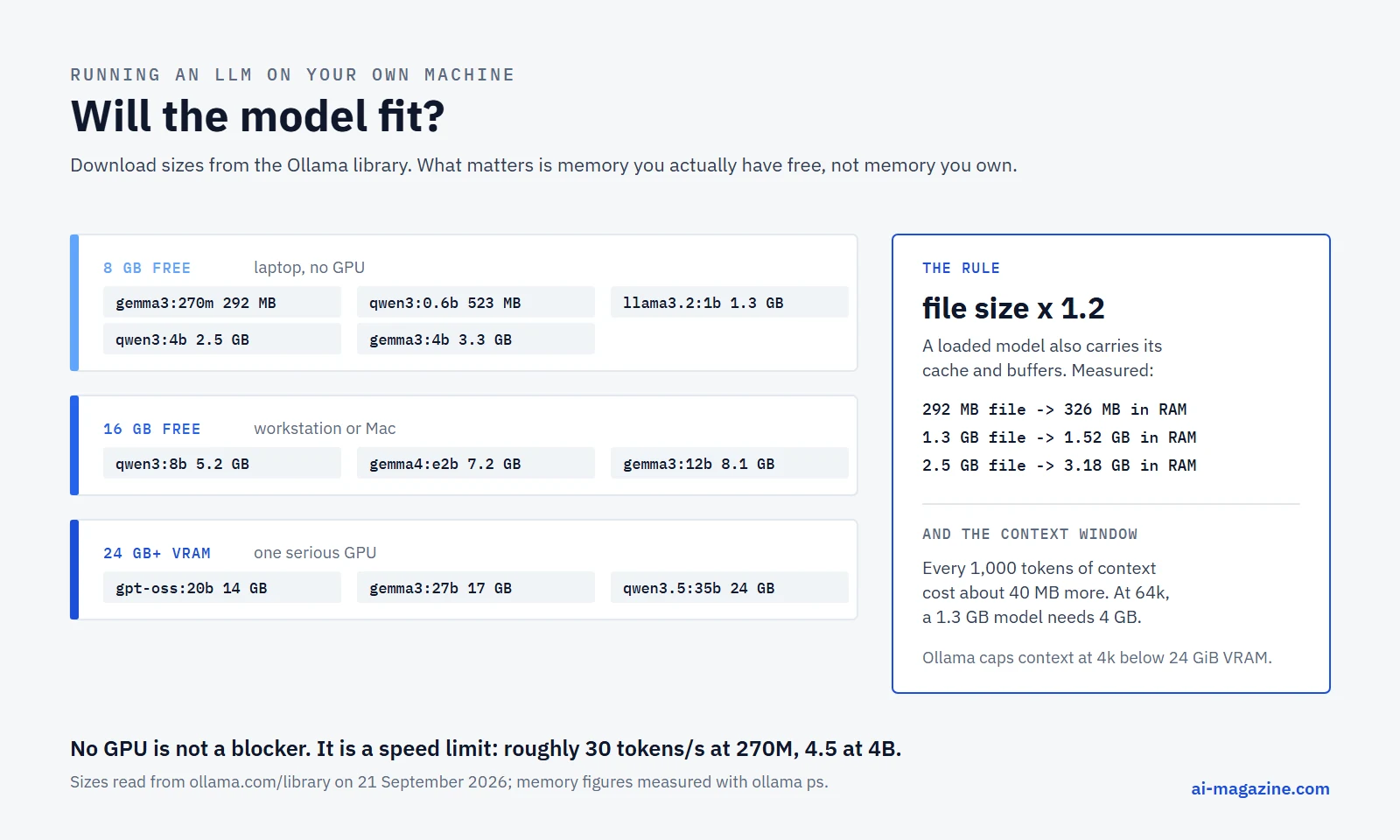
The download size is not the running size. A loaded model also carries its key-value cache, the working buffers and the runtime. Measured on the test machine, a model occupies roughly 1.1 to 1.3 times its file size at the default context window — and much more at a larger one, which the context section explains.
So the working rule is:
Budget about 1.2 times the download size, in memory you actually have free. On a GPU that means VRAM. On a Mac it means unified memory. On a CPU-only machine it means free system RAM, and “free” is the operative word: a browser with thirty tabs can be the reason a model refuses to load.
Ollama’s own quickstart puts the same idea in a sentence about its default model: “The model download is about 7.2 GB. We recommend 8 GB of available VRAM, or unified memory on a Mac. Larger context windows need more memory. With less VRAM, Ollama can use system RAM, but responses may be slower.”
Install
The commands come from the project’s README.
macOS and Linux:
curl -fsSL https://ollama.com/install.sh | shWindows:
irm https://ollama.com/install.ps1 | iexThere are also direct downloads — Ollama.dmg for macOS, OllamaSetup.exe for Windows — and an official Docker image, ollama/ollama.
Requirements worth knowing before you start:
- Windows 10 22H2 or newer. The installer does not need Administrator and installs into your home directory. Budget at least 4 GB for the program itself, then room for the models on top.
- Nvidia GPUs need compute capability 5.0 or higher and driver 550 or newer; cards with compute capability 5.0 through 6.2 need driver 570 or newer.
- AMD needs a ROCm v7 / HIP7-capable driver stack, or a Vulkan-capable driver for the Vulkan path.
- Apple silicon is accelerated through Metal with no extra setup.
- Everything else falls back to the CPU, which works, and the next section shows what that feels like.
Models land in ~/.ollama/models on macOS, C:\Users\%username%\.ollama\models on Windows, and /usr/share/ollama/.ollama/models on Linux. If that disk is small, point OLLAMA_MODELS somewhere else before you start pulling.
The first five minutes
ollama run gemma3:270mThe model downloads once, then you get a prompt. Type /bye to leave. A few things are worth trying immediately:
ollama list          # what you have on disk
ollama ps            # what is loaded right now, and where
ollama show gemma3:270m   # context length, quantization, licence, capabilities
ollama rm gemma3:270m     # delete it again
ollama show is the one people skip, and it answers the questions that matter before you commit to a model:
  Model
    architecture        llama
    parameters          1.2B
    context length      131072
    embedding length    2048
    quantization        Q8_0

  Capabilities
    completion
    tools

  License
    LLAMA 3.2 COMMUNITY LICENSE AGREEMENT
That output is from llama3.2:1b. Note the capabilities line: this model can do tool calling, while gemma3:270m reports only completion. If you plan to build an agent, check that line first.
What a laptop without a GPU actually does
Published local-LLM guides tend to be written on machines with a recent GPU. This one was measured on the opposite end: an Intel Core i5-7200U, two cores and four threads at 2.50 GHz, 16 GB of RAM, Windows 10, with Intel HD Graphics 620 that Ollama could not use. Its own log says so:
msg="inference compute" id=cpu library=cpu compute="" name=cpu
description=cpu total="15.9 GiB" available="899.6 MiB"
Ollama probed for CUDA and ROCm devices, both probes crashed on this machine, Vulkan found nothing usable, and it fell back to library=cpu. Every number below is pure CPU inference, with ollama ps reporting 0 B of VRAM in use.
Each model answered the same prompt three times at temperature 0 — one cold pass and two warm — capped at 160 output tokens. The speeds come straight from the API’s own eval_count and eval_duration fields.
| Model | Parameters | Quantization | On disk | In RAM | Output speed | Prompt speed |
|---|---|---|---|---|---|---|
gemma3:270m |
268 M | Q8_0 | 292 MB | 326 MB | 31.6–33.0 tok/s | 127–420 tok/s |
llama3.2:1b |
1.2 B | Q8_0 | 1.3 GB | 1.52 GB | 10.2–10.9 tok/s | 50–530 tok/s |
qwen3:4b |
4.0 B | Q4_K_M | 2.5 GB | 3.18 GB | 4.3–4.7 tok/s | 12–110 tok/s |
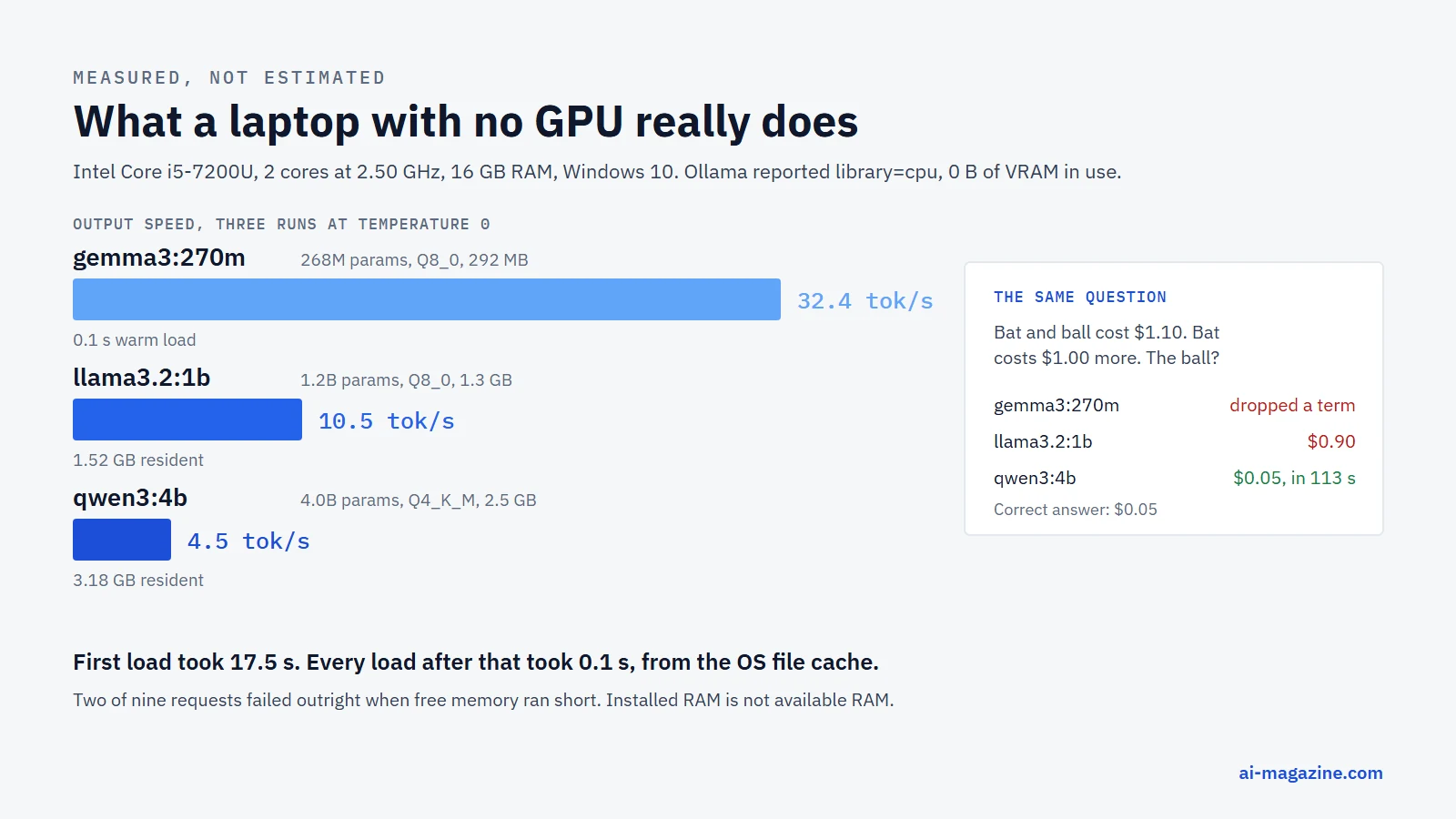
Three things to take from that table.
Speed falls roughly with size, and 4 tokens per second is the floor of usable. At 32 tok/s the 270M model feels instant. At 10 tok/s the 1B model reads like a slow typist — fine for a background task, tiring in a chat. At 4.5 tok/s a 4B model produces a paragraph in about half a minute, which is tolerable for a script and painful for a conversation.
The first load is slow, every load after that is not. The very first run of gemma3:270m spent 17.5 seconds loading the model before generating a token. Once the file was in the operating system’s cache, the same load took 0.1 seconds. Do not judge a model by its first run.
Under memory pressure, the runner dies. Two of nine benchmark requests failed outright with an error was encountered while running the model when free RAM was tight. Not a hang, not a slow answer — a 500 from the API. 16 GB of installed memory is not 16 GB of available memory.
What you actually give up
Speed is the visible cost. Quality is the one that decides whether local is an option at all. All three models got the same classic question, at temperature 0:
A bat and a ball cost 1.10 dollars in total. The bat costs 1.00 dollar more than the ball. How much does the ball cost?
gemma3:270mset the algebra up correctly, then dropped a term while substituting and never recovered.llama3.2:1banswered$0.90. Confidently, and wrong.qwen3:4banswered0.05, which is right — after 421 tokens of visible reasoning and 112.7 seconds on this machine.
That is the trade in one experiment. The model small enough to feel fast is the one that gets arithmetic wrong; the model that gets it right needs two minutes. On a machine with a modern GPU the same 4B model would answer in seconds, and the quality ranking would not change at all.
Choosing a model
Once you know your memory budget, the choice is mostly about what the model is for. The families in Ollama’s library that matter in September 2026:
| Family | Sizes offered | Good for | Licence |
|---|---|---|---|
| Gemma 3 | 270m, 1b, 4b, 12b, 27b | Small sizes, vision from 4b up | Gemma Terms of Use |
| Gemma 4 | e2b, e4b, 12b, 26b, 31b | Ollama’s current default family | Gemma Terms of Use |
| Qwen 3 | 0.6b – 235b | Reasoning, broad size ladder | Apache 2.0 |
| Qwen 3.5 | 0.8b – 122b | Newest Qwen generation | Apache 2.0 |
| Llama 3.2 | 1b, 3b | Small models with tool calling | Llama 3.2 Community License |
| GPT-OSS | 20b, 120b | OpenAI’s open-weight models | Apache 2.0 |
| Qwen 3 Coder | 30b, 480b | Code | Apache 2.0 |
| Nomic Embed, EmbeddingGemma | — | Embeddings for search and RAG | Apache 2.0 / Gemma Terms |
The licence column matters more than it looks. Apache 2.0 is a normal open-source licence. The Gemma Terms of Use and the Llama Community License are not: they are custom licences with use restrictions and, for Llama, a threshold tied to monthly active users. If the output is going into a product, read the licence that ollama show prints, not a blog post about it.
For a first model, pick by job:
- Watching it work at all:
gemma3:270m. It fits anywhere and it is fast enough to be fun. - A general small chat model:
qwen3:4borllama3.2:3b. - Tool calling and agents: check for
toolsinollama show;llama3.2:1bhas it,gemma3:270mdoes not. - Embeddings for a local search index:
nomic-embed-textorembeddinggemma, which are far smaller than chat models. - Serious work on a serious GPU:
gpt-oss:20bat 14 GB, orgemma3:27bat 17 GB.
Quantization, with real numbers
Model weights are trained at 16-bit precision. Quantization stores them with fewer bits per weight, which shrinks the file and speeds up inference at some cost in quality. Almost every model you download locally is quantized, and the Ollama tag list makes the trade concrete. For llama3.2:1b:
| Tag | Precision | Size |
|---|---|---|
1b-instruct-q4_0 |
4-bit | 771 MB |
1b-instruct-q4_1 |
4-bit | 832 MB |
1b-instruct-q5_0 |
5-bit | 893 MB |
1b-instruct-q5_1 |
5-bit | 953 MB |
1b-instruct-q8_0 |
8-bit | 1.3 GB |
1b-instruct-fp16 |
16-bit | 2.5 GB |
The whole span is 771 MB to 2.5 GB for the same model — a factor of 3.2. llama.cpp, the engine underneath much of this ecosystem, offers 1.5-bit through 8-bit integer quantization.
Two practical notes.
The default tag is not always the same quantization. People repeat that Ollama defaults to 4-bit. On the three models measured here, /api/tags reported llama3.2:1b as Q8_0, gemma3:270m as Q8_0 and qwen3:4b as Q4_K_M. Check rather than assume: ollama show <model> prints the quantization of what you actually downloaded.
Quantization-aware tags are worth preferring when they exist. Gemma 3 ships qat variants — gemma3:270m-it-qat is 241 MB against 292 MB for the standard Q8_0 build. Those weights were trained with quantization in mind rather than compressed afterwards, so they hold up better at the same size.
Below roughly 4 bits, quality degrades quickly. As a default, prefer a smaller model at a higher precision over a bigger model crushed into 2 bits.
The context window trap
This one costs people hours. ollama show llama3.2:1b reports a context length of 131072 tokens. Load it and run ollama ps, and the context column says 4096.
Ollama caps the context window by default, because the cap protects memory. Its documentation gives the rule by VRAM:
- under 24 GiB: 4k context
- 24–48 GiB: 32k context
- 48 GiB and above: 256k context
The FAQ states the same default flatly: “By default, Ollama uses a context window size of 4096 tokens.” Both were measured true here — this machine, with no GPU at all, served a 131k-token model with a 4,096-token window.
The reason is memory, and the cost is measurable. The same llama3.2:1b, 1.3 GB on disk, at three context sizes:
| Context window | Resident memory |
|---|---|
| 4,096 tokens | 1.52 GB |
| 16,384 tokens | 2.02 GB |
| 65,536 tokens | 4.00 GB |
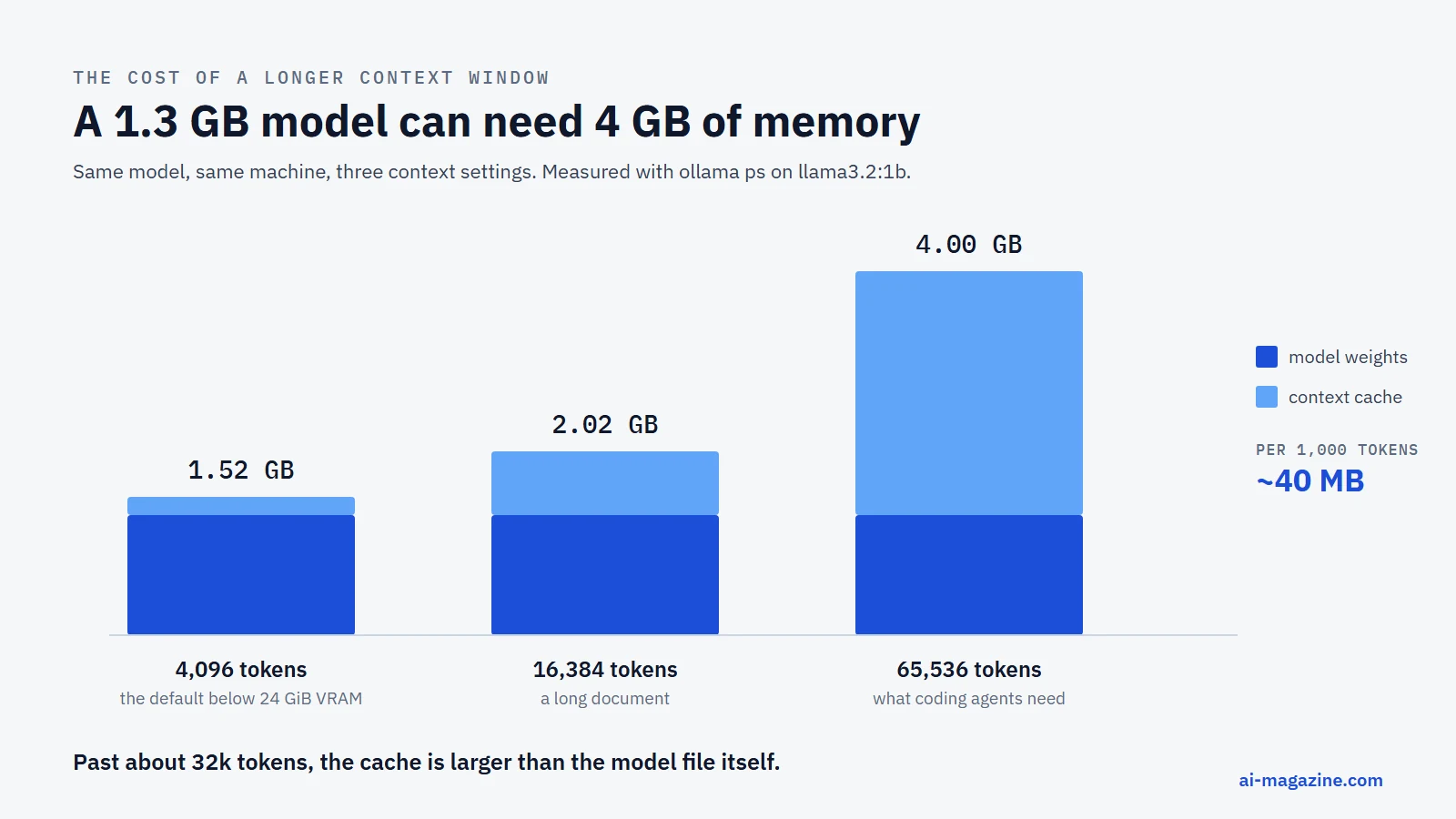
Going from 4k to 64k added 2.48 GB for 61,440 tokens of context — about 40 MB per thousand tokens for this model. The model file stopped being the biggest thing in memory somewhere around 32k. That is the whole explanation for why a model that “fits” starts swapping the moment you paste a long document into it.
To raise the cap:
OLLAMA_CONTEXT_LENGTH=64000 ollama serveOr per session, inside ollama run, with /set parameter num_ctx 64000. Or per request, with "options": {"num_ctx": 64000}. Ollama’s own guidance: “Tasks which require large context like web search, agents, and coding tools should be set to at least 64000 tokens.” If you plug a local model into a coding agent and it behaves as though it forgot the file it just read, this is almost always why.
Keeping models in memory
By default a model stays loaded for five minutes after its last request, then unloads. That is why the second question in a session answers instantly and the one you ask ten minutes later stalls.
ollama ps                 # what is loaded, how big, CPU or GPU, and until when
ollama stop llama3.2:1b   # unload now
Per request, the keep_alive parameter overrides it: a duration such as "10m", 0 to unload immediately, or a negative number to keep the model resident indefinitely. OLLAMA_KEEP_ALIVE changes the default for the whole server.
The PROCESSOR column in ollama ps is the single most useful diagnostic in the whole tool. 100% GPU means the model fits in VRAM. 100% CPU means it is running in system memory. 48%/52% CPU/GPU means it was split, and a split model runs at close to CPU speed for the part that lives in RAM — which is usually the answer to “why is this so slow when my GPU is idle?”
Calling it from code
The server listens on http://localhost:11434. Its native chat endpoint:
curl http://localhost:11434/api/chat -d '{
  "model": "llama3.2:1b",
  "messages": [{ "role": "user", "content": "Why is the sky blue?" }],
  "stream": false
}'
The answer is in message.content. Set "stream": true and you get newline-delimited JSON chunks instead, which is what you want for anything a human is watching at 10 tokens per second.
The same server also answers OpenAI-format requests, so most existing clients work by changing the base URL:
curl http://localhost:11434/v1/chat/completions -d '{
  "model": "llama3.2:1b",
  "messages": [{ "role": "user", "content": "Why is the sky blue?" }]
}'
/v1/responses and Anthropic’s /v1/messages are supported too, each covering a subset of the original API. In Python:
pip install ollamafrom ollama import chat
response = chat(model='llama3.2:1b', messages=[
{'role': 'user', 'content': 'Why is the sky blue?'},
])
print(response['message']['content'])Beyond chat, the server exposes embeddings (/api/embed), structured outputs, vision input for multimodal models and tool calling. One server-level setting is worth knowing before you build on it: OLLAMA_NUM_PARALLEL defaults to 1, so a second simultaneous request queues behind the first. Raising it multiplies the memory needed for context, because “a 2K context with 4 parallel requests will result in an 8K context and additional memory allocation.” The queue itself holds 512 requests by default, after which the server returns 503.
Making your own variant
A Modelfile bakes a system prompt and parameters into a named model, so you do not repeat them on every call:
FROM gemma4
SYSTEM """You are a happy cat."""
ollama create -f ModelfileThe result behaves like any other model: ollama run, the API, everything. For a repeatable job — a commit-message writer, a log summarizer — this is the difference between a prompt you paste and a tool you call. It is the local equivalent of the skills idea: package the instructions once, then invoke by name.
Wiring it into editors and agents
Recent Ollama versions ship a launch command that configures a coding tool to use local models:
ollama launch claude          # Claude Code
ollama launch codex           # OpenAI Codex CLI
ollama launch opencode
ollama launch droid --config  # configure without launching
ollama launch claude --model qwen3.5
Documented integrations also include VS Code, JetBrains, Zed, Cline, Roo Code, Xcode, Goose and n8n; on macOS the desktop app can connect Claude Desktop and ChatGPT Desktop to local models. Two cautions from the measurements above: agentic tools need a large context window, so raise OLLAMA_CONTEXT_LENGTH to at least 64000 first, and they need a model whose ollama show output lists tools.
Ollama, llama.cpp or LM Studio?
| Ollama | llama.cpp | LM Studio | |
|---|---|---|---|
| What it is | Model manager plus server | The inference engine | Desktop app with a GUI |
| Interface | CLI, HTTP API, desktop app | CLI, HTTP server | Graphical, plus a CLI and SDKs |
| Licence | MIT | MIT | Proprietary app, free at home and at work |
| Best for | Scripting, APIs, agents | Maximum control, exotic hardware | Browsing and trying models by hand |
They are not really competitors. llama.cpp is the engine much of this ecosystem is built on, and it supports an unusually wide range of backends — CUDA, Metal, Vulkan, SYCL, HIP, OpenCL, WebGPU, plus CPU paths for AVX, AVX2, AVX512 and ARM NEON. Its own quick start now pulls straight from Hugging Face:
llama serve -hf ggml-org/Qwen3.5-0.8B-GGUFLM Studio is the friendliest way to browse and test models by hand; since July 8, 2025 it has been free for use at work as well as at home, with no form to fill in. Ollama is the one that fits best into scripts, services and agents, which is why it is the subject of this guide.
Local versus an API: the honest arithmetic
Local models are often sold as the cheap option. On the hardware most people own, that is not the argument.
Take the measured 10.4 tokens per second of llama3.2:1b on this laptop. One million output tokens at that rate is about 26.7 hours of continuous full-load generation. Assume 20 watts at the wall and $0.20 per kWh, and the electricity comes to roughly 11 cents.
Now the comparison. The cheapest model on our LLM API pricing page is GPT-5 nano at $0.40 per million output tokens. So the laptop is cheaper per token — by pennies — while being slower by a factor of hundreds and much weaker at the task. Buy a GPU to close the speed gap and you have spent several hundred dollars up front against a bill that would have been measured in single dollars.
Cost is the wrong reason to run locally. The right ones are specific:
- Data that must not leave the building. Contracts, patient records, unreleased code, anything under a confidentiality clause you would rather not argue about.
- No network. Planes, air-gapped environments, field work, flaky connections.
- No metering. Batch jobs that would be awkward to price per token, or experiments where you want to stop counting.
- Stability. A model on your disk does not get deprecated, reprice itself or change its behavior overnight. Every model on our LLM changelog did at least one of those.
- Learning. Watching memory, context and quantization interact on real hardware teaches more about how these systems work than any amount of reading.
If none of those apply, an API is usually the better engineering decision, and the two mix well: a small local model for routine extraction and classification, a hosted model for the hard requests.
What leaves your machine
Ollama runs local models locally, and the FAQ is unambiguous about it. But the same binary can also call Ollama’s hosted models, and those requests do go to a server. For hosted use the documentation says prompts and responses are processed to serve the request, are not stored or logged, and are not used for training.
If you want the guarantee rather than the policy, turn the cloud path off. Either set the environment variable:
OLLAMA_NO_CLOUD=1or put this in ~/.ollama/server.json:
{
  "disable_ollama_cloud": true
}
After a restart the log line Ollama cloud disabled: true confirms it.
Do not expose it to the network
Ollama binds to 127.0.0.1:11434 by default, and there is a good reason to leave it there. The API has no authentication. Anyone who can reach the port can list your models, run inference on your hardware and read anything you send through it.
OLLAMA_HOST=0.0.0.0:11434 opens it to the network. If you need that — a server in a lab, a container — put it behind a reverse proxy that handles authentication, or restrict it at the firewall. Treat OLLAMA_ORIGINS, which controls which browser origins may call the API, the same way: widen it deliberately, not by copying * from a forum post.
When something goes wrong
| Symptom | Likely cause | Fix |
|---|---|---|
| Generation is far slower than expected | Model running on CPU, or split with the GPU | Check PROCESSOR in ollama ps; use a smaller model or a smaller context |
| The model “forgets” a document you just gave it | Default 4k context window | Raise OLLAMA_CONTEXT_LENGTH, or set num_ctx per request |
| A 500 error mid-generation | Not enough free memory | Close applications, use a smaller quantization, lower num_ctx |
| First answer takes 15+ seconds, later ones are fast | Cold load from disk | Expected; use keep_alive to hold the model in memory |
| GPU sits idle | Driver too old, or an unsupported card | Nvidia needs driver 550+ (570+ for older cards); check the server log for the inference compute line |
| Second concurrent request hangs | OLLAMA_NUM_PARALLEL defaults to 1 |
Raise it, and budget the extra context memory |
| Disk fills up | Models accumulate | ollama list, then ollama rm; move the store with OLLAMA_MODELS |
Frequently asked questions
How much RAM do I need to run an LLM locally?
Budget about 1.2 times the model’s download size at the default context window, in memory that is actually free. A 1.3 GB model occupied 1.52 GB here. 8 GB of free memory is enough for models up to roughly 4–5 GB; a 20 GB model needs a machine built for it.
Can I run an LLM without a GPU?
Yes. Every measurement in this guide was taken on a laptop with no usable GPU. Expect roughly 30 tokens per second for a 270M model, 10 for a 1.2B model and 4.5 for a 4B model on a 2017-era dual-core CPU — usable for scripts, slow for chat.
Are local models as good as ChatGPT or Claude?
No. The models small enough to run on a typical laptop are much weaker: two of the three tested here failed a standard arithmetic puzzle that any hosted frontier model answers correctly. Large open-weight models are far better, and they need hardware to match.
Is Ollama free, and can I use it at work?
Ollama itself is MIT-licensed and free. The models have their own licences, and those differ: Qwen and GPT-OSS are Apache 2.0, while Gemma and Llama ship custom terms with restrictions. Check with ollama show.
Does Ollama send my data anywhere?
Not for local models. Its hosted models are a separate feature that does send requests to a server; disable it with OLLAMA_NO_CLOUD=1 if you want the setting rather than the promise.
Why is my 128k-context model only using 4k?
Because that is the default below 24 GiB of VRAM. Set OLLAMA_CONTEXT_LENGTH, and remember it costs memory — about 40 MB per thousand tokens for a 1.2B model in our measurements.
Related
- What is RAG? and vector databases — the usual next step after a local model
- How to connect an MCP server and Claude Skills for extending an AI app
- Prompt caching: how it works and what it saves, the same prefix reuse you can watch locally, priced by the hosted APIs
- How to reduce LLM API costs, a worked example stacking every lever, for the hosted side worth optimizing before you consider local
- LLM API pricing and the LLM API cost calculator for the hosted side of the comparison
- Large language model, quantization and inference in the glossary