What Is RAG? Retrieval-Augmented Generation Explained With a Working Example
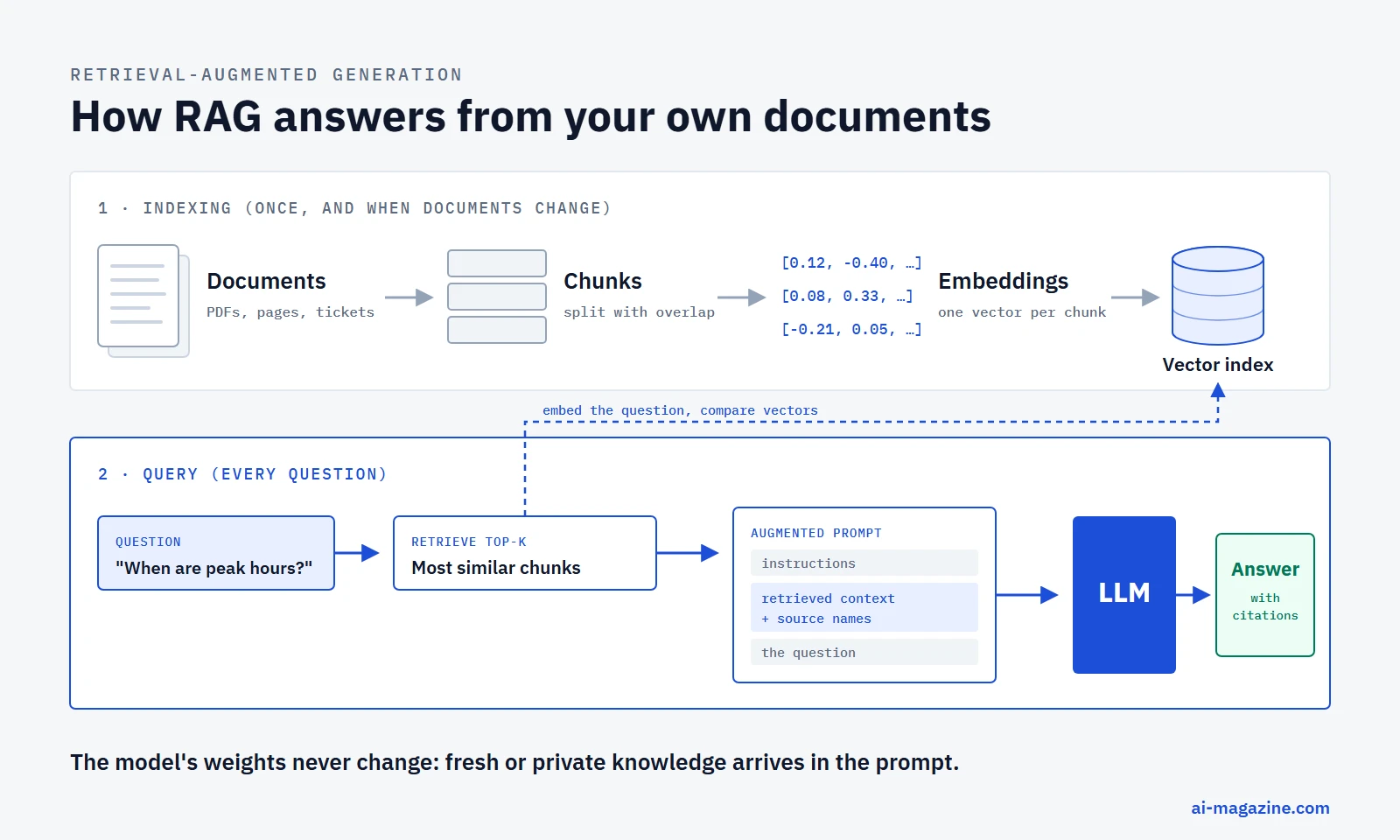
Retrieval-augmented generation (RAG) is a way to make a large language model answer from information it was never trained on. Before the model responds, a search step finds the passages in your own documents that are most relevant to the question and adds them to the prompt. The model then writes its answer from that text, and can cite where each fact came from.
RAG is the most common way to build chatbots over company documents, support assistants that know the current help center, and search tools that answer in full sentences. This guide explains how it works step by step, what each part costs in September 2026, how to choose between RAG, long context and fine-tuning, and ends with a small Python pipeline you can run on a laptop without an API key.
RAG in one sentence
The name describes the three steps:
- Retrieve: search a knowledge base for the passages most relevant to the question.
- Augment: insert those passages into the prompt, next to the question.
- Generate: let the large language model write the answer using that context.
Nothing about the model changes. Its weights stay exactly the same; the new knowledge arrives in the prompt for that one request. That is the key difference from fine-tuning, which changes the model itself.
Why RAG exists
Language models learn from a fixed training set, which leaves three gaps that come up in almost every real product:
- The knowledge cutoff. A model knows nothing that happened after its training data was collected.
- Private data. A model has never seen your contracts, tickets, wiki or product catalog.
- Provenance. A model’s answer from memory does not come with a source you can check.
OpenAI’s accuracy optimization guide frames the choice as two kinds of problem. When the model lacks knowledge, because it was never trained on it, the knowledge is out of date, or it is proprietary, that is an “in-context memory” problem, and RAG is the tool. When the model needs to behave more consistently, that is a “learned memory” problem, and fine-tuning is the tool. The same guide notes that many of OpenAI’s largest customer deployments used only prompt engineering and RAG.
RAG also helps with hallucinations. Giving the model the right text and telling it to answer only from that text makes it less likely to invent facts. Anthropic’s guidance on reducing hallucinations recommends exactly that combination: ground answers in quotes from the provided documents, check claims against citations, and let the model say “I don’t know”. RAG reduces invented answers; it does not eliminate them.
Where RAG came from
The term comes from the paper Retrieval-Augmented Generation for Knowledge-Intensive NLP Tasks by Patrick Lewis and colleagues at Facebook AI Research, University College London and New York University. It was first posted on May 22, 2020 and published at NeurIPS 2020.
The original system joined two neural networks:
- A retriever, Dense Passage Retrieval (DPR), which uses two BERT-base encoders: one turns the question into a vector, the other turns each document into a vector.
- A generator, BART-large, a sequence-to-sequence transformer with about 400 million parameters.
The knowledge base was a December 2018 Wikipedia dump split into 100-word chunks, 21 million passages in total, searched with FAISS. The paper described two variants: RAG-Sequence, which uses the same retrieved passage for the whole answer, and RAG-Token, which can draw on a different passage for each word.
The results made the idea stick. RAG set new state-of-the-art scores on open-domain question answering: on Natural Questions it scored 44.5 (RAG-Sequence), ahead of 40.4 for Google’s REALM, an earlier retrieval-augmented model, and 34.5 for T5-11B answering from memory alone. In a human evaluation of generated Jeopardy questions, raters judged RAG more factual than plain BART in 42.7% of cases and BART more factual in 7.1%. The paper also showed “index hot-swapping”: replacing the document index updates what the model knows without any retraining.
Modern RAG systems look different. Instead of a jointly trained retriever and generator, most combine an off-the-shelf embedding model, a vector database and a general-purpose chat model through an API. The core idea is unchanged.
How RAG works, step by step
A RAG system has two separate stages: indexing, which prepares the documents, and querying, which runs for every question.
Stage 1: indexing
Indexing runs once, then again whenever documents change.
- Load the documents. PDFs, web pages, help center articles, tickets, database rows. Convert them to plain text and keep metadata such as the title, URL and last update date.
- Split them into chunks. Documents are cut into passages small enough to search precisely and to fit several into one prompt.
- Embed each chunk. An embedding model turns each chunk into a vector, a list of numbers that represents its meaning. Chunks about similar topics end up with similar vectors.
- Store the vectors. A vector database stores each vector with the original text and metadata, and builds an index for fast similarity search.
Stage 2: querying
- Embed the question with the same embedding model.
- Retrieve the chunks whose vectors are most similar to the question’s vector, usually the top 5 to 20.
- Optionally rerank those candidates with a more precise model and keep the best few.
- Augment the prompt: instructions, the retrieved chunks with their source names, then the question.
- Generate the answer with a language model, asking it to cite the sources it used.
The rest of this guide goes through each of these parts.
Chunking: how to split documents
Chunk size is a trade-off. Small chunks match questions precisely but can lose the surrounding context that makes them meaningful. Large chunks keep context but dilute the match and use up more of the prompt.
There is no universal right size, but published defaults give a sense of scale:
| Source | Chunk size | Overlap |
|---|---|---|
| Original RAG paper (2020) | 100 words | none |
| OpenAI file search, default | 800 tokens | 400 tokens |
| Anthropic Contextual Retrieval post (2024) | “usually no more than a few hundred tokens” | not specified |
OpenAI’s file search lets you change its defaults: chunks can be 100 to 4,096 tokens, and the overlap can be at most half the chunk size.
Overlap repeats a little text at the end of one chunk at the start of the next, so a fact that falls on a boundary still appears whole in at least one chunk. The cost is duplication, which you will see in the example below.
Practical rules that hold for most projects:
- Split along the document’s own structure first: headings, sections, paragraphs. A chunk that starts mid-sentence retrieves badly.
- Keep the title and section heading with each chunk, either in the text or in metadata, so a passage like “It costs $2 per month” still says what “it” is.
- Treat tables and code differently from prose. Chroma, for example, documents syntax-aware chunking for code.
- Measure. Try two or three chunk sizes on real questions and keep the one that retrieves the right passage most often.
Embeddings: turning text into vectors
An embedding model maps text to a vector with hundreds or thousands of dimensions. Texts with similar meaning land close together, even when they share no words: “When is the service busiest?” and “peak hours” end up near each other. Closeness is usually measured with cosine similarity, which ranges from −1 (opposite) to 1 (the same direction).
Embedding is cheap compared with generation. Here are the main hosted models and their list prices, checked on September 17, 2026:
| Model | Vendor | Price per 1M tokens | Default dimensions | Max input |
|---|---|---|---|---|
| text-embedding-3-small | OpenAI | $0.02 | 1,536 | 8,192 tokens |
| text-embedding-3-large | OpenAI | $0.13 | 3,072 | 8,192 tokens |
| gemini-embedding-2 | $0.20 (text) | 3,072 | 8,192 tokens | |
| embed-v4.0 | Cohere | $0.12 (text) | 1,536 | 128K tokens |
| voyage-4-large | Voyage AI | $0.12 | 1,024 | 32K tokens |
| voyage-4 | Voyage AI | $0.06 | 1,024 | 32K tokens |
| voyage-4-lite | Voyage AI | $0.02 | 1,024 | 32K tokens |
| mistral-embed | Mistral AI | $0.10 | 1,024 | 8K tokens |
Sources: OpenAI, Google, Cohere, Voyage AI, Mistral.
At $0.02 per million tokens, embedding a knowledge base of one million tokens, roughly 750,000 words, costs two cents with OpenAI’s small model. Voyage AI also gives its current models the first 200 million tokens free. Anthropic does not offer its own embedding model and points developers to Voyage AI.
Several of these models support shortened vectors: OpenAI’s dimensions parameter, Google’s and Cohere’s Matryoshka-style embeddings. Shorter vectors take less storage and search faster at a small cost in accuracy.
Open-weight models are a real option too. BAAI/bge-small-en-v1.5, for example, produces 384-dimensional vectors, accepts up to 512 tokens and is MIT-licensed. To compare models on retrieval tasks, the community-run MTEB leaderboard is the usual starting point, but test on your own documents before deciding.
One rule has no exceptions: use the same embedding model for documents and questions. Vectors from different models are not comparable, so changing models means re-embedding the whole knowledge base.
Where the vectors live
Searching millions of vectors one by one is too slow, so vector stores build approximate nearest-neighbor indexes. The most common is HNSW (Hierarchical Navigable Small World graphs), described by Malkov and Yashunin in 2016.
| Option | What it is | License |
|---|---|---|
| pgvector | Vector search inside PostgreSQL, with HNSW and IVFFlat indexes | PostgreSQL license |
| Qdrant | Standalone vector database with built-in hybrid queries | Apache 2.0, plus managed cloud |
| Milvus | Vector database designed for very large collections, under the LF AI & Data Foundation | Apache 2.0 |
| Weaviate | Vector database that stores objects and their vectors together | BSD-3-Clause, with parts under the Weaviate License |
| Chroma | Lightweight open-source store, local or hosted | Apache 2.0 |
| Pinecone | Fully managed, serverless vector database | Proprietary service |
| sqlite-vec | Vector search extension for SQLite; still pre-1.0 | Apache 2.0 |
If you already run PostgreSQL, pgvector is often the simplest start: no new system to operate, and vectors sit next to the data they describe. Its HNSW index supports up to 2,000 dimensions for the standard vector type and 4,000 for halfvec, so very wide embeddings need shortening before indexing. Dedicated databases earn their keep at larger scale or when you need features like built-in hybrid search.
If you don’t want to run any of this yourself, managed options exist. OpenAI’s file search tool handles chunking, embedding and retrieval for you, and charges $0.10 per GB of storage per day after the first free GB, plus $2.50 per 1,000 tool calls.
Retrieval: vector search, keywords and hybrid
Vector search finds text with similar meaning. It is weaker at exact matches: product codes, error messages, names, version numbers. A question about “Sonnet 5” may retrieve passages about other Claude models because they are semantically close.
Keyword search covers that gap. BM25, the classic ranking function behind most search engines, scores passages by how often the question’s words appear in them, weighted by how rare each word is across the collection.
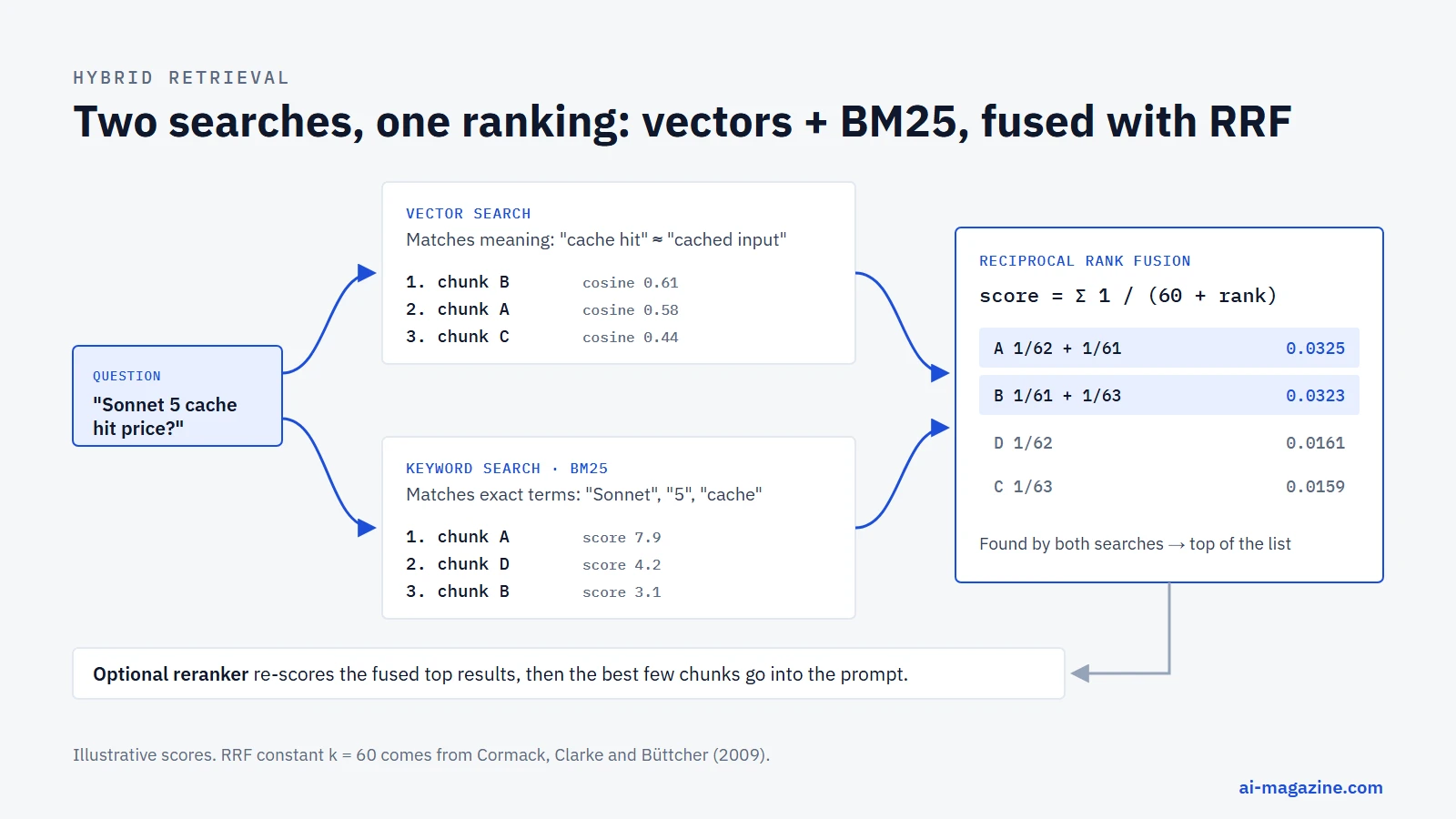
Hybrid search runs both and merges the results. The most common merging method is reciprocal rank fusion (RRF), introduced by Cormack, Clarke and Büttcher at SIGIR 2009. Each result gets a score of 1 / (k + rank) from each list it appears in, and the scores are added. The authors fixed k at 60 in a pilot study and noted that the exact value was not critical. RRF works on ranks rather than raw scores, so it doesn’t matter that cosine similarity and BM25 use completely different scales.
Hybrid search is built into several tools: OpenAI’s file search combines semantic and keyword search, and Qdrant offers RRF fusion out of the box. Weaviate also supports hybrid queries, but its default fusion method since version 1.24 is relative score fusion rather than RRF.
Reranking
Retrieval models are built for speed across millions of passages. A reranker is a slower, more accurate model that looks at the question and each candidate passage together and re-scores the shortlist. A typical setup retrieves 50 to 100 candidates and keeps the top 5 to 20 after reranking.
Hosted rerankers are inexpensive. Cohere’s Rerank 4 costs $2.00 (Fast) or $2.50 (Pro) per 1,000 searches, and Voyage AI’s rerank-2.5 costs $0.05 per million tokens, according to Cohere and Voyage AI.
How much the retrieval upgrades matter
Anthropic published one of the clearest measurements in its Contextual Retrieval post in September 2024. The technique uses a language model to write 50 to 100 tokens of context for each chunk, explaining where it sits in the document, and prepends that text before embedding and before building the BM25 index. On Anthropic’s test sets, measured as the share of questions where the right passage was missing from the top 20 results:
| Setup | Retrieval failure rate |
|---|---|
| Standard embeddings | 5.7% |
| Contextual embeddings | 3.7% (−35%) |
| Contextual embeddings + contextual BM25 | 2.9% (−49%) |
| All of the above + reranking | 1.9% (−67%) |
The gains stacked: better embeddings, adding keyword search and adding a reranker each helped. Anthropic put the one-time cost of generating the chunk context at $1.02 per million document tokens when using prompt caching.
A working RAG example in Python
The code below builds a complete retrieval pipeline over three short documents: chunking with overlap, embeddings, vector search, BM25, reciprocal rank fusion and prompt assembly. It uses model2vec with the small potion-base-8M static embedding model, which runs on an ordinary CPU and needs no API key.
pip install model2vec numpyimport math
import re
from collections import Counter
import numpy as np
from model2vec import StaticModel
# 1. A tiny knowledge base: three "documents" about LLM API pricing.
documents = {
"deepseek-pricing.md": (
"DeepSeek bills its API by time of day. Off-peak rates are half of peak rates. "
"Peak hours are 01:00-04:00 and 06:00-10:00 UTC, Monday to Friday. "
"DeepSeek V4 Pro costs $0.66 per million input tokens and $1.98 per million output tokens off-peak."
),
"anthropic-pricing.md": (
"Claude Sonnet 5 costs $2 per million input tokens and $10 per million output tokens. "
"Anthropic made this introductory price the standard price on August 10, 2026. "
"A 5-minute prompt cache write costs 1.25 times the input price, and a cache hit costs 0.1 times."
),
"gemini-pricing.md": (
"Gemini 3.8 Flash is on launch pricing through December 31, 2026: $0.75 input and $3.75 output per million tokens. "
"From January 1, 2027 the price doubles to $1.50 input and $7.50 output. "
"Context caching on Gemini 3.8 Flash also charges storage per hour."
),
}
# 2. Chunking: pack sentences into chunks of up to ~40 words, with a one-sentence overlap.
def chunk(text, max_words=40, overlap_sentences=1):
sentences = re.split(r"(?<=[.!?])\s+", text.strip())
chunks, current = [], []
for s in sentences:
if current and sum(len(x.split()) for x in current) + len(s.split()) > max_words:
chunks.append(" ".join(current))
current = current[-overlap_sentences:]
current.append(s)
if current:
chunks.append(" ".join(current))
return chunks
chunks = [(doc, c) for doc, text in documents.items() for c in chunk(text)]
# 3. Embeddings: a small static embedding model that runs on CPU (256 dimensions).
model = StaticModel.from_pretrained("minishlab/potion-base-8M")
vectors = model.encode([c for _, c in chunks])
vectors = vectors / np.linalg.norm(vectors, axis=1, keepdims=True)
# 4a. Vector search: cosine similarity between the question and every chunk.
def vector_search(query, k=3):
q = model.encode([query])[0]
q = q / np.linalg.norm(q)
scores = vectors @ q
return list(np.argsort(-scores)[:k]), scores
# 4b. Keyword search: BM25, so exact terms such as "peak" or "Sonnet" still count.
tokenized = [re.findall(r"\w+", c.lower()) for _, c in chunks]
avg_len = sum(map(len, tokenized)) / len(tokenized)
df = Counter(t for doc in tokenized for t in set(doc))
def bm25_search(query, k=3, k1=1.5, b=0.75):
terms = re.findall(r"\w+", query.lower())
n = len(tokenized)
scores = []
for doc in tokenized:
tf = Counter(doc)
s = 0.0
for t in terms:
if t not in tf:
continue
idf = math.log(1 + (n - df[t] + 0.5) / (df[t] + 0.5))
s += idf * tf[t] * (k1 + 1) / (tf[t] + k1 * (1 - b + b * len(doc) / avg_len))
scores.append(s)
return list(np.argsort(-np.array(scores))[:k])
# 4c. Hybrid: reciprocal rank fusion of both rankings (k = 60).
def hybrid_search(query, k=2):
fused = Counter()
for ranking in (vector_search(query, k=len(chunks))[0], bm25_search(query, k=len(chunks))):
for rank, idx in enumerate(ranking):
fused[idx] += 1 / (60 + rank + 1)
return [idx for idx, _ in fused.most_common(k)]
# 5. Augment: put the retrieved chunks into the prompt, with their sources.
def build_prompt(question):
context = "\n\n".join(f"[{chunks[i][0]}]\n{chunks[i][1]}" for i in hybrid_search(question))
return (
"Answer the question using only the context below. "
"Cite the source file in brackets. If the context does not contain the answer, say so.\n\n"
f"Context:\n{context}\n\nQuestion: {question}"
)
if __name__ == "__main__":
print(f"{len(chunks)} chunks from {len(documents)} documents\n")
for q in ["When are DeepSeek peak hours?", "How much will Gemini 3.8 Flash cost next year?"]:
top, scores = vector_search(q)
print("Q:", q)
print(" vector:", [(chunks[i][0], round(float(scores[i]), 3)) for i in top])
print(" bm25: ", [chunks[i][0] for i in bm25_search(q)])
print(" hybrid:", [chunks[i][0] for i in hybrid_search(q)])
print()
print(build_prompt("When are DeepSeek peak hours?"))This is the actual output when we ran it (model2vec 0.9.0, Python 3.12):
6 chunks from 3 documents

Q: When are DeepSeek peak hours?
  vector: [('deepseek-pricing.md', 0.569), ('deepseek-pricing.md', 0.461), ('anthropic-pricing.md', 0.218)]
  bm25:   ['deepseek-pricing.md', 'deepseek-pricing.md', 'anthropic-pricing.md']
  hybrid: ['deepseek-pricing.md', 'deepseek-pricing.md']

Q: How much will Gemini 3.8 Flash cost next year?
  vector: [('gemini-pricing.md', 0.586), ('gemini-pricing.md', 0.582), ('anthropic-pricing.md', 0.312)]
  bm25:   ['gemini-pricing.md', 'gemini-pricing.md', 'deepseek-pricing.md']
  hybrid: ['gemini-pricing.md', 'gemini-pricing.md']

Answer the question using only the context below. Cite the source file in brackets. If the context does not contain the answer, say so.

Context:
[deepseek-pricing.md]
DeepSeek bills its API by time of day. Off-peak rates are half of peak rates. Peak hours are 01:00-04:00 and 06:00-10:00 UTC, Monday to Friday.

[deepseek-pricing.md]
Peak hours are 01:00-04:00 and 06:00-10:00 UTC, Monday to Friday. DeepSeek V4 Pro costs $0.66 per million input tokens and $1.98 per million output tokens off-peak.

Question: When are DeepSeek peak hours?
Three things are worth noticing:
- Both questions retrieved the right document, even though the second question says “next year” and the passage says “January 1, 2027”. Vector search matched the meaning; BM25 matched “Gemini” and “Flash”.
- The overlap shows up as duplication. The sentence about peak hours appears in both retrieved chunks. That is the price of making sure no fact is cut in half. Production systems usually merge or deduplicate neighboring chunks before building the prompt.
- The prompt tells the model how to behave: answer only from the context, cite the source, and admit when the answer is missing. Those three instructions do more against hallucination than any retrieval tweak.
The generation step
The last step sends the prompt to any chat model. This part needs an API key, so we did not run it in our test; the calls below follow the official SDK documentation. With OpenAI’s Responses API:
from openai import OpenAI

client = OpenAI()
response = client.responses.create(model="gpt-5.6-luna", input=build_prompt("When are DeepSeek peak hours?"))
print(response.output_text)
With Anthropic’s Messages API:
import anthropic

client = anthropic.Anthropic()
message = client.messages.create(
    model="claude-haiku-4-5",
    max_tokens=300,
    messages=[{"role": "user", "content": build_prompt("When are DeepSeek peak hours?")}],
)
print(message.content[0].text)
Anthropic also offers a Citations feature: pass the retrieved chunks as documents instead of pasting them into the text, and the response returns the exact passages that support each claim.
For a small, fast model, the generation cost of a RAG question is mostly input tokens. A prompt with 2,000 tokens of retrieved context and a 200-token answer costs a fraction of a cent on most small models; you can compare exact numbers for your own volumes in our LLM API cost calculator and see how many tokens your context is with the token counter.
Taking the example to production
The toy pipeline covers the concepts. A real system adds:
- a proper embedding model for your language and domain, chosen by testing on your own questions;
- a vector database instead of an in-memory array, with metadata filters such as product, language or date;
- chunking along document structure, with titles attached to each chunk;
- a reranker over a larger candidate set;
- deduplication of overlapping chunks before building the prompt;
- a re-indexing job that runs when documents change, and deletes vectors for removed documents.
RAG vs long context vs fine-tuning
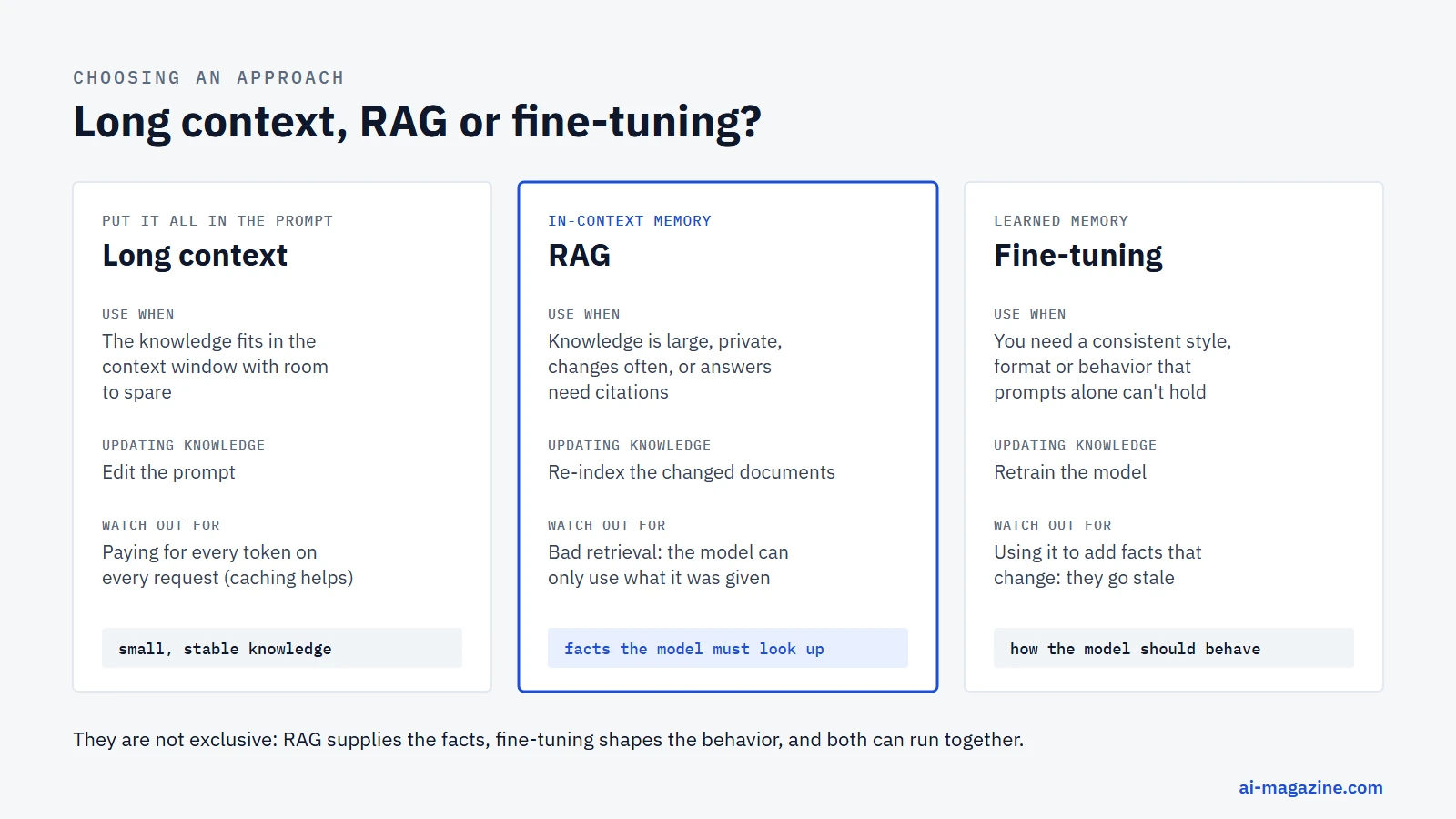
Long context. Context windows have grown fast: Claude Fable 5.1, Opus 5 and Sonnet 5 all accept 1 million tokens, according to Anthropic’s model overview. When a knowledge base is small, the simplest option is to put all of it in the prompt. Anthropic’s 2024 Contextual Retrieval post gave a rule of thumb: if the knowledge base is smaller than 200,000 tokens, about 500 pages, include it whole and skip RAG. Prompt caching makes that cheaper by charging a fraction of the input price for the repeated part. Long context gets expensive and slower as the knowledge base grows, because you pay for every token on every request, and it can’t work at all once the material outgrows the window.
RAG. Best when the knowledge is large, changes often, is private, or when answers need citations. Updating knowledge means re-indexing the changed documents, which takes minutes rather than a training run. The main failure mode is retrieval: if the right passage isn’t found, the model can’t use it.
Fine-tuning. Best for teaching a model how to behave: a consistent format, tone, classification scheme or domain style. OpenAI’s guide describes it as solving “learned memory” problems. It is a poor way to add facts that change, because each update needs another training run and the model can still misremember.
The approaches combine. A support assistant might use a fine-tuned model for tone and format, RAG for the current help center, and long context for the full text of the one document a customer is asking about.
Beyond basic RAG
The retrieve-then-generate pattern has several well-known extensions:
- GraphRAG. Microsoft Research’s GraphRAG uses a language model to build a knowledge graph of entities and relationships from the documents, then answers from summaries of that graph. It targets questions baseline RAG handles poorly, such as “what are the main themes across all of these reports?”, where no single passage holds the answer. Microsoft’s implementation is open source under the MIT license.
- HyDE. Hypothetical Document Embeddings (ACL 2023) first asks a language model to write a hypothetical answer, then embeds that answer to search for real documents. A fake answer often looks more like the real passage than the short question does.
- Self-RAG. Self-RAG trains a model to decide when retrieval is needed and to critique its own output against the retrieved passages.
- Agentic RAG. Instead of one fixed retrieval step, an AI agent plans searches, rewrites queries, calls several tools and checks whether it has enough information before answering. A 2025 survey on agentic RAG maps the design space. Retrieval tools for agents are often connected through the Model Context Protocol.
How to evaluate a RAG system
A RAG system can fail in two places, and OpenAI’s guide recommends evaluating them separately:
- Retrieval failures: the right passage was not retrieved, or too much irrelevant text was.
- Generation failures: the right passage was in the prompt, but the model ignored it, misread it or added facts that weren’t there.
The open-source Ragas library names the standard metrics:
| Metric | What it measures |
|---|---|
| Context precision | Whether relevant chunks are ranked above irrelevant ones |
| Context recall | Whether the retrieved context contains the information needed to answer |
| Faithfulness | Whether every claim in the answer is supported by the retrieved context (0 to 1) |
| Response relevancy | Whether the answer addresses the question that was asked |
In practice, start small: write 50 to 100 real questions with the passage that should answer each one, measure how often that passage appears in the top results, and read a sample of answers by hand. Re-run the same set whenever you change the chunk size, embedding model or prompt, so you know whether a change helped.
Security risks specific to RAG
Retrieved text is untrusted input. The OWASP Top 10 for LLM Applications 2025 lists two risks that apply directly:
- LLM01 Prompt Injection includes indirect injection: instructions hidden inside a web page, email or document that the model reads as part of its context. A knowledge base built from user uploads, tickets or crawled pages can carry text such as “ignore previous instructions” straight into the prompt. See prompt injection in our glossary.
- LLM08 Vector and Embedding Weaknesses covers weaknesses in how vectors are generated, stored or retrieved: poisoned documents inserted into the index, and data leaking between users who share one vector store.
Basic defenses:
- Enforce access control at retrieval time. Filter by user, team or tenant in the vector query itself, so a user can never retrieve chunks they are not allowed to read.
- Separate instructions from data in the prompt, and tell the model that retrieved text is reference material, not instructions.
- Keep a record of where each chunk came from, so a bad answer can be traced to its source and removed.
- Don’t let a RAG assistant take actions, such as sending email or changing records, based on retrieved text without a human confirmation.
Common problems and fixes
| Symptom | Likely cause | What to try |
|---|---|---|
| The answer says “not in the context” but the document exists | The right chunk wasn’t retrieved | Hybrid search, more candidates plus a reranker, smaller chunks |
| Retrieval finds similar but wrong passages, such as another product version | Vector search blurs exact names and numbers | Add BM25, add metadata filters |
| The answer mixes facts from different documents | Chunks lack context about their source | Attach titles and headings to chunks; try contextual retrieval |
| The answer contains facts not in any passage | The model is filling gaps from memory | Stricter instructions, citations, a faithfulness check |
| Answers are right but slow and expensive | Too much context per request | Fewer, better chunks after reranking; a smaller generation model |
| Answers are out of date | The index isn’t refreshed | Re-index on document change; store and show last-updated dates |
Frequently asked questions
What does RAG stand for?
Retrieval-augmented generation. The model’s generation is augmented with passages retrieved from an external knowledge source at the time of the question.
Is RAG the same as fine-tuning?
No. RAG adds information to the prompt for each request and leaves the model unchanged. Fine-tuning retrains the model’s weights on examples. RAG is suited to facts that change; fine-tuning is suited to consistent behavior and format.
Do I need a vector database for RAG?
Not always. For a few thousand chunks, vectors in memory or in a PostgreSQL table with pgvector are enough. Dedicated vector databases help at larger scale, with many concurrent users, or when you need built-in hybrid search and filtering.
Is RAG still needed now that models have 1-million-token context windows?
For small, stable knowledge bases, putting everything in the prompt is often simpler. RAG still wins when the knowledge is larger than the window, changes frequently, must respect per-user permissions, or when paying for the full knowledge base on every request would be too expensive.
Does RAG stop hallucinations?
It reduces them but does not eliminate them. A model can still misread a passage or add unsupported details, and if retrieval misses the right passage, the model may answer from memory. Instructions to answer only from the context, citations and faithfulness checks close most of the gap.
How much does RAG cost?
Embedding is usually the smallest cost: $0.02 per million tokens with OpenAI’s text-embedding-3-small. The main recurring costs are the language model’s input tokens for the retrieved context on every question, plus hosting for the vector store. See LLM API pricing for current per-token rates.
Related
- Vector databases: how they work and how to choose one
- LLM Hallucinations: Why They Happen and How to Reduce Them, the failure mode RAG is most often used to reduce
- Retrieval-augmented generation (RAG), embedding, vector database and semantic search in the glossary
- How to connect an MCP server, for giving AI apps access to tools and data
- How to run an LLM locally with Ollama, to run the generation step on your own machine
- Prompt caching: how it works and what it saves, for cutting the cost of a long retrieved context
- Token counter and LLM API cost calculator