Structured Outputs: How to Get Reliable JSON From an LLM
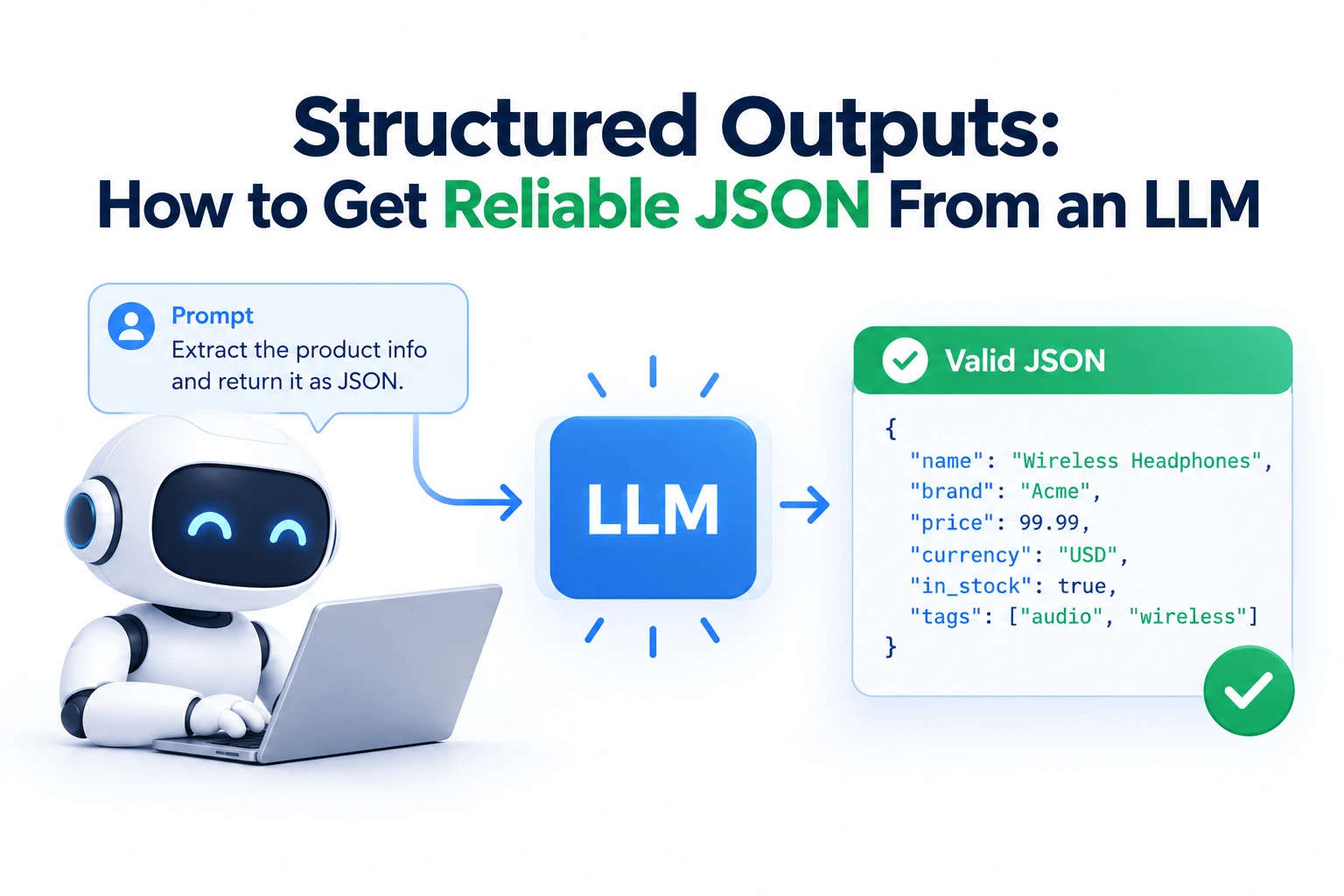
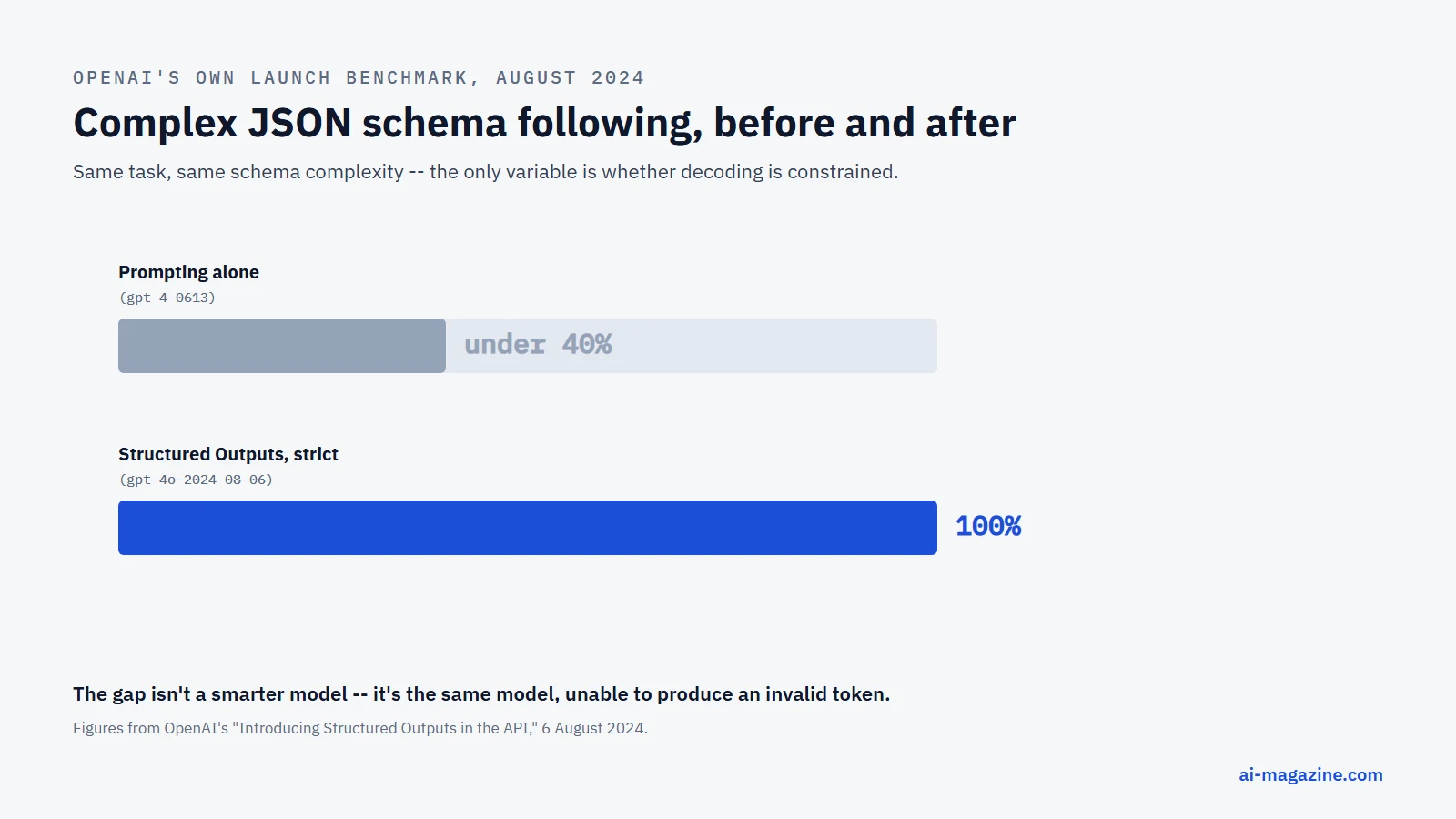
Structured outputs is the feature that stops an LLM’s JSON from breaking your code. Instead of asking a model nicely to “please respond in JSON” and hoping, you hand it a schema — field names, types, which fields are required — and the API guarantees every response matches it exactly. OpenAI’s own numbers from the feature’s launch are the clearest reason it exists: on their internal eval of complex schema-following, gpt-4-0613 scored under 40% with prompting alone; gpt-4o-2024-08-06 with Structured Outputs scored 100%.
This isn’t one company’s trick. OpenAI, Anthropic, Google, and the open-source Ollama runtime have all shipped a version of it, and the underlying technique — constrained decoding — is the same across all of them. This guide explains how it actually works, walks through real, current code from all three major providers, and is honest about where it still falls short.
From “please use JSON” to a guarantee
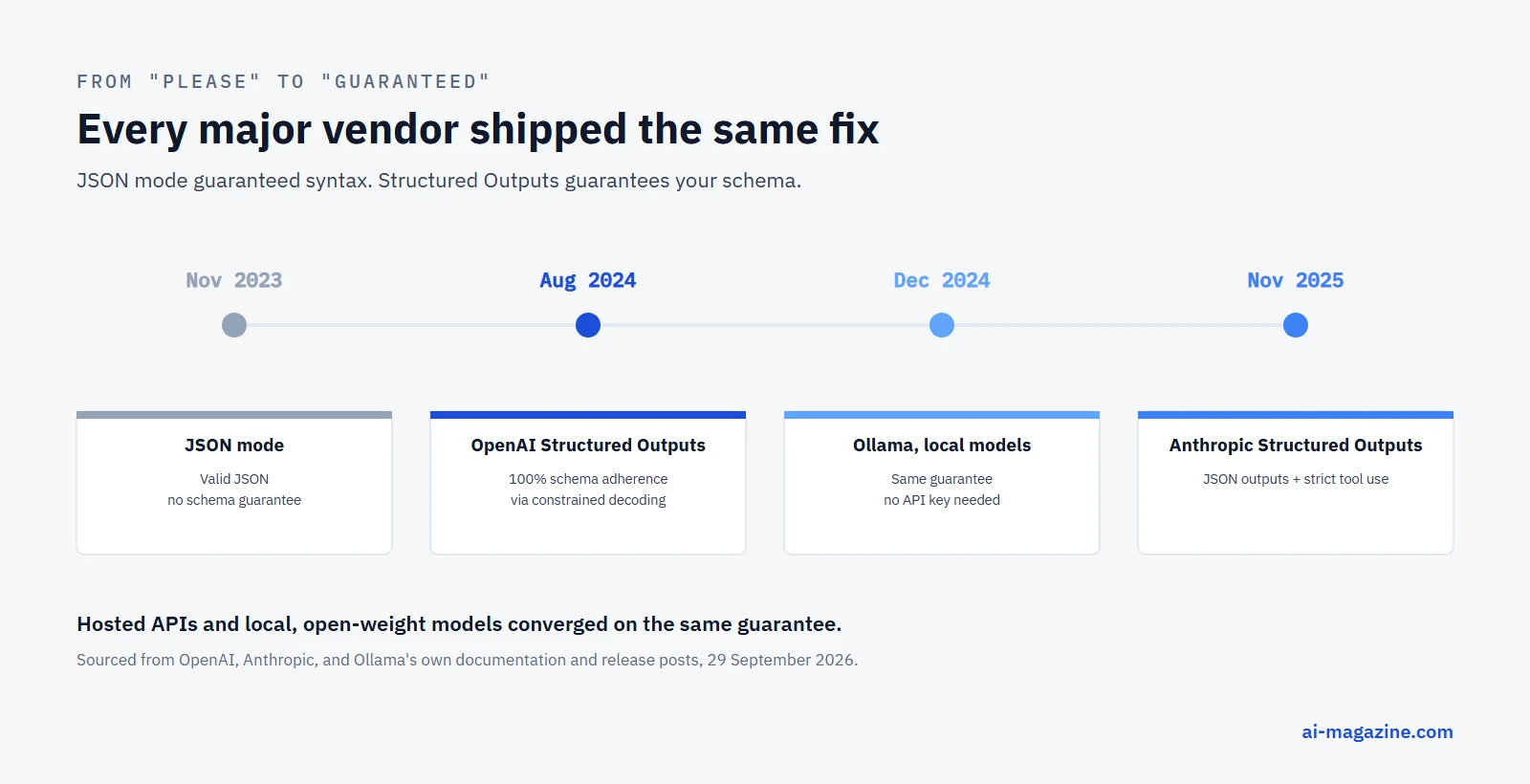
The timeline matters because “JSON mode” and “Structured Outputs” get confused constantly, and they solve different problems:
- June 2023 — OpenAI adds function calling to the Chat Completions API: the model can request that a specific function be called with specific arguments, which for the first time gave developers something more reliable than parsing free text.
- November 2023 — OpenAI’s DevDay introduces JSON mode (
response_format: {"type": "json_object"}): the output is guaranteed to be valid JSON — but nothing guarantees it has the fields you asked for, or that a field typed as a number won’t come back as a string. - 6 August 2024 — OpenAI ships Structured Outputs: the model is constrained to match a JSON Schema exactly, not just produce valid JSON. This is the feature this guide is actually about.
- 6 December 2024 — Ollama ships structured outputs for local, open-weight models, using the same JSON Schema
formatparameter idea, so the guarantee isn’t limited to hosted APIs. - 13 November 2025 — Anthropic ships Structured Outputs for Claude, as
output_config.format(JSON outputs) plusstrict: true(strict tool use), explicitly built on constrained decoding as well.
How it actually works: constrained decoding
An LLM generates text one token at a time, and by default, at every step, it’s free to pick any token in its vocabulary. That freedom is exactly why a model can produce invalid JSON — nothing stops it from closing a brace too early or typing a word where a number belongs.
Constrained decoding removes that freedom, dynamically. OpenAI’s own engineering writeup explains it plainly: the JSON Schema you supply is compiled into a context-free grammar (CFG) — a formal set of rules describing every valid way the output can continue at any point. After every single token the model generates, the inference engine consults that grammar, works out exactly which tokens would still be valid, and masks out everything else — invalid tokens get their probability forced to zero before the model even samples the next one. The model isn’t being asked to follow the schema; it is structurally unable to violate it.
This is also why the first request against a new schema is slower than the rest: the schema has to be compiled into that grammar and cached before generation can begin. OpenAI’s own numbers: typically under 10 seconds, but complex schemas can take up to a minute — a one-time cost, not a per-request one, since the compiled grammar is reused for every later call with the same schema.
The code: three providers, one pattern
The remarkable part isn’t any single vendor’s API — it’s that all three have converged on the identical developer-facing shape: define your schema as a Pydantic model, hand it to the client, get a validated object back.
OpenAI, using the Responses API:
from openai import OpenAI
from pydantic import BaseModel

client = OpenAI()

class CalendarEvent(BaseModel):
    name: str
    date: str
    participants: list[str]

response = client.responses.parse(
    model="gpt-6-astra",
    input=[
        {"role": "system", "content": "Extract the event information."},
        {"role": "user", "content": "Alice and Bob are going to a science fair on Friday."},
    ],
    text_format=CalendarEvent,
)

event = response.output_parsedAnthropic, using Claude’s own parse() helper:
from pydantic import BaseModel
from anthropic import Anthropic

class ContactInfo(BaseModel):
    name: str
    email: str
    plan_interest: str
    demo_requested: bool

client = Anthropic()

response = client.messages.parse(
    model="claude-opus-5-5",
    max_tokens=1024,
    messages=[{
        "role": "user",
        "content": "Extract the key information from this email: John Smith "
                    "([email protected]) is interested in our Enterprise plan "
                    "and wants to schedule a demo for next Tuesday at 2pm.",
    }],
    output_format=ContactInfo,
)

contact = response.parsed_outputOllama, running entirely on your own hardware, no API key involved:
from ollama import chat
from pydantic import BaseModel

class Country(BaseModel):
    name: str
    capital: str
    languages: list[str]

response = chat(
    messages=[{"role": "user", "content": "Tell me about Canada."}],
    model="llama3.1",
    format=Country.model_json_schema(),
)

country = Country.model_validate_json(response.message.content)
Same shape, three times: a Pydantic class is the schema, the client validates the response against it, and you get a typed object instead of a string you have to hope parses correctly. If you’ve read our guide to running an LLM locally with Ollama, this is the same runtime — structured outputs work identically on a model running on your own laptop.
Two different mechanisms, easy to conflate
Both OpenAI and Anthropic expose structured outputs in two forms, and picking the wrong one is the most common mistake:
- Response formatting (
text_format/output_config.format) — for when the model is answering the user directly, and you want that answer to arrive as JSON matching your schema. Use this for data extraction, generating a UI from a description, or separating a final answer from its reasoning. - Strict tool use / function calling (
strict: true) — for when the model is deciding to call one of your functions, and you need its arguments to exactly match that function’s parameter schema, every time, so your code can call it without validating first.
OpenAI’s own guidance: if you’re connecting the model to tools, functions, or data in your system, use function calling; if you want to shape what the model says back to the user, use the response-format path. They can be combined in the same request.
What structured outputs don’t fix
This is the part vendors mention only in their fine print, and it matters:
- It’s structural, not factual. A schema guarantees the shape of the output — the right fields, the right types — not that the values are correct. A math tutor forced into a
{explanation, output}schema can still get the arithmetic wrong inside a perfectly valid JSON object. - Only a subset of JSON Schema is supported. Every vendor restricts which schema features you can use — deeply recursive structures, certain combinations of
anyOf, and some string formats are commonly excluded. Check your schema against the current docs before assuming an arbitrary schema will work. - It doesn’t survive early termination. If the model hits
max_tokensor another stop condition before finishing, you still get truncated, invalid output — the guarantee only holds for a response that finishes generating. - Refusals bypass the schema by design. If a model refuses a request for safety reasons, that refusal — reasonably — doesn’t follow your schema either. OpenAI surfaces this as an explicit
refusalfield so your code can detect it rather than fail a JSON parse. - OpenAI’s structured outputs are incompatible with parallel function calls. Requesting multiple tool calls at once can produce output that doesn’t match any single schema; you have to disable parallel calls to get the guarantee.
Where this actually matters
The use cases converge across every vendor’s own documentation, because they’re the same use cases regardless of which model is doing the work:
- Data extraction — pulling structured records (contacts, invoices, calendar events) out of unstructured text or documents, without writing a regex parser for the model’s prose.
- Agentic tool calling — the backbone of the AI agent pattern: an agent is only as reliable as its ability to call tools with correctly-typed arguments every single time, not most of the time.
- UI generation — producing a fixed shape of content (a set of cards, a form’s fields) that a front end can render without a fallback path for malformed data.
- Classification with structure — Google’s own docs use content moderation as an example: an
enumfield constrains the model to one of a fixed set of categories, andanyOflets the output’s shape itself vary depending on the classification.
Frequently asked questions
Is structured outputs the same as JSON mode?
No. JSON mode (OpenAI, November 2023) only guarantees the output parses as JSON — not that it has the fields or types you need. Structured Outputs (August 2024 onward, and the equivalent features from Anthropic and Google) guarantees the output matches your exact schema.
Does structured outputs stop hallucination?
No — it constrains the shape of the output, not whether the content is true. A structured response can still contain a factually wrong value inside a perfectly schema-valid field.
Why is the first request with a new schema slower?
The schema has to be compiled into a grammar the inference engine can use to mask invalid tokens during generation. That compilation is cached after the first request, so every later call with the same schema runs at normal speed.
Can I use structured outputs with a local, open-weight model?
Yes — Ollama has supported it since December 2024, using the same JSON Schema format parameter idea as the hosted APIs, with no API key or network call required.
Which should I use: response formatting or strict tool use?
Response formatting, when you want the model’s direct answer to the user to be valid JSON. Strict tool use / function calling, when the model is deciding to call one of your functions and you need its arguments to be reliably typed. Both are available from OpenAI and Anthropic, and can be combined in one request.
Related
- LLM Hallucinations: Why They Happen and How to Reduce Them, a related but distinct reliability problem structured outputs doesn’t fix
- How to Build an AI Agent, where reliable tool-call arguments matter most
- How to run an LLM locally with Ollama, for structured outputs with no hosted API
- Model Context Protocol (MCP) in the glossary
- Prompt Caching: How It Works and What It Actually Saves, another API feature worth knowing before you scale a pipeline