WebMCP Explained: What It Is, How It Works and How to Add It to Your Website (2026)

WebMCP is a proposed browser API that lets a website hand AI agents a list of things they can do on it, as JavaScript functions called tools. Instead of relying on fragile screenshots or DOM snapshots, the site tells the agent exactly what it can do, reusing existing client-side logic. This matters for anyone running a website because it enables agents to perform real actions—like adding an item to a cart or filtering search results—with the precision and speed of a human click, but without the guesswork. As of October 2026, the API is a Draft Community Group Report and is live in Chrome’s origin trial. Shopify has already shipped it on every Liquid storefront, while Safari remains opposed and Firefox is neutral. This guide explains what WebMCP is and how it differs from MCP, how the API works (with code that matches the current spec), which browsers support it, who uses it, the security debate, how to add it to your site, and a test we ran comparing page-reading agents with tool-calling agents.
What is WebMCP?
In the words of its specification, “The WebMCP API enables web applications to provide JavaScript-based tools to AI agents.” It is developed in the W3C Web Machine Learning Community Group; the spec editors are Brandon Walderman (Microsoft), Khushal Sagar (Google) and Dominic Farolino (Google). The project’s roots trace back to August 2025, when the repository was created and the initial explainer was published. However, the conceptual groundwork was laid earlier by Alex Nahas, an Amazon engineer who created “MCP-B.” His experiment ran an MCP server directly in the browser’s client-side JavaScript, reusing the user’s logged-in session. The idea went viral on Hacker News, prompting Google and Microsoft to invite Nahas to help shape the formal standard.
The current specification is a Draft Community Group Report, dated 16 October 2026. It is not yet a W3C Standard and is not on the formal W3C Standards Track. There is no dedicated W3C Working Group for it yet. The spec borrows heavily from the original Model Context Protocol (MCP) vocabulary, specifically the concepts of “tools” and JSON Schemas for parameters. However, WebMCP is designed to complement, not replace, backend protocols. It addresses gaps in the original MCP, such as browser-specific concepts like origins, permissions, the DOM, and tab lifecycle.
A critical detail for developers is the API entry point. The API lives on document.modelContext. Older articles, blogs, and even Chrome 146 previews used navigator.modelContext, along with methods like provideContext(), clearContext(), and unregisterTool(). These are now outdated. provideContext() and clearContext() have been removed from the draft. Similarly, unregisterTool() is gone; you now unregister tools by passing an AbortSignal to registerTool() and calling controller.abort(). Also note that requestUserInteraction() is mentioned in Chrome’s secure-tools documentation but is not yet in the official spec IDL, as it is still under discussion in issue #165.
The GitHub repository had about 4,660 stars and 171 commits on 18 October 2026. The name has drawn criticism: in Mozilla’s standards-position discussion, a Mozilla engineer wrote that “There is no MCP here”, arguing that the browser API shares little with the protocol beyond its vocabulary.
WebMCP vs MCP
WebMCP and the original MCP share a common vocabulary but operate in entirely different environments. MCP was designed to connect AI assistants to tools and data via servers, typically running in backend environments. WebMCP runs directly in the browser page, within the user’s existing logged-in session. This distinction changes everything about how authentication, security, and user experience work.
In MCP, a separate server handles the tool execution. In WebMCP, the tools are JavaScript functions registered by the page itself. This means the agent can access the same state the human user sees, without needing to authenticate separately or parse complex API responses. The human web UI stays primary; the agent is an additional layer, not a replacement. Tools are scoped by origin and controlled by a Permissions Policy.
| MCP | WebMCP | |
|---|---|---|
| Who builds it | Created by Anthropic in 2024; now under the Agentic AI Foundation | Spec: W3C Web Machine Learning CG; tools: each website |
| Where tools run | Backend servers | Browser page, in the user’s session |
| How the agent connects | HTTP/WS to a server | document.modelContext API in the page |
| Authentication | Handled by the server | Reuses the user’s existing browser session |
| Typical use | Backend data retrieval, API execution | UI actions, filtering, checkout, DOM manipulation |
| Status | Widely used open protocol | Draft Community Group Report, origin trials in Chrome and Edge |
WebMCP is meant to complement backend protocols. You might still use MCP for your backend services, but WebMCP handles the client-side interaction. This separation allows site owners to keep control over the user experience while enabling agents to perform actions with precision.
Why WebMCP exists
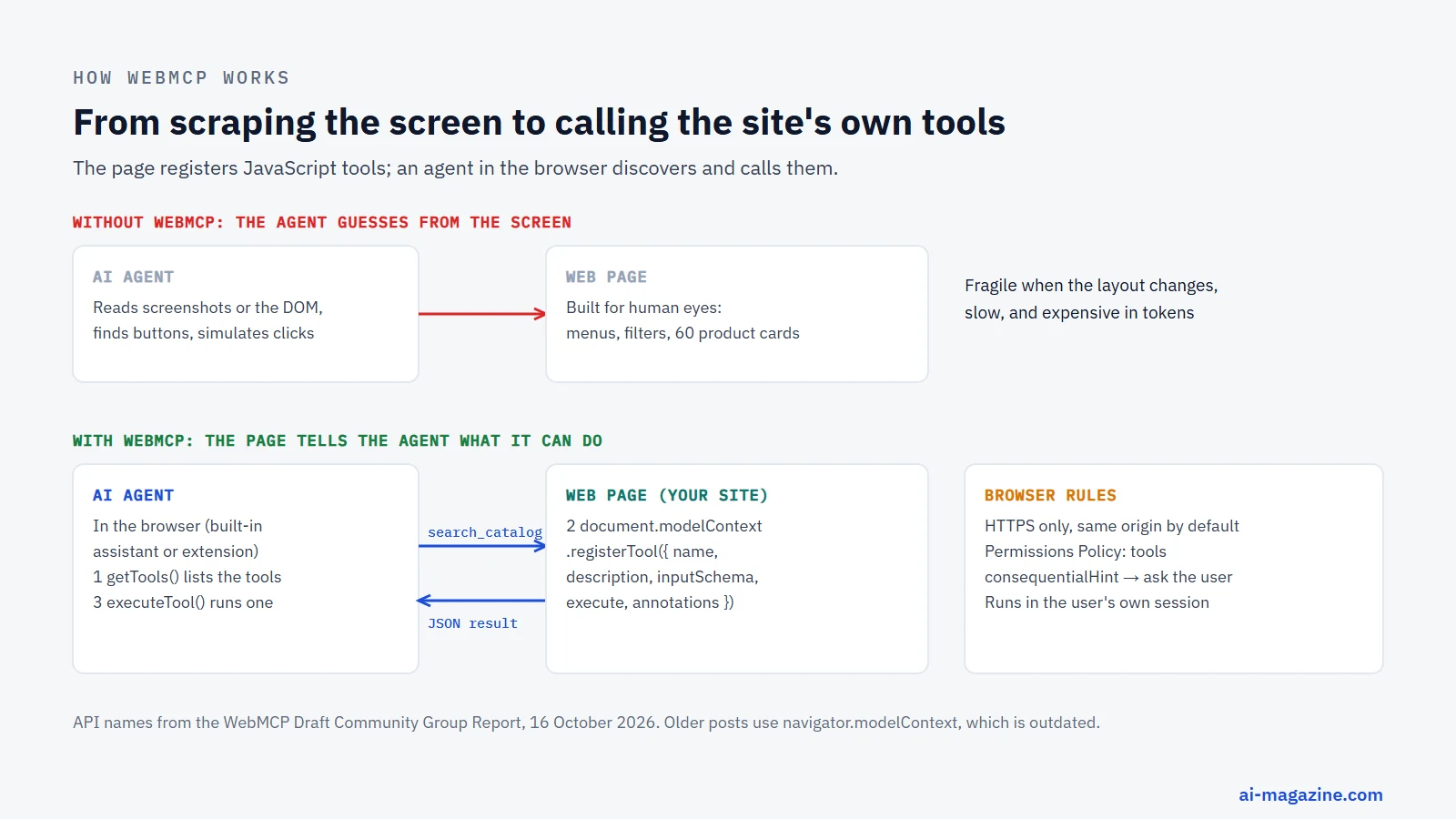
Agents that read screenshots and DOM snapshots and simulate clicks are fragile and slow. They often misinterpret UI elements, fail to handle dynamic content, or get stuck in loops. WebMCP solves this by letting the site tell the agent exactly what it can do. Instead of guessing where the “Add to Cart” button is, the agent calls a registered tool that performs the action directly. This leads to increased speed, reliability, and precision, as noted by Chrome’s documentation.
Site owners stay in control. They define the tools, their parameters, and their visibility. Instead of an agent improvising with the visible interface, the site decides which actions are offered and validates every call in its own code. The explainer highlights non-goals: WebMCP is not meant for fully autonomous workflows with no browser UI, nor is it designed to replace backend integrations or human interfaces. It is a bridge between human UI and AI agents.
The use cases are practical. A design tool might expose a tool to apply a template. A shopping site might let an agent filter dresses by size and style. A code review platform might allow an agent to trigger trybots. These are tasks that require precision and context, which screenshots can’t provide.
How WebMCP works
The imperative API
The core of WebMCP is the imperative API, accessed via document.modelContext. This interface extends EventTarget and is exposed only in secure contexts (HTTPS). The primary method is registerTool, which takes a ModelContextTool object and an optional ModelContextRegisterToolOptions object.
A ModelContextTool requires a name, a description, an inputSchema (JSON Schema), and an execute function. The execute function receives the input object and a signal, and returns a promise. The name is limited to 128 characters. The inputSchema defines the parameters the tool accepts, allowing the agent to validate inputs before execution.
To unregister a tool, you pass an AbortSignal to registerTool and call controller.abort(). Note that in Chrome 153, unregistering doesn’t cancel in-progress executions. This is a known limitation.
Agents discover tools using getTools, which returns a sequence of RegisteredTool objects. They invoke tools using executeTool, passing the tool object and the input. Events like toolchange, toolactivated, and toolcancel notify the page when tools are added, used, or canceled.
// Register a tool when the page loads (HTTPS only).
const controller = new AbortController();

await document.modelContext.registerTool({
  name: 'search_products',
  title: 'Search products',
  description: 'Search the catalog by keyword, color, size and maximum price. Returns matching products with id, name, price and stock.',
  inputSchema: {
    type: 'object',
    properties: {
      query: { type: 'string', description: 'What the shopper is looking for' },
      size: { type: 'string', enum: ['XS', 'S', 'M', 'L', 'XL'] },
      maxPrice: { type: 'number' }
    }
  },
  annotations: { readOnlyHint: true },
  execute: async ({ query, size, maxPrice }) => {
    const results = await catalog.search({ query, size, maxPrice }); // your existing site code
    return JSON.stringify(results.slice(0, 10));
  }
}, { signal: controller.signal });

// Later, when the tool no longer makes sense on this page:
controller.abort();
Tool annotations
Tool annotations are boolean flags that provide additional context to the agent and the browser. readOnlyHint indicates the tool doesn’t mutate state. untrustedContentHint marks the tool as processing user-generated or external content, which might be risky. consequentialHint signals that the action is irreversible, like a purchase or money transfer. debugging is for development purposes.
Chrome’s secure-tools guidance recommends using these hints to improve agent behavior. For example, a tool with consequentialHint: true might trigger a browser-level confirmation dialog before execution. This adds a layer of safety for high-stakes actions.
The declarative API
The declarative API is a separate early proposal, not yet in the spec. It uses HTML form attributes to register tools. Attributes like toolname, tooldescription, and toolautosubmit (a boolean) allow forms to declare tools. toolparamdescription can be added to form controls. The existing name attribute on inputs provides the schema property names.
Events like SubmitEvent.agentInvoked (a boolean) and SubmitEvent.respondWith (which accepts a promise) allow agents to interact with forms. CSS pseudo-classes like :tool-form-active and :tool-submit-active help developers style forms when agents are using them. Chromium is testing a partial version of this API, but it’s still experimental.
<!-- Declarative proposal (separate explainer, early stage) -->
<form action="/reserve" toolname="reserve_table"
      tooldescription="Reserve a table for a given date, time and party size">
  <input name="date" type="date" toolparamdescription="Reservation date">
  <input name="time" type="time">
  <input name="guests" type="number" min="1" max="12">
  <button type="submit">Reserve</button>
</form>
Permissions and iframes
The Permissions Policy feature tools controls who can access the API. By default, it’s allowed for 'self'. Iframes need allow="tools" to access the API. A site that wants none of this can switch the API off with a response header:
Permissions-Policy: tools=()Cross-origin sharing is handled via the exposedTo option in registerTool and the fromOrigins option in getTools. This allows tools to be visible only to trusted origins, reducing the attack surface.
Browser support in October 2026
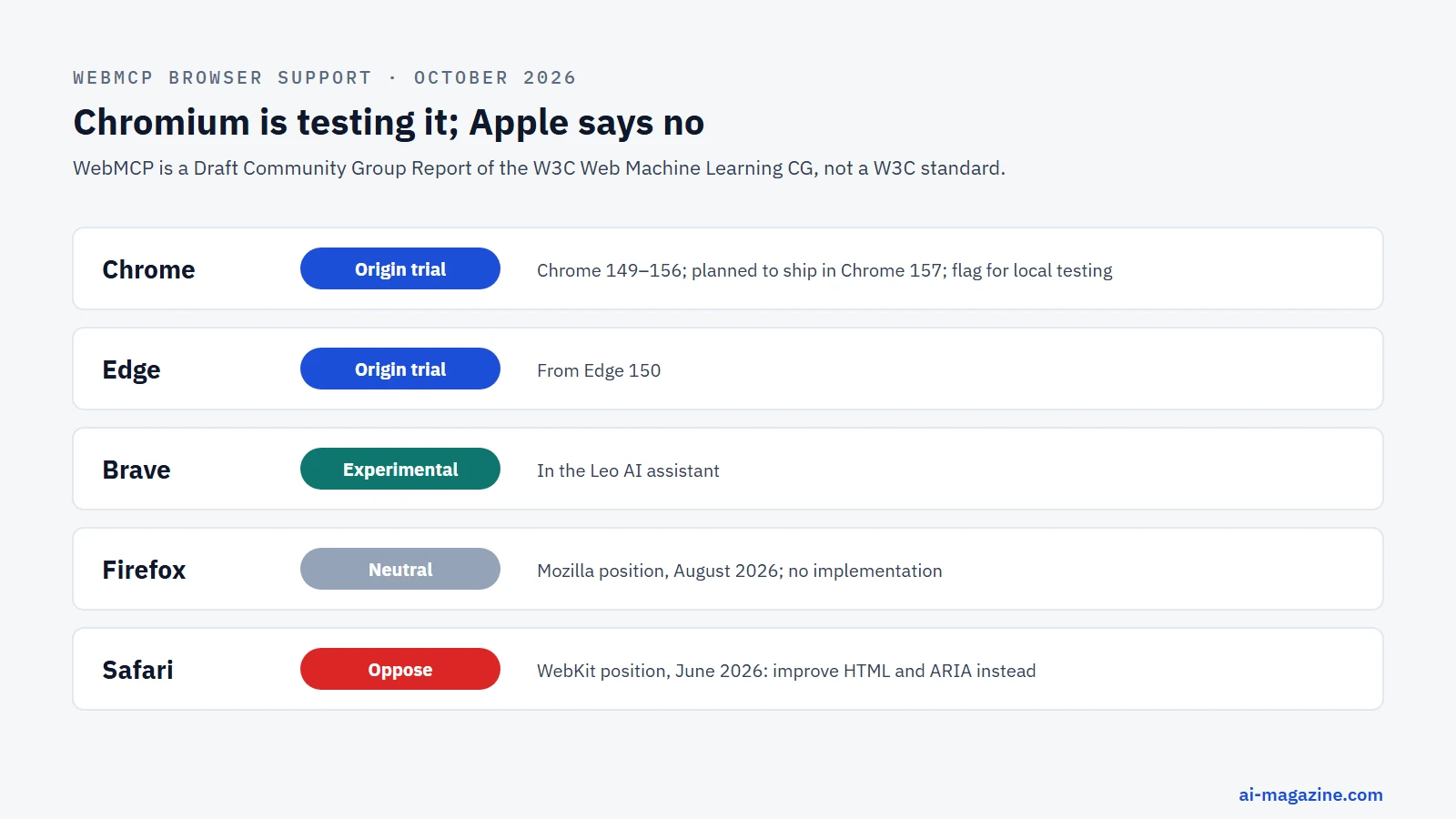
WebMCP is no longer a speculative concept, but it is not yet a universal feature of the web. As of October 2026, adoption is fragmented across browsers, with Google’s Chromium-based engines leading the charge while Apple and Mozilla maintain distinct reservations. Understanding this landscape is critical for developers deciding whether to implement the API now or wait for broader consensus.
The timeline began in February 2026, when Chrome announced an early preview for prototyping. This initial phase used navigator.modelContext, a naming convention that has since been corrected to document.modelContext in the current specification. The origin trial runs from Chrome 149 to Chrome 156, and Chrome plans to ship the API in Chrome 157; a review by the W3C Technical Architecture Group (TAG) is still pending. Microsoft Edge has mirrored this progress, launching its own Origin Trial starting with Edge 150.
Firefox holds a neutral position. While there is no active implementation in the codebase yet, Mozilla has not blocked the standard. Their concerns, detailed in their standards position, focus on the potential for adversarial sites to expose tools that misalign with the user interface, as well as issues around prompt injection and privacy. Mozilla also wants agents to be able to call tools through WebExtensions and WebDriver BiDi, not only through browser vendors’ own or in-page agents.
Safari (WebKit) is firmly opposed. Apple argues that the current proposal creates a parallel tool layer that duplicates the work of improving HTML and ARIA semantics. They believe the fix for agent-ready web lies in better accessibility and semantic markup, not a new JavaScript API. WebKit has proposed a new Community Group to explore these alternatives and suggested a W3C workshop to discuss the direction. Brave has taken a more experimental approach, integrating WebMCP into its Leo AI chat feature, signaling that even niche browsers are testing the waters.
The following table summarizes the current status of WebMCP support across major browsers:
| Browser | Status | Notes |
|---|---|---|
| Chrome | Origin Trial (149–156) | Planned shipping in Chrome 157. DevTrial started in 146. |
| Edge | Origin Trial (150+) | Microsoft runs its own origin trial. |
| Firefox | Neutral | No implementation yet. Concerns about UI mismatch and privacy. |
| Safari | Oppose | Prefers semantic HTML/ARIA improvements. Proposed new CG. |
| Brave | Experimental | Integrated into Leo AI chat feature. |
Developers should note that while Chrome and Edge are advancing, the lack of Safari support means cross-browser compatibility is not yet guaranteed. Adding WebMCP does not break anything in browsers without it: the tools are simply not offered there.
Who uses WebMCP
Adoption of WebMCP is driven by a mix of large-scale e-commerce platforms, infrastructure providers, and internal Google demos. Most companies are still experimenting, but one large platform already ships it.
Shopify stands out as the most significant adopter. As of August 2026, WebMCP tools are live on every Liquid storefront and in the Hydrogen developer preview. This means that any Shopify store using these themes is already exposing tools to AI agents. The available tools include search_catalog, browse_store, get_product, show_variant, get_cart, update_cart, cancel_cart, proceed_to_checkout, manage_orders, and search_shop_policies_and_faqs. Because these tools run in the shopper’s existing session, they enable seamless agent-driven shopping experiences without requiring a separate integration layer.
Vercel has also integrated WebMCP support into its mcp-handler package (version 2.2.0, released September 2026). It is enabled with an experimental_webMcp option, so teams that already run MCP servers on Vercel can experiment with exposing tools in the browser as well.
Google’s own demos illustrate the practical utility of the API. The “WebMCP zaMaker” and “Travel demo (React)” showcase imperative tool registration, while “Le Petit Bistro” demonstrates the declarative API using <form> attributes. These demos are not just theoretical; they serve as reference implementations for developers looking to understand the pattern.
At Google I/O 2026, a logo wall displayed several major brands experimenting with WebMCP. These include Expedia, Booking.com, Credit Karma, TurboTax, Redfin, Etsy, Instacart, and Target. It is important to distinguish between “experimenting” and “shipping.” For most of these brands, WebMCP is likely in a pilot phase, used to test agent capabilities in specific workflows rather than being a core part of their customer-facing product yet.
Security, privacy and criticism
WebMCP introduces new attack vectors by allowing AI agents to interact directly with your site’s logic. The specification and browser vendors have identified several risks, but the mitigations are not yet foolproof. Understanding these trade-offs is essential for security-conscious developers.
The primary concern is prompt injection. Since agents can execute tools based on user input or external data, a malicious prompt could trick an agent into calling a tool it shouldn’t. For example, an agent might be tricked into calling update_cart with a negative quantity if the input isn’t properly validated. The spec addresses this by recommending strict input validation in the tool’s execute function, but it relies on the developer to implement it.
Privacy leakage is another risk. Tools might expose sensitive user data if the inputSchema is too broad. The spec includes a untrustedContentHint annotation for tools that process user-generated content or external data, signaling to the agent that the content is not trusted. This helps the agent decide whether to ask for user confirmation before acting.
Cross-origin security is managed through the exposedTo option in registerTool. By default, tools are scoped to the page’s origin. If you need to expose tools to iframes or other origins, you must explicitly list them. The Permissions-Policy: tools=() header allows you to disable WebMCP entirely for the site, providing a kill switch if a vulnerability is discovered.
Mozilla’s concerns include adversarial sites exposing tools that do something different from what the visible interface suggests, prompt injection through tool descriptions and results, and sites harvesting more input than they need. It also objects that only browser vendors’ own agents and in-page agents can call the tools, and wants WebExtensions and WebDriver BiDi support.
WebKit’s opposition is rooted in a different philosophy. They argue that the current proposal creates a parallel layer of tooling that duplicates the functionality of HTML and ARIA. They believe that improving semantic markup and accessibility would solve the agent problem more elegantly than adding a new JavaScript API. They have proposed a new Community Group to explore these alternatives.
Chrome’s secure-tools guidance (updated September 2026) recommends using consequentialHint: true for irreversible actions like payments or bookings. This signals to the agent that it should ask for user confirmation before executing. Similarly, readOnlyHint should be used for non-mutating tools, and untrustedContentHint for external data. The spec leaves it to the browser or agent to decide how to act on these hints, for example by asking the user to confirm.
We tested it: reading the page vs calling the site’s tools
Neither Google nor the Web Machine Learning Community Group has published speed or cost figures for WebMCP, and the “89% fewer tokens” number that circulates online is back-of-envelope arithmetic. So we measured the underlying idea ourselves. On 18 October 2026 we built a fake clothing shop page with 60 products (realistic markup: navigation, filters, product cards with sizes, ratings, stock badges and buttons) and asked an AI model 12 shopping questions with one correct answer each, such as “Which in-stock navy t-shirt available in size M is the cheapest?” or “I need something in size XL for at most $40. Which in-stock product has the best rating?” The model was Qwen3.6-35B-A3B, an open-weight model, and each question ran three times.
The same questions were answered three ways:
| How the agent sees the site | Correct answers | Tokens per question (in + out) | Model calls |
|---|---|---|---|
| The page’s HTML, as a scraping agent would read it | 30 of 36 (83%) | about 24,100 | 1 |
| The page’s visible text, like an accessibility snapshot | 28 of 36 (78%) | about 3,400 | 1 |
Two WebMCP-style tools: search_products and get_product |
34 of 36 (94%) | about 2,300 | 2.2 |
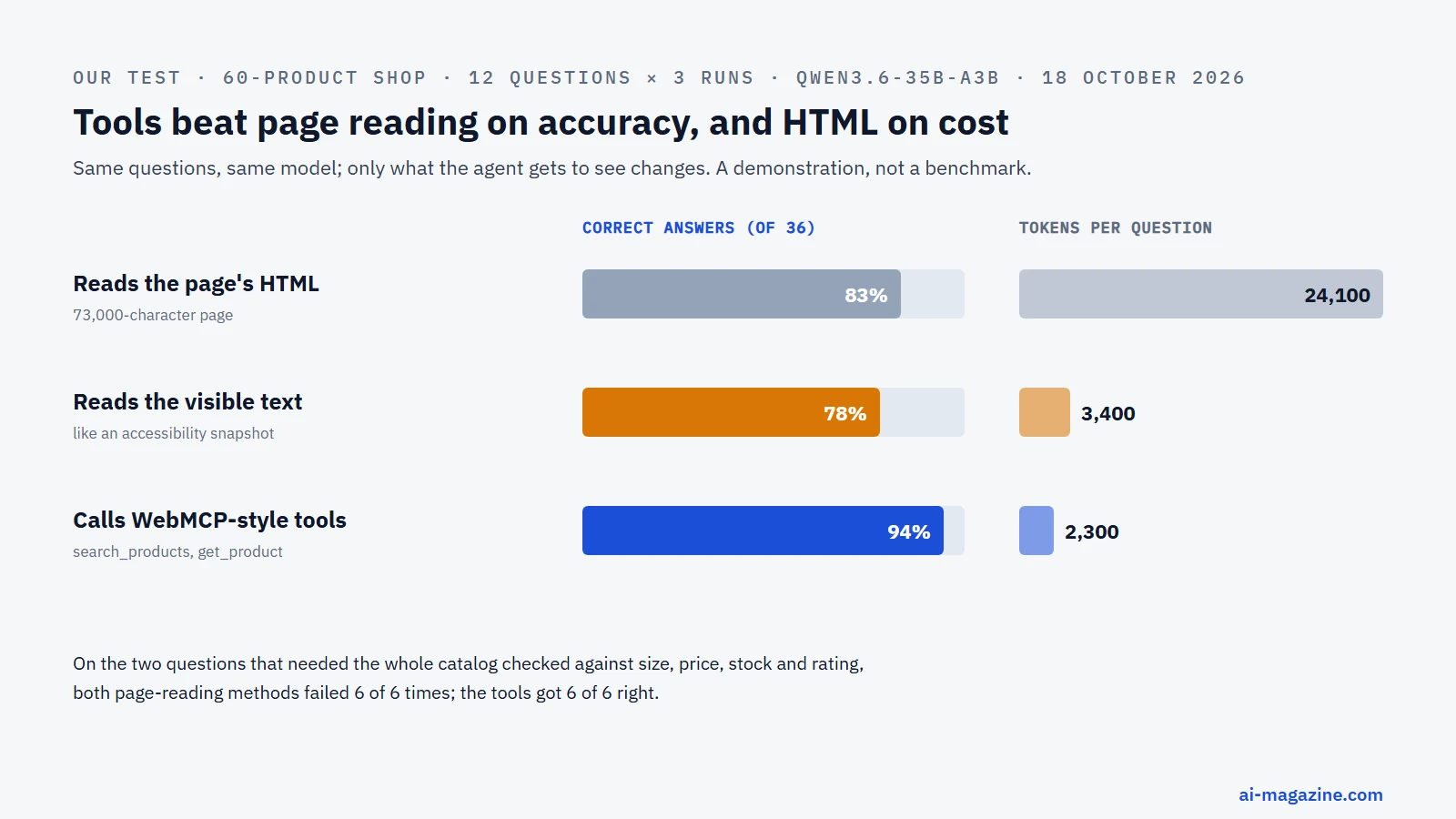
Three findings. First, raw HTML is expensive: the 60-product page was 73,000 characters and cost about ten times as many tokens per question as the tool approach. Second, a cleaned text snapshot is almost as cheap as tools on a single page, so the honest token saving against a well-built text-reading agent was about a third, not 89%. Third, and more important, the tools were more accurate: when the site’s own code does the filtering and sorting, the model only has to choose the right parameters, instead of comparing 60 prices in its head. The difference was starkest on the two questions that required checking the whole catalog against several conditions at once (size, price limit, stock and rating): both page-reading methods got them wrong in all six attempts, while the tool runs got all six right.
The test is generous to page reading. Our whole catalog fit on one page; on a real store with thousands of products, a reading agent has to search, paginate and load several pages, while a tool call such as Shopify’s search_catalog returns only the matching items. And we did not test clicking, form filling or checkout, where a screen-driven agent has to simulate every click.
Limits: one open model, one synthetic page, 108 runs. We simulated the tools with the same JSON-schema function calling that WebMCP uses, outside a browser, because WebMCP itself is only available behind a flag or origin trial; the built-in browser we used for testing (Chrome 152) did not expose document.modelContext.
How to add WebMCP to your website
Integrating WebMCP requires a mix of imperative JavaScript and optional declarative HTML. The process is straightforward, but attention to detail is required to ensure security and usability.
- Decide which actions an agent should be able to do. Start with a small set of high-value tools. Avoid exposing every possible API endpoint. Focus on actions that agents can perform reliably, such as searching products or updating a cart.
- Enable local testing. Open
chrome://flags/#enable-webmcp-testingin Chrome and set it to “Enabled.” Relaunch the browser. This activates the API for development, even if you are not in the Origin Trial. - Register tools. Use
document.modelContext.registerTool()as in the example above, or annotate existing forms with the declarative attributes. To remove a tool, abort itsAbortSignal; as of Chrome 153 that does not cancel executions already in progress. - Follow best practices. Register one function per tool to avoid overlap. Use clear, verb-based names like
create-eventinstead ofstart-event-creation-process. Describe what the tool does and when it should be used. Use specific types and enums in yourinputSchema. Validate input strictly in your code, but keep the schema loose enough to accept raw user input. Fail with meaningful errors, and update the UI after execution. - Mark annotations. Use
consequentialHint: truefor actions like purchases or bookings, so the agent knows to ask for confirmation. UsereadOnlyHint: truefor non-mutating tools. UseuntrustedContentHint: truefor tools that process user-generated content. - Respect length budgets. Chrome recommends keeping tool descriptions under 500 characters, parameter descriptions under 150 characters, and tool/parameter names under 30 characters. Output should be limited to 1.5K characters. This helps agents manage context windows efficiently.
- Test with DevTools. Use Chrome DevTools to debug your tools. The “Model Context Tool Inspector” extension is also useful for testing tools with natural-language prompts. It requires a Gemini API key and defaults to the
gemini-3.6-flashmodel. - Join the Origin Trial. For production use, register for the Origin Trial in Chrome 149–156. This allows you to gather real-world usage data before the feature ships in Chrome 157.
- How to opt out. If you need to disable WebMCP entirely, add the header
Permissions-Policy: tools=()to your site. This prevents any agent from accessing your tools.
To use the API before browsers ship it, the community-maintained @mcp-b/global and @mcp-b/webmcp-polyfill packages on npm (version 6.0.3 in October 2026) provide document.modelContext, and webmcp-types provides TypeScript types. They are not official W3C projects.
WebMCP and other ‘agent-ready web’ standards
WebMCP is not the only standard trying to make the web agent-ready. Understanding how it fits into the broader ecosystem is key to avoiding redundancy.
MCP (Model Context Protocol): Announced by Anthropic in November 2024, MCP is an open protocol for connecting AI assistants to tools and data. WebMCP borrows MCP’s common vocabulary, such as tools, schemas, and parameters. However, WebMCP is designed for the client-side browser, reusing existing auth sessions and DOM integration, whereas MCP is often used for server-side integrations.
llms.txt: Proposed by Jeremy Howard in September 2024, llms.txt is a markdown file placed at /llms.txt that summarizes a site for LLMs. It is a simple, static approach to providing context, whereas WebMCP is a dynamic, interactive API. They can be used together: llms.txt provides context, and WebMCP provides actions.
NLWeb (Natural Language Web): Announced by Microsoft at Build 2025, NLWeb turns a site into a natural-language interface. Every NLWeb instance is also an MCP server. It focuses on natural language interaction, while WebMCP focuses on structured tool execution.
A2A (Agent2Agent): Google’s A2A protocol, announced in April 2025, enables communication between agents. It is complementary to WebMCP, which focuses on the interaction between an agent and a web page.
OpenAI Apps SDK: Announced at DevDay 2025, this SDK allows developers to build apps inside ChatGPT, built on top of MCP. It targets apps inside ChatGPT rather than websites in a browser.
Agentic Commerce Protocol: A joint standard by OpenAI and Stripe, announced in September 2025, for agent-initiated checkout. It is focused on e-commerce transactions, whereas WebMCP is a general-purpose API that can be used for any type of interaction.
Frequently asked questions
What is WebMCP in simple terms? WebMCP is a new web standard that allows AI agents to use your website’s tools directly, without simulating human clicks. It lets you expose functions like “search products” or “add to cart” to agents, enabling them to perform actions on your site using your existing logic and user sessions.
Is WebMCP the same as MCP? No. MCP (Model Context Protocol) is a broader protocol often used for server-side integrations. WebMCP borrows MCP’s vocabulary but is specifically designed for the client-side browser, integrating with the DOM, permissions, and existing user sessions.
Which browsers support WebMCP? Chrome (149–156 in Origin Trial, shipping in 157) and Edge (150+) support WebMCP. Firefox is neutral with no active implementation. Safari opposes the standard. Brave has experimental support in its Leo AI chat.
Does Gemini in Chrome use WebMCP? As of October 2026, Gemini in Chrome has been announced to support WebMCP “soon,” but it is not yet confirmed if it is fully shipped. Testing extensions are separate from the built-in Gemini agent.
Is WebMCP safe?
WebMCP has security risks like prompt injection and privacy leakage. Mitigations include using consequentialHint for important actions, restricting tool visibility with exposedTo, and validating input in your code. It is not inherently unsafe, but it requires careful implementation.
Should my site add WebMCP now? If you run a store, a booking flow or a web app with clear actions, it is worth prototyping now: the API is behind a flag or an origin trial, so nothing changes for normal visitors. If you are on Shopify, Liquid storefronts already expose tools. For production, wait for the origin-trial results and Chrome 157, and keep an eye on the open security questions.